
ePayPolicy review for insurance agencies: fees, deposits and agency system connections
ePayPolicy gives your agency a branded payment page, pay links and invoices, so clients can pay premium by card, ACH or check. The money goes to a US bank account you choose, usually one to four business days after ePayPolicy sends the payout.
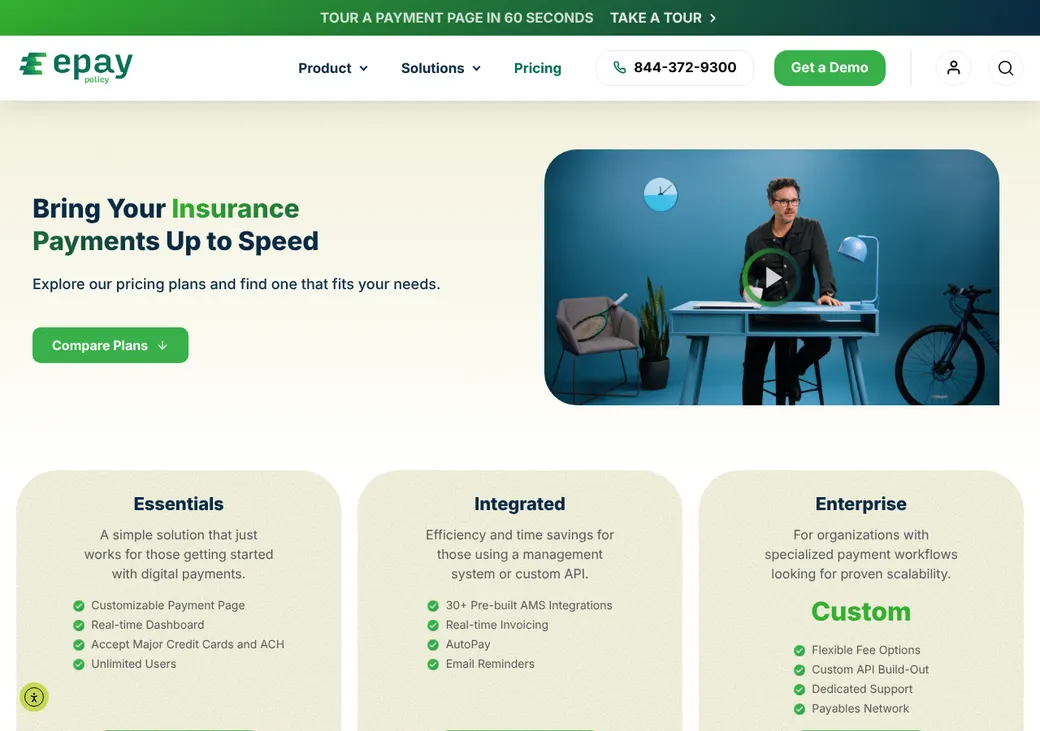
It fits independent agencies, MGAs and wholesalers. Plans cost $25 or $50 a month, and the client pays the processing fee unless you choose to cover it.
- Best for
- Agencies and MGAs that want clients to pay online, with the client paying the processing fee
- Type
- Payment platform built for insurance
- Monthly price
- $25 on Essentials or $50 on Integrated. Enterprise is quoted
- Card fee
- Varies by state. ePayPolicy quotes your rate
- Who pays fees
- The client by default. You can cover card fees, ACH fees or both
- Deposits
- One to four business days after ePayPolicy sends the payout
- Agency systems
- Applied Epic, AMS360, HawkSoft, Momentum AMP and others on Integrated
- Premium finance
- Four finance companies at checkout on Integrated
Our take
ePayPolicy suits an agency that wants clients to pay online without the agency absorbing the card fee. The fee shows at checkout and the client pays it, unless you decide to cover it.
Essentials is enough for a payment page and a dashboard. Integrated adds the agency system connections, invoices, AutoPay and financing at checkout, so most agencies on AMS360, Epic or HawkSoft will want it.
The processing rate isn't published, and it changes from state to state. Ask for your state's rate in writing before you sign up.
Pros
- Published plan prices, with unlimited users on Essentials
- The client pays the processing fee unless you choose to cover it
- Clients can e-sign a premium finance agreement at checkout
- CheckMate scans paper checks and posts them with your other payments
- Sends ACH or check payments to carriers and vendors on Enterprise
- Voids are free before the 8 PM Eastern cutoff
Cons
- The processing fee isn't returned when you refund a payment
- A failed recurring payment cancels the schedule with no retry
- Paying carriers needs the quoted Enterprise plan
- Canceling takes 30 days written notice, and paid fees aren't refunded
Plans and fees
| Plan | Price a month | What it adds |
|---|---|---|
| EssentialsAgencies that only need a payment page | $25 | Unlimited users, card and ACH payments, a branded payment page and a live dashboard |
| IntegratedAgencies that want payments tied to their agency systemNeeded to connect your agency system | $50 | Invoices, AutoPay, email reminders, financing at checkout and more than 30 agency system connections |
| EnterpriseMGAs and wholesalers that pay carriers | Quote only | Network Payables for paying carriers and vendors, custom API work, fee options and a dedicated support contact |
The agency pays the plan price, as of October 2026, from epaypolicy.com/pricing. Processing fees on each payment are on top.
Fees on each payment
| Fee | Amount | Who pays |
|---|---|---|
| Card and ACH processing | Varies by state and shows at checkout | The client by default. You can cover card fees, ACH fees or both |
| Void (cancel) before the 8 PM Eastern cutoff | Free | No one |
| Refund | The original processing fee isn't returned | The agency on a full refund. A net refund takes the fee out of what the client gets back |
| Chargeback | The disputed amount. Too many chargebacks can bring extra fees | The agency |
| Returned ACH payment | The returned amount. No fee beyond the original one | The agency |
| Paper check (CheckMate) | A flat rate per check, given on request | The agency |
| Financing at checkout | No added monthly fee. The finance company sets the loan terms | The client, under the finance agreement |
| Setup | A one-time fee may apply. You get the amount in writing before you go live | The agency |
From ePayPolicy's terms (June 3, 2026) and help center, checked October 2026.
Good to know before you buy
- The client fee is ePayPolicy's own charge, which it keeps. It isn't a surcharge your agency adds.
- If you cover fees, you cover them on every payment of that type. You can't waive them for one client.
- Each ACH payment has a limit set for your account, with no daily cap. You can see and change it in the dashboard.
What each plan includes
| Feature | Essentials | Integrated |
|---|---|---|
| Branded payment page and pay links | ||
| Card and ACH payments | ||
| Live dashboard | ||
| Agency system connections | ||
| Invoices with pay links | ||
| AutoPay | ||
| Email reminders | ||
| Financing at checkout | ||
| Paying carriers and vendors |
Enterprise is quoted. It adds Network Payables for paying carriers and vendors, custom API work and fee options.
Where the money goes
- Merchant account
- In your agency's name, under a contract you sign with Adyen
- Processor
- Adyen and Propay process the cards. Partner banks process ACH
- Where deposits go
- The US bank account you verify
- How fast
- One to four business days after ePayPolicy sends the payout. It doesn't publish how soon after the payment that is, so ask
- Trust or operating account
- Either one. Your state's rules decide which, and your state association of independent agents (Big I) can help
- Split funding
- No. Payments go to your one receiving account unless the law requires otherwise or ePayPolicy agrees in writing
Refunds and chargebacks come out of your bank account. When the client pays the fee, you receive the payment minus that fee. Refunds, returned ACH payments and chargebacks are debited from the agency account, and ePayPolicy can hold payouts or hold back part of them as a reserve against possible losses.
Ways clients can pay
Accepted
- Visa, Mastercard, Discover and American Express
- Debit cards tied to a checking account
- ACH from a US checking account
- Paper checks through CheckMate, a paid add-on priced on request
Not accepted
- Prepaid and gift cards
- Savings accounts
- Banks outside the US
- One payment split across two methods
Payment links, portal and autopay
- How you request payment
- Your payment page, invoice or quote links sent by email or text, and Pay Now buttons on your website
- Client portal
- Clients can also pay through InsurLink or Applied CSR24 portals you already use
- Autopay
- AutoPay on Integrated. You can also add a fixed recurring payment to any payment page
- Reminders
- Clients get an email two days before each recurring debit
- Missed payments
- A failed recurring payment ends the schedule with no retry. The client pays by hand, then sets up a new schedule or asks you to restart it
- Branding
- Your own payment page, which you can customize
Agency system connections
| Connects to | Type | How | What it does |
|---|---|---|---|
| Applied Epic | Agency system | Applied's developer kit | Takes online payments through Applied's own connection kit |
| AMS360 | Agency system | Built in | Shows the balance due on the payment page, then adds an activity and a suspense entry, a holding line staff match to the invoice |
| HawkSoft | Agency system | HawkLink | Cuts double entry through HawkSoft's own connector |
| Momentum AMP | Agency system | Built in | Staff take payment from an invoice, and invoice emails carry a pay link |
| Sagitta | Agency system | Built in | Reconciles card and ACH payments |
| AIM | Agency system | Built in | Reconciles card and ACH payments |
| Nexsure | Agency system | Built in | Collects payments |
| Novidea | Agency system | Built in | Creates a cash receipt after payment |
| Jetfile | Agency system | Built in | Creates an e-receipt after payment |
| Applied CSR24 | Client portal | Built in | Sends payments made in the portal into the agency system |
| InsurLink | Client portal | Built in | Clients pay agency-billed policies in the portal |
| FinancePro | Premium finance software | Built in | Handles down payments and installments for finance companies |
| WeSignature | E-signature | Built in | Collects a signature and a payment in one step |
| ePayPolicy API | Developer | API | Public documentation at docs.epaypolicy.com for custom connections |
Agency system connections need the Integrated plan. ePayPolicy lists more on its integrations page, including QQCatalyst, InsuredMine and BindHQ.
Posting and reconciliation
On Integrated, the connection records each payment in your agency system. In AMS360 that is an activity plus a suspense entry your accounting staff apply, and in Novidea it is a cash receipt.
- Deposit batches
- Up to three a day, for ACH, American Express and other cards. CheckMate adds a batch for checks
- Reports
- A batch report about one business day before each deposit, matching it to the penny
- Checks
- CheckMate posts check images daily. On Integrated it matches them to open invoices
- Export
- Transaction downloads from the dashboard
Refunds, chargebacks and returns
- Voids
- Free before nightly processing at 8 PM Eastern, or 5 PM Eastern on bank holidays
- Refunds
- Full, net or partial, from settlement until 12 months after the payment. The client gets the money within 2 to 10 business days
- Card refund deadline
- Send card refunds within 30 days when you can, and never later than a year
- Chargebacks
- The agency answers for disputed card payments
- Returned ACH
- Usually known 5 or 6 business days after the payment. You and the client get an email and your account is debited
- Who pays
- The agency, for the original fee on a full refund and for chargebacks and returns
Paying carriers and vendors
- Who you can pay
- Carriers, MGAs, brokers, other agencies, premium finance companies and vendors
- How
- ACH or check, one at a time or in bulk
- Approval
- A second user approves each payment. A sole user can ask support to turn this off
- Invoice matching
- Payables Connect scans invoices and statements and matches them
- From plan
- Enterprise
Premium finance
- Lenders
- First Insurance Funding, Honor Capital, Peoples Premium Finance and AFCO Direct
- How it works at checkout
- The finance company's terms and payment schedule show on the payment page. The client reads and e-signs the finance agreement there
- Who is the lender
- The finance company. ePayPolicy doesn't lend
- Cost to the agency
- No added monthly fee
- From plan
- Integrated
Getting started
Start the free trial
60 days without a plan fee. It can turn into a paid plan unless you cancel before it does.
Send the business application
ePayPolicy's risk team reviews it, usually within 24 to 48 hours.
Verify your bank account
You need a US bank account. Choose the trust or operating account the deposits should land in.
Connect your agency system
On Integrated, link your agency system and set up invoices and AutoPay.
Take your first payment
Send a pay link by email or text, or share your payment page.
Support by phone, email and chat, Monday to Friday, 8 AM to 5 PM Central. The web app runs in desktop and phone browsers.
Security and PCI
Security
- PCI Level 1, audited every year
- Card and bank details aren't kept after a payment
- A second approver on outgoing payments
What the agency must do
- Pass ePayPolicy's account approval review
- Verify a US bank account
- Decide who approves outgoing payments
Contract and your data
- Term
- No fixed term
- Notice
- 30 days in writing
- Canceling
- An account administrator emails support@epaypolicy.com. Fees you still owe stay due
- Refunds
- Fees already paid aren't refunded
- Fee changes
- 30 days notice
- Your data when you leave
- Download your transactions from the dashboard before the account closes
- At closing
- Pending payments settle. ePayPolicy can hold funds for amounts owed or an investigation
- Disputes
- Individual arbitration under Texas law, with no class actions
From ePayPolicy's terms, effective June 3, 2026.
What users say
What reviewers say most often, as of October 2026.
What users like
- Easy to use
- Quick, helpful support
What users dislike
- Clients find the fees high
ePayPolicy alternatives
- AndDoneNo monthly fee. Card and ACH rates by custom quoteLaunched by IPFS, with IPFS financing and AMS360 receipt posting
- Applied PayQuote only, plus 3.5% on cards that clients usually payBuilt into Applied Epic and EZLynx, with a paper check lockbox
- InsurePayQuote onlyPays carriers from your agency system and sends premium refunds
- Input 1$20 a month under $1,000 in payments, then no monthly feeRuns its own premium finance company and connects to HawkSoft
See every option in insurance payment processing.
Frequently asked questions
How much does ePayPolicy cost?
Essentials is $25 a month and Integrated is $50, paid by the agency. A processing fee that varies by state applies to each payment.
Who pays the processing fee?
The client, by default. You can cover card fees, ACH fees or both, for every payment of that type.
Does ePayPolicy work with Applied Epic, AMS360 and HawkSoft?
Yes, on the Integrated plan. AMS360 gets an activity and suspense entry after each payment.
Can deposits go to my premium trust account?
Yes. Deposits go to the US bank account you verify, which can be your trust account or your operating account.
How fast does ePayPolicy deposit payments?
Usually one to four business days after ePayPolicy sends the payout.
Can clients finance their premium?
Yes, on Integrated. They can sign a finance agreement with one of four finance companies on the payment page.
How we researched this review. We based this review on the pricing, terms and product pages published by ePayPolicy, reviewed in October 2026, together with our team's experience working with insurance agents and agency owners since 2008.
Corrections
Vendors change their pricing all the time and they don't email us when they do. So if you see a price on here that's gone up, a plan ePayPolicy quit selling or a contract term that reads different now, let us know and send the link to the page where ePayPolicy has it. Somebody here pulls up that page and checks it before we change anything on ours.