
GReminders review for insurance agents: pricing, features and integrations
GReminders books client meetings, sends email, text and voice reminders and writes meeting notes back to your CRM. It also has an AI notetaker for calls and in-person meetings.
It fits solo agents up to larger agencies. Health and Medicare agents usually need Professional for the BAA, and AgencyBloc or NextAgency users need the Business team plan.
- Best for
- Agencies that want booking, reminders and CRM notes in one tool, including AgencyBloc and NextAgency users
- Price
- Free Basic plan. Paid plans from $8 a month billed yearly, with one user included
- Free trial
- 14 days free, plus a demo. Afterward the account can drop to Basic
- Team scheduling
- Round robin and all-together booking on paid plans. Routing forms on Business
- Reminders
- Email on every plan. Text and voice use credits
- CRM connections
- Redtail and Wealthbox on Essentials. HubSpot on Professional. Salesforce, AgencyBloc and NextAgency on Business
- HIPAA BAA
- Included on individual Professional, requested by email
- Apps
- Web. iPhone and Android apps for the AI Notetaker
Our take
GReminders fits an agency that wants booking, reminders and meeting follow-up in one tool, tied to its CRM. It connects to AgencyBloc and NextAgency as well as advisor CRMs like Redtail and Wealthbox.
Professional is the plan most solo agents need, since it adds text credits, a BAA and HubSpot. Agencies that share appointments or use AgencyBloc should price the team plans.
The limit to plan around is team-plan pricing. Team plans are customized from a starting price, so get a quote for your team size before you compare.
Pros
- Round robin with priorities and all-together booking
- Built-in AgencyBloc and NextAgency connections on Business
- Routes clients to the producer who owns them in the CRM
- Email, text and voice reminders clients can answer
- No-show follow-up with a new booking link
- A BAA on individual Professional
Cons
- Team plans are quoted above a starting price
- Texts on Standard need a bundle bought separately
- The phone apps only work with a paid AI Notetaker license
- Routing doesn't check producer licenses
- Canceled events you keep still block time
- No refunds for unused time
Plans and pricing
Individual plans
| Plan | Billed yearly | Billed monthly | What it adds |
|---|---|---|---|
| BasicTrying it out | $0 | $0 | 1 calendar, 1 appointment type, 100 email reminders a month and GReminders branding |
| StandardSolo agents who want team booking | $8 | $10 | 5 calendars, 10 appointment types, 320 email reminders a month and round robin. Texts need a bundle |
| ProfessionalHealth and Medicare agentsWhere most agents start | $39 | $47 | 10 calendars, unlimited appointment types, 320 text and voice credits a month, a BAA, HubSpot, payments and Zapier |
Prices are per month, as of October 2026, from greminders.com/pricing. Standard and Professional include one user. Each extra user is $10 a month on Standard ($8 billed yearly) and $18 on Professional ($15 billed yearly).
Team plans
| Plan | Starts at | What it adds |
|---|---|---|
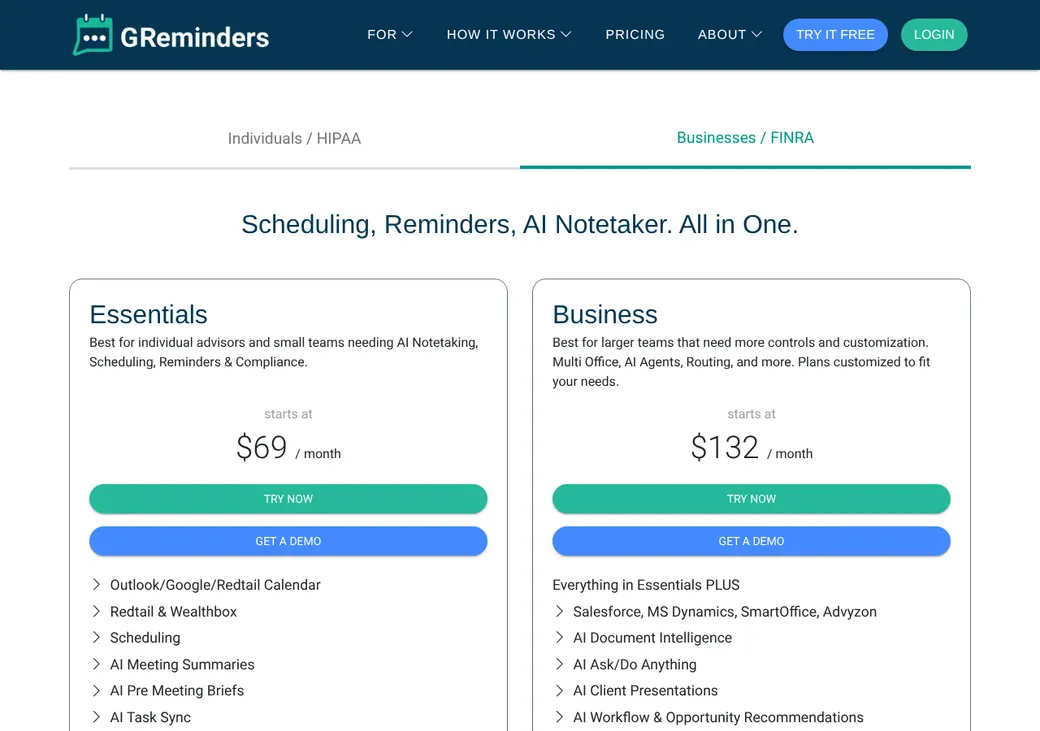
| EssentialsTeams on Redtail or Wealthbox | $69 a month | 2 calendars per user, 10 appointment types, 160 text and voice credits a month, Redtail, Wealthbox, the API and AI meeting notes |
| BusinessAgencies sharing appointmentsFor AgencyBloc and NextAgency | $132 a month | 10 calendars, unlimited appointment types, 320 credits, routing forms, account teams, AgencyBloc, NextAgency, Salesforce and payments |
| EnterpriseLarge agencies | Quote only | Single sign-on, automatic user setup, unlimited API, custom AI, custom disclosures and custom data retention |
GReminders sells these as business plans. Each is customized, so get a quote for your team size.
Good to know before you buy
- Add-ons such as text bundles and the AI Notetaker need a paid plan.
- AI Notetaker Essentials is $49 a user per month billed yearly or $61 billed monthly.
- Reminder overages are billed at the end of the cycle in blocks of 50.
- Monthly credits don't roll over. Yearly customers can use theirs across the year.
- New users get free setup. Paid onboarding packages are also available.
Text message bundles
Each bundle adds text credits and twice as many email credits each month. One credit covers a text of up to 160 characters.
| Texts a month | Billed yearly | Billed monthly |
|---|---|---|
| 160 | $11 | $13 |
| 320 | $20 | $25 |
| 700 | $36 | $45 |
| 1,200 | $60 | $75 |
| 2,500 | $96 | $120 |
| 5,000 | $160 | $200 |
Which plan has it
| Feature | Basic | Standard | Professional | Business |
|---|---|---|---|---|
| Calendars per user | 1 | 5 | 10 | 10 |
| Appointment types | 1 | 10 | Unlimited | Unlimited |
| Text and voice credits a month | Bundle | 320 | 320 | |
| Round robin and team booking | ||||
| Recurring appointment types | ||||
| Take payment with Stripe or Square | ||||
| Webhooks | ||||
| Routing forms | ||||
| Account teams | ||||
| Rooms and resources | ||||
| AgencyBloc and NextAgency | ||||
| Salesforce |
Essentials includes Redtail, Wealthbox, the API and the AI meeting tools. Enterprise adds single sign-on and automatic user setup.
Getting started
Start a free trial or book a demo
Team scheduling works during the trial. Afterward you upgrade or drop to the free Basic plan.
Connect your calendar
Pick which calendars block time and which one gets new bookings. Google, Outlook, Microsoft 365, Exchange and Redtail all work.
Set up your appointment types
Add intake questions, disclosures and a text opt-in box. You can require approval before a booking is final.
Share your link
Send a producer or team link in emails and texts, embed it on your site or print a QR code.
Choose a plan
Professional covers the BAA. Business adds AgencyBloc, NextAgency and routing forms.
New users get free setup, and Standard and Premier onboarding packages are for sale. Support is US-based, with a knowledge base.
Booking and calendars
Booking pages and links
Clients book from a public page with your branding, or from an inline, pop-up or QR code link. Single-use links expire after one booking, and links built from your CRM can fill in the client's details.
Intake questions
Questions can be text, dropdowns or checkboxes, required or optional, with terms and disclosure boxes. Answers can map to CRM fields, and you can approve a booking before it's final.
Booking pages come in 14 languages, including Spanish. The app itself is in English.
Calendar sync
- Works with
- Google Calendar, Outlook.com, Microsoft 365, Exchange 2007 or later and Redtail Calendar
- Calendars checked
- The ones you pick
- Where bookings go
- One main calendar you choose
- Changes you make
- Moving a meeting updates the calendar event. A canceled meeting can be deleted or kept as declined
- Canceled events
- A canceled event you keep still blocks the time until you delete it or mark it Free
- Other meetings
- Reminders can also run on meetings you add straight to your calendar
Mobile app
The iPhone and Android apps are for the AI Notetaker, at in-person meetings and on phone calls it joins by merging into the call. They need an AI Notetaker license, so you manage booking on the web.
Team routing
Paid plans can share appointments across two or more people. You pick how GReminders decides who gets each one.
Round robin
Bookings go to whoever is free. Hosts with equal priority are picked at random, or you set high, medium and low priority.
All together
Clients only see times when every required person is free. Two-person, group and recurring round robin are also available.
Routing forms
On Business, a routing form uses the client's answers to send them to a person, team, appointment type or web page, with a fallback when nothing matches. It can also send clients to the producer who owns them in Redtail, Salesforce or HubSpot.
Licensing is a separate check. A form can ask for the client's state or line, but GReminders won't check a producer's license or line of authority. Keep those checks in your own process.
Reminders and texts
Reminders and no-shows
Email, text and voice reminders can run before a meeting, with email or text follow-ups after. Clients can confirm, reschedule or cancel from the message.
Staff mark meetings Completed or No Show, and a no-show can get a text or email with a new booking link. Marking a meeting complete also updates Redtail, Wealthbox, Pipedrive, ActiveCampaign and HubSpot.
Text message rules
- Client consent
- An opt-in box on the booking form, which you can set to start unchecked. Bulk sends need proof of opt-in
- Sending number
- Shared GReminders numbers in the US and Canada, or a dedicated local number on qualifying plans
- Registration
- A dedicated US number needs US carrier registration for business texting. You need an updated privacy policy, SMS terms and an unchecked opt-in box first
- Opt-outs
- STOP ends texts until the client sends START. Staff can also block a number or email after a spoken request
- Credits
- 320 a month on Professional and Business and 160 on Essentials. Standard buys bundles. See text message bundles
Integrations
| Connects to | Type | How | From plan | What it does |
|---|---|---|---|---|
| Google Calendar | Calendar | Built in | All plans | Checks busy times and adds bookings |
| Outlook and Microsoft 365 | Calendar | Built in | All plans | Checks busy times and adds bookings |
| Exchange | Calendar | Built in | Professional | Checks busy times and adds bookings on Exchange 2007 or later |
| AgencyBloc | Agency management | Built in | Business | Looks up contacts for reminders and writes AI notes and tasks to the client record |
| NextAgency | Agency CRM | Built in | Business | Feeds client notes into meeting briefs and sends AI notes and tasks to Cases |
| Redtail | CRM | Built in | Essentials | Pulls contacts and owners and writes activities, notes and tasks |
| Wealthbox | CRM | Built in | Essentials | Pulls contacts and writes notes, new contacts and workflows |
| HubSpot | CRM | Built in | Professional | Writes contacts, meetings and reminder activity |
| Salesforce | CRM | Built in | Business | Creates leads or events and logs reminder activity |
| Advyzon | CRM | Built in | Business | Creates prospects and writes meeting notes and tasks |
| Microsoft Dynamics 365 and SmartOffice | CRM | Built in | Business | Logs meeting activity |
| Pipedrive and ActiveCampaign | CRM | Built in | Professional | Write activity and completed status |
| Zoom, Microsoft Teams, Google Meet, GoTo Meeting and Webex | Video | Built in | All plans | Adds a meeting link to the invite |
| Stripe and Square | Payments | Built in | Professional | Takes or holds payment when the client books |
| Zapier | Automation | Zapier | Professional | Sends new, changed and deleted bookings to Zapier |
| REST API and webhooks | Developer | API | Professional or Essentials | Checks availability and books, changes or cancels meetings |
Zapier connections need a Zapier account, which is billed separately.
Security and HIPAA
HIPAA and health data
Individual Professional includes a BAA, which you request by email. Google Contacts aren't covered by Google's BAA, so you can turn off contact matching. Sign the BAA before health questions go on a booking form.
Security
- Hosted on Microsoft Azure
- Encrypted in transit and at rest
- Daily vulnerability scans and quarterly penetration tests
- Single sign-on and automatic user setup
- Custom roles and data retention settings
- GReminders says customer data doesn't train its AI models
Contract terms
- Billing
- Monthly or yearly, set at checkout or in a signed agreement
- Renewal
- Individual plans renew on their own after each billing cycle. Yearly plans run the full 12 months
- Price at renewal
- Can rise up to 5% a year, capped at the list price, unless your agreement says otherwise
- Canceling
- From Setup and Billing. Downgrades take effect when the cycle ends, and canceling the account can be immediate
- Refunds
- None for unused time, including the rest of a yearly term
- Your data
- Download reminders and replies as CSV and see booked and canceled meetings in a log. The API reaches the records it supports
- Free accounts
- A Basic account can be closed after 90 days without a login
- Disputes
- Individual arbitration in Orange County, California
From GReminders' terms, updated April 3, 2026.
What users say
What reviewers say most often, as of October 2026.
What users like
- Easy to use
- Less manual reminder work
- Calendar and CRM connections
- Reminders you can customize
- Fewer missed appointments
- Helpful onboarding and support
What users dislike
- The setup takes time to learn
- Occasional calendar or reminder setup problems
- Template limits for some workflows
- Handling of changed and missed appointments
- A few time zone complaints
GReminders alternatives
- CalendlyFree plan. Paid from $10 a seat per monthSimpler booking with HubSpot built in, but no BAA
- OnceHubFree Basic plan. Paid from $10 a seat per monthRoutes by CRM owner and connects to Redtail, Wealthbox and AgencyBloc
- Acuity SchedulingFrom $16 a month per account. No free planPayments, packages and intake forms, with a BAA on Premium
- YouCanBookMeFree plan. Paid from $8.10 a monthRound robin by availability or equal distribution on Team
- Zoho BookingsFree for one user. Paid from $6 a user per monthZoho CRM built in, with a BAA template on Premium
See every option in appointment scheduling software.
Frequently asked questions
How much does GReminders cost?
Basic is free with limits. Standard is $10 a month or $8 billed yearly for one user, and Professional is $47 or $39. Team plans start at $69 a month with Essentials.
Does GReminders sign a BAA for HIPAA?
Yes. Individual Professional includes a BAA, which you request by email. Sign it before you collect health details.
Does GReminders work with AgencyBloc?
Yes, on Business. It looks up AgencyBloc contacts and phone numbers for reminders and writes AI notes and tasks back to the client record.
Does GReminders do round robin?
Yes, on paid plans with two or more users. Hosts are picked by availability and priority, and Business adds routing forms.
Can GReminders follow up after a no-show?
Yes. Staff mark the meeting No Show, and a text or email can send the client a new booking link.
Does GReminders send text reminders?
Yes, along with email and voice reminders. Professional and Business include 320 text and voice credits a month, and Standard buys text bundles.
How we researched this review. We based this review on the pricing, terms and product pages published by GReminders, reviewed in October 2026, together with our team's experience working with insurance agents and agency owners since 2008.
Corrections
Vendors change their pricing all the time and they don't email us when they do. So if you see a price on here that's gone up, a plan GReminders quit selling or a contract term that reads different now, let us know and send the link to the page where GReminders has it. Somebody here pulls up that page and checks it before we change anything on ours.