
YouCanBookMe review for insurance agents: pricing, features and integrations
YouCanBookMe lets clients book time with you from a link, a QR code or your agency website. It checks your calendars for conflicts, adds the meeting and sends the reminders you set up.
Solo agents usually start on Professional for several appointment types and HubSpot. Agencies with several producers use Team to let clients pick a producer or share appointments evenly.
- Best for
- Solo agents and agencies that want detailed booking forms and shared team pages
- Price
- Free plan. Paid plans from $8.10 a month, billed yearly
- Free trial
- 14 days of the paid features. No card needed
- Team scheduling
- Round robin and client choice on Team
- Reminders
- Email on every plan. Text with credits you buy
- CRM connections
- HubSpot built in on Professional and Team. Salesforce through Zapier
- HIPAA BAA
- Not offered
- Apps
- Web and phone browser. No iPhone or Android app
Our take
YouCanBookMe is a good fit for an agent who wants clients to book from a link and answer a few questions first. Its forms can ask follow-up questions and carry a lead source or CRM ID into the booking.
Professional is the plan most solo agents need, since it adds several appointment types, no-show follow-ups and HubSpot. Team makes sense once producers share appointments, because it adds round robin and lets clients pick a producer.
YouCanBookMe has no BAA, so Medicare agents should leave health details and Medicare numbers out of booking questions.
Pros
- Booking forms with follow-up questions and hidden fields
- Prefilled, single-use and QR code links
- Round robin by availability, equal count or priority order on Team
- Built-in HubSpot on Professional and Team
- No-show follow-ups by email, text or webhook
- Webhooks on every plan
Cons
- No BAA for health data
- Round robin and team pages need the Team plan
- Texts cost extra, and replies arrive by email
- Your own texting number has a 12-month minimum
- Salesforce connects only through Zapier
- No iPhone or Android app
Plans and pricing
| Plan | Billed yearly | Billed monthly | What it adds |
|---|---|---|---|
| FreeTrying it out with one booking page | $0 | $0 | One calendar, one booking page, up to 7 form questions and YouCanBookMe branding |
| IndividualOne agent with simple needs | $8.10 | $9 | Two calendars, two booking pages, group sessions and more page design options |
| ProfessionalMost solo agentsWhere most agents start | $11.70 | $13 | Six calendars, ten booking pages, several appointment types, follow-ups, no-show workflows, HubSpot and Zapier |
| TeamAgencies sharing appointments | $16.20 | $18 | Team pages, round robin, client choice of producer, team admin and the API |
Prices are per month, as of October 2026, from youcanbook.me/pricing. Individual and Professional are one price per account. Team is priced per person.
What it would cost you
Cost per month
First-year cost
Cost per booked appointment
Uses the Team price per person. Text credits are extra.
Good to know before you buy
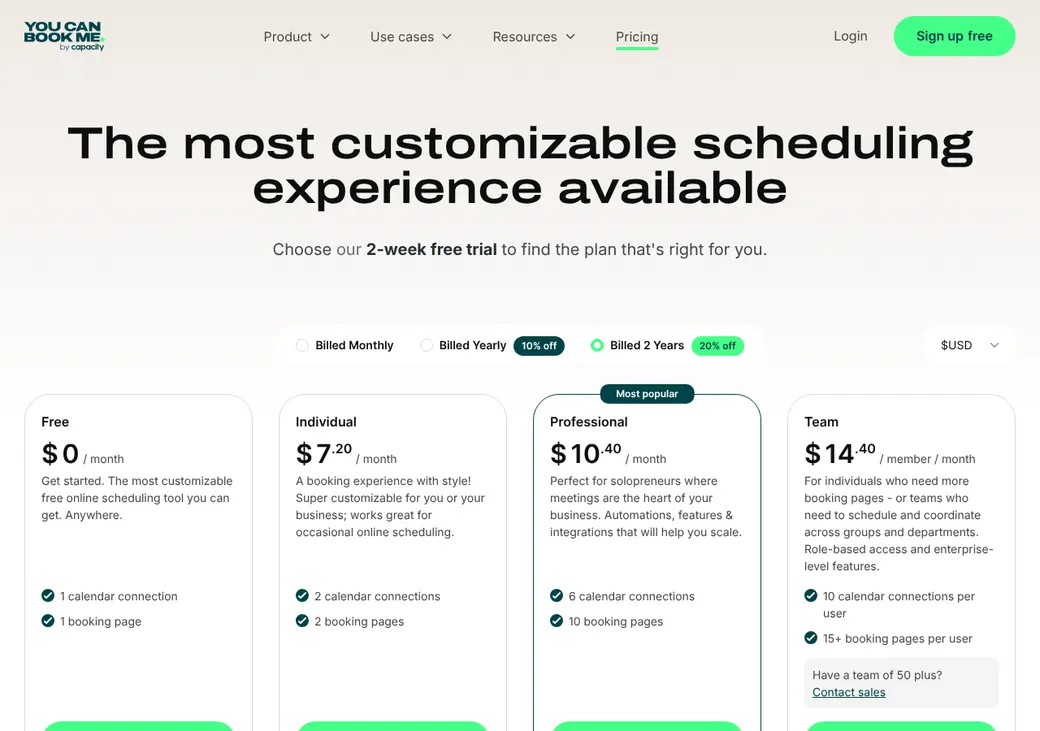
- A two-year term lowers the monthly price to $7.20 on Individual, $10.40 on Professional and $14.40 a person on Team.
- Stripe payments carry a 1% YouCanBookMe fee on top of Stripe's own charges.
- Customers outside the UK aren't charged tax on top of the price.
- Agencies with more than 50 users are sent to the sales team.
- Each account covers one organization, so separate agencies need separate accounts.
Text message credits
Basic texts use credits you buy at $0.07 each, and one credit covers up to 160 characters. Enhanced texting on Professional and Team gives you your own number in the US and Canada, with a 12-month minimum and credits that don't roll over.
| Enhanced texting | Price |
|---|---|
| Setup | $59 once |
| One line and 500 credits | $17 a month |
| One line and 1,000 credits | $27 a month |
| Each extra line | $5 a month |
Which plan has it
| Feature | Free | Individual | Professional | Team |
|---|---|---|---|---|
| Booking page, embed and QR code | ||||
| Booking pages | 1 | 2 | 10 | 10 |
| Calendars connected | 1 | 2 | 6 | 6 |
| Email confirmations and reminders | ||||
| Text reminders with credits you buy | ||||
| Your own texting number | Add-on | Add-on | ||
| Take payment through Stripe | ||||
| Webhooks that send booking events to other systems | ||||
| Group sessions | ||||
| Several appointment types | ||||
| Approve requests before booking | ||||
| Follow-ups and no-show workflows | ||||
| HubSpot | ||||
| Zapier | ||||
| Round robin and team pages | ||||
| API |
Getting started
Start the free trial
You get 14 days of the paid features without a card.
Connect your calendar
Pick which calendars YouCanBookMe checks for conflicts and which one gets new bookings.
Set up your booking page
Add an appointment type for each kind of meeting, such as a quote review or a renewal. Add your intake questions.
Share your link
Share it by email or text, embed it on your site or print it as a QR code.
Choose a plan before the trial ends
If you don't upgrade, the account stays on the Free plan with one calendar and one booking page.
Help is by email, chat and the help center. Trial and paid accounts can book a callback, and Team includes personal onboarding.
Booking and calendars
Booking pages and links
Clients book from a YouCanBookMe page, a website embed, a button or a QR code, without making an account. Prefilled links can fill in a client's name, email and phone. Single-use links expire after one booking, which suits a one-off review.
Group sessions hold up to 50 places in one time slot. By default clients can book from 2 hours to 365 days ahead, and you can change both.
Intake questions
Booking forms can ask required questions, choices and checkboxes, and the Free plan allows up to 7. Paid plans add follow-up questions that appear after an answer, questions that stop a booking and hidden fields that carry a lead source or CRM ID. Booking pages come in more than 40 languages.
Calendar sync
- Works with
- Google Calendar, Microsoft 365 and Outlook, Apple iCloud, Fastmail and Fruux. CalDAV is in beta
- Calendars checked
- One on Free, two on Individual and six on Professional and Team
- Where bookings go
- One calendar you choose. Checking several calendars doesn't copy the booking to each one
- Changes you make
- Moving or deleting the event in Google or Outlook changes the booking, with no email from YouCanBookMe
- Team reschedules
- Keep the same producer when possible, or assign a new one
- Unlinking a calendar
- Pages and notifications can stop, and bookings may show as canceled
Mobile app
There's no iPhone or Android app. You and your clients use YouCanBookMe in a phone browser, and you can save the Bookings page to your home screen.
Team routing
The Team plan lets several producers share one booking page. You pick how YouCanBookMe decides who gets each appointment.
Most availability
Round robin favors whoever is free, so clients see the most open times.
Equal distribution
Round robin spreads bookings so each producer gets about the same number.
Priority order
Each booking goes to the first free producer in the order you set.
Client choice
Clients pick a producer, or choose no preference and get a free producer at random.
To split appointments by office or line, make a separate team page for each. If nobody on a page is free, that page shows no times.
Licenses aren't part of routing. A booking can land with a producer who isn't licensed in the client's state or appointed with the carrier. Limit each booking page to producers who can take that client.
Reminders and texts
Reminders and no-shows
Every plan sends email confirmations and reminders, and you can add messages for reschedules, cancellations and follow-ups. On Professional and Team you can mark a no-show within a week of the appointment, which can send a follow-up email, a text or an automatic alert to another system.
Text message rules
- Two kinds
- Basic texts on any plan, from shared numbers. Enhanced texting, a paid extra for Professional and Team, sends from your own toll-free or local number
- Client consent
- An opt-in checkbox on the booking form. Enhanced texts go only to clients who opt in
- Replies
- Sent to your email, not a text inbox
- Opt-outs
- Clients reply STOP, STOPALL, UNSUBSCRIBE, CANCEL, END or QUIT
- Local number
- Enhanced texting can use a local 10-digit number, with help registering it
- Credits
- $0.07 each for basic texts. See text message credits
Integrations
| Connects to | Type | How | From plan | What it does |
|---|---|---|---|---|
| Google Calendar | Calendar | Built in | All plans | Checks busy times and adds bookings |
| Microsoft 365 and Outlook | Calendar | Built in | All plans | Checks busy times and adds bookings |
| Apple iCloud, Fastmail and Fruux | Calendar | Built in | All plans | Checks availability and adds bookings |
| HubSpot | CRM | Built in | Professional | Matches contacts by email and logs meetings and booking changes |
| Salesforce | CRM | Zapier | Professional | Creates a lead or contact from a new booking |
| Zoom, Google Meet and Microsoft Teams | Video | Built in | All plans | Adds meeting details to the booking |
| Stripe | Payments | Built in | All plans | Takes payment at booking |
| Zapier | Automation | Zapier | Professional | Sends booking data to CRMs, email and spreadsheets |
| Make and API | Developer | API | Team | Finds, creates, changes and deletes bookings |
| Webhooks | Developer | Built in | All plans | Sends booking, reminder and no-show events to another system |
Zapier connections need a Zapier account, which is billed separately.
Security and HIPAA
HIPAA and health data
YouCanBookMe doesn't offer a BAA. It says it can't claim HIPAA compliance because bookings pass through outside calendar systems. Leave Medicare numbers and health details out of booking forms.
Security
- SOC 2 Type II audit with no exceptions
- ISO 27001 certified
- Encrypted in transit and at rest
- Data hosted on Amazon's cloud in the United States
- Two-factor sign-in and Google or Microsoft sign-in
- Owner, Administrator, Editor and Contributor roles
- Booking data kept 24 months by default, which you can change
Contract terms
- Billing
- Monthly, yearly or every two years
- Renewal
- Renews on the same cycle until you cancel
- Canceling
- On the billing page or by email. Unlinking calendars or taking pages offline doesn't stop billing
- After you cancel
- Paid features stay on until the end of the paid period
- Refunds
- Within 14 days on new plans and on yearly or two-year renewals. None on monthly renewals or text fees
- Your data
- CSV export of bookings. Deleting the account removes your data
From YouCanBookMe's terms, dated March 18, 2026.
What users say
What reviewers say most often, as of October 2026.
What users like
- Easy to schedule
- Less back and forth
- Booking page design options
- Calendar connections
- Reminders
- Helpful support
What users dislike
- Advanced settings take time to learn
- Useful features need a higher plan
- Limits on customization
- Calendar and email problems
- Mixed support experiences
YouCanBookMe alternatives
- CalendlyFree plan. Paid from $10 a seat per monthRouting forms and built-in Salesforce on Teams
- Acuity SchedulingFrom $16 a month per account. No free planOffers a BAA on Premium and pools team calendars
- SetmoreFree for up to four users. Pro from $5 a user per monthFree for up to four users, with a BAA through Setmore Health
- Cal.comFree for one user. Teams from $12 a user per monthRouting forms on Teams and a BAA for health data
See every option in appointment scheduling software.
Frequently asked questions
How much does YouCanBookMe cost?
The Free plan costs nothing. Individual is $8.10 a month billed yearly or $9 monthly, and Professional is $11.70 or $13. Team is $16.20 or $18 a person.
Does YouCanBookMe do round robin?
Yes, on the Team plan. It can favor open times, keep the count even or follow a priority order, and clients can also pick a producer.
Does YouCanBookMe sign a BAA for HIPAA?
No. YouCanBookMe doesn't offer a BAA, so it doesn't fit a workflow that needs one.
Does YouCanBookMe work with HubSpot or Salesforce?
HubSpot is built in on Professional and Team, matching contacts by email and logging meetings. Salesforce connects through Zapier, which can create a lead or contact from each booking.
Can YouCanBookMe send text reminders?
Yes, on any plan, using text credits you buy. Replies go to your email, and clients can reply STOP to opt out.
Which calendars work with YouCanBookMe?
Google Calendar, Microsoft 365 and Outlook, Apple iCloud, Fastmail and Fruux. It checks them for conflicts and adds each booking to the one calendar you choose.
How we researched this review. We based this review on the pricing, terms and product pages published by YouCanBookMe, reviewed in October 2026, together with our team's experience working with insurance agents and agency owners since 2008.
Corrections
Vendors change their pricing all the time and they don't email us when they do. So if you see a price on here that's gone up, a plan YouCanBookMe quit selling or a contract term that reads different now, let us know and send the link to the page where YouCanBookMe has it. Somebody here pulls up that page and checks it before we change anything on ours.