
HubSpot review: pricing, plans and integrations
HubSpot is a general CRM, marketing and service platform that insurance agencies set up to run their sales pipeline, email and renewal campaigns beside their AMS. Households and policies are built from linked records, properties or custom objects.
The free CRM covers two users, and paid Sales Hub plans start at $20 a user per month.
- Best for
- Agencies that want marketing, sales and service in one configurable CRM, with policies kept in their AMS
- Type
- General CRM and marketing platform
- Lines
- Any line. Agencies set up the insurance fields themselves
- Price
- Free for 2 users. Paid from $20 a user per month
- Free trial
- Free plan, no card needed. Demo on request
- AMS connections
- None built in. Applied Epic through a custom build
- Calling and texting
- Calling minutes on paid plans. Texting is an add-on on Professional and Enterprise
- Apps
- Web, iPhone and Android
Our take
HubSpot fits agencies that want one platform for marketing, sales and client service and are ready to set it up for insurance. Policies stay in the AMS, and HubSpot runs the outreach once policy data reaches it through a sync or import.
Most agencies start with the free CRM or a demo, then work with HubSpot or a partner on the AMS link and the workflows.
Storing policies as their own records takes Enterprise, the top plan.
Pros
- A free CRM for two users and published prices for every paid plan
- Marketing, sales and service tools on one set of records
- Native apps for iPhone and Android
- A large app marketplace, APIs and webhooks
- Sequences stop on their own when a contact replies or books a meeting
Cons
- Households and policies have to be built, and policy records need Enterprise
- No standard AMS connector, so syncing your AMS is a custom project
- No carrier downloads, commission tracking or Medicare tools
- A required onboarding fee comes with Professional and Enterprise
Plans and pricing
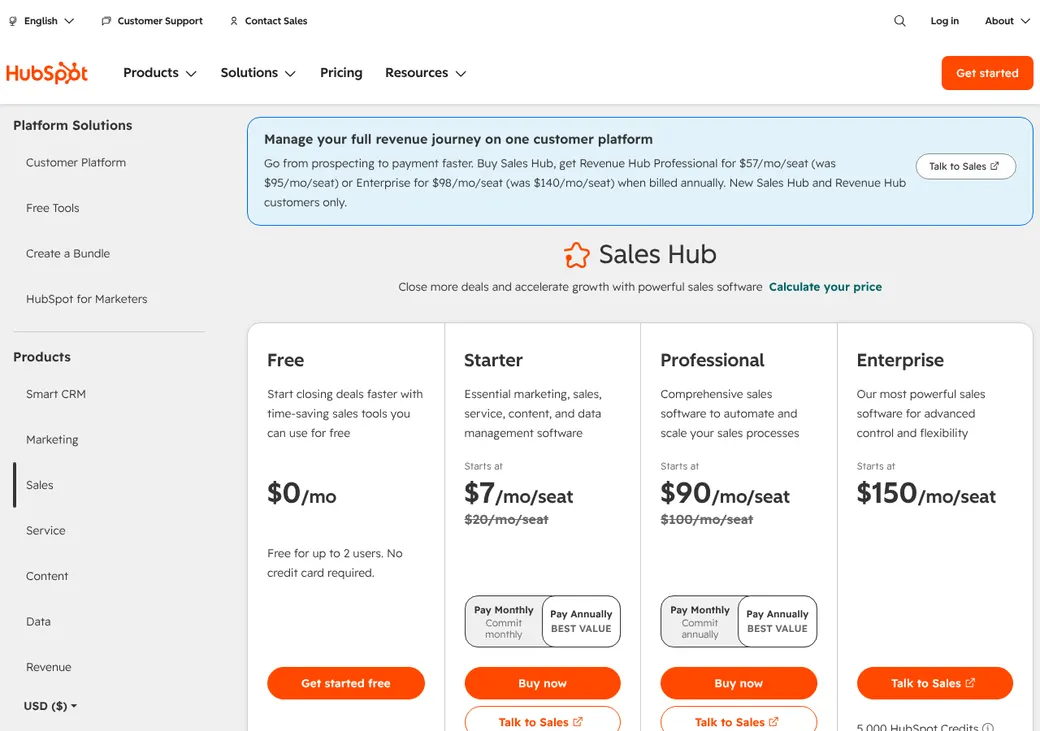
| Plan | Price a user per month | Billed | What it adds |
|---|---|---|---|
| Free CRMTrying it out | $0 | Free | Up to 2 users and 1,000 contacts |
| Sales Hub StarterA small team with simple follow-up | $20 | Monthly | Calling, task queues, AI tools and 50 basic workflows |
| Sales Hub ProfessionalAgencies running renewal and cross-sell sequencesAdds sequences | $90 yearly or $100 monthly | Yearly commitment | Sequences, forecasting, call coaching and 300 workflows |
| Sales Hub EnterpriseAgencies storing policies as their own records | $150 | Yearly | Custom objects, 1,000 workflows and stronger admin controls |
Sales Hub prices as of October 2026, from HubSpot's pricing page. For a limited time, new customers can start Starter at $7 a user per month.
What it would cost you
Cost per month
First-year cost
Software cost per new policy
User prices only. The one-time onboarding fee and add-ons such as texting are extra.
One-time onboarding
| Plan | Fee |
|---|---|
| Sales Hub Professional | $1,500 |
| Sales Hub Enterprise | $3,500 |
| Marketing Hub Professional | $3,000 |
| Marketing Hub Enterprise | $7,000 |
Add-ons a month
A text segment is one message of up to 160 characters. HubSpot Credits are spent on AI and data enrichment tools.
| Add-on | Price |
|---|---|
| Texting for sales and service | $75 with 1,000 segments |
| More texts | $15 per 1,000 segments |
| More calling | $50 per 1,000 minutes |
| More phone numbers | $25 per 5 numbers |
| More HubSpot Credits | $10 per 1,000 |
| More workflows | $200 per 100 |
| More custom objects | $500 per 10, Enterprise |
| Test sandbox | $750, Enterprise |
Marketing Hub, if you also want campaigns
- Marketing Hub is a separate product for email campaigns, landing pages and ads.
- Professional starts at $890 a month with 3 seats and 2,000 marketing contacts.
- Enterprise starts at $3,600 a month with 5 seats and 10,000 marketing contacts.
Which plan has it
| Feature | Starter | Professional | Enterprise |
|---|---|---|---|
| HubSpot Credits | 500 | 3,000 | 5,000 |
| Calling minutes a month | 500 | 3,000 | 12,000 |
| HubSpot phone numbers | 1 | 3 | 5 |
| Workflows | 50, limited | 300 | 1,000 |
| Sequences | |||
| Texting add-on | Add-on | Add-on | |
| Custom objects for policies | |||
| Single sign-on | |||
| One-time onboarding fee | None | $1,500 | $3,500 |
Client and policy records
- Records it keeps
- Contacts, companies and deals, with notes, tasks, calls and emails
- Households
- Built by linking contacts to each other or to a company
- Policies
- Properties on a deal or contact, or their own custom object on Enterprise
- Role next to your AMS
- Front office only. HubSpot's insurance guide keeps the AMS as the policy book of record
- Duplicates
- Matched by email. Professional and Enterprise can also review duplicates by phone
Leads and pipeline
HubSpot has no insurance lead marketplace. Purchased leads arrive through an import, the API or a connector you set up.
Assignment rules
- Methods
- Even rotation, a named user or team, or by workload on lead and ticket workflows
- When no one is free
- The record stays unassigned
- Plan needed
- Rotation needs a paid Sales or Service seat
Renewals, retention and cross-sell
- Renewal reminders
- Workflows fire from a policy expiration date, for example 90, 60 and 30 days out
- Where the dates come from
- Your AMS, through a sync or an import
- Cross-sell
- Campaigns by policy type, life events, business growth or coverage gaps
- Stopping outreach
- Sequences stop on a reply or a booked meeting. Other workflows need their own stop rules
Email, calling and texting
One-to-one email, templates and tracking on every plan. Sequences, timed series of emails and tasks, start on Professional.
Calling
Built-in calling with recording. Minutes and HubSpot numbers grow with the plan.
Texting
An add-on for Sales Hub and Service Hub Professional and Enterprise.
- Opt-outs
- STOP and similar replies update the contact's texting status. Email subscription types handle email opt-outs
- Quiet hours
- Texts wait between 8 p.m. and 8 a.m. in the contact's time zone by default
- Texting registration
- Long-code texting needs carrier registration. Your agency answers for consent and messaging rules
AMS and carrier connections
HubSpot has no built-in AMS connector and no carrier downloads. Its insurance guide describes a custom Applied Epic build that copies clients, policies, claims and producers into HubSpot, with Epic staying the source of truth. Other tools connect through Zapier, the app marketplace, APIs and webhooks.
| Connection | Type | What it does |
|---|---|---|
| Applied Epic | AMS | Custom build. Separate policy records need Enterprise |
| Zapier | Connector | Links to other apps without code |
Client portal and mobile app
Mobile app
iPhone and Android apps cover contacts, companies, deals, tickets and custom records, with notes, tasks, calls and messages. Nothing works offline.
Client portal
Service Hub Professional and Enterprise add a login page where clients follow their support tickets. It does not show policies or ID cards.
Reporting
Reports
- Lead source on every contact
- Pipeline and deal activity
- Rep and team performance
- Calls, emails and meetings
- Campaign and source attribution
- Sequence results
- Custom reports across any records
Migration and getting started
Start free
Sign up for the free CRM without a card, or book a demo.
Import
Bring in spreadsheets or another CRM with the import tools and migration wizard.
Connect the AMS
HubSpot or a partner quotes the Applied Epic build or other syncing.
Build the workflows
HubSpot says a full insurance setup with AMS link, automation and training typically takes 8 to 12 weeks.
Support through the help center.
What users say
What reviewers mention most, as of October 2026.
What users like
- Easy-to-learn interface
- Sales activity and client history in one place
- Automation and integrations
- A free plan to start on
What users dislike
- Costs climb with seats, contacts and added hubs
- Learning curve for reports and automation
- Advanced setups get complex
- Imports need careful field mapping
- Some integrations drop their sync
Contract, export and cancellation
- Term
- Set in your order
- Renewal
- Automatic, for the same period or one year, whichever is shorter
- Refunds
- None. Paid fees can't be cancelled
- Your data
- Records and associations export directly. Some activities and files need the API
Export before the term ends. Access usually stops when the subscription does. Marketing Hub customers can ask for a copy within 30 days, and a reactivation fee may apply.
HubSpot alternatives
- Salesforce Financial Services CloudInsurance Brokerages from $500 a user per monthBuilt-in policy records for larger agencies
- Zoho CRMFree for 3 users. Paid from $14 a user per monthCustom modules for policies and a free plan for small teams
- Act!From $30 a user per month, billed yearlyGeneral CRM with an insurance table template and email marketing
- InsuredMineFrom $106 a user per monthInsurance CRM with AMS sync built in
See every option in insurance CRM.
Frequently asked questions
How much does HubSpot cost for an insurance agency?
Starter is $20 a user per month. Professional is $90 billed yearly or $100 monthly. Enterprise is $150, billed yearly.
Does HubSpot connect to my AMS?
Not out of the box. Applied Epic needs a custom build, and other systems use middleware such as Zapier.
Can HubSpot track insurance policies?
Yes, once set up, as deal properties or as a custom object on Enterprise.
How we researched this review. We based this review on the pricing, terms and product pages published by HubSpot, reviewed in October 2026, together with our team's experience working with insurance agents and agency owners since 2008.
Corrections
Vendors change their pricing all the time and they don't email us when they do. So if you see a price on here that's gone up, a plan HubSpot quit selling or a contract term that reads different now, let us know and send the link to the page where HubSpot has it. Somebody here pulls up that page and checks it before we change anything on ours.