
Acuity Scheduling review for insurance agents: pricing, features and integrations
Acuity Scheduling lets clients book time with you from a link, a hosted page or a button on your website. Each appointment type can carry its own intake form, so you have the client's details before the call.
Solo agents can run it on Starter, but most agents want Standard for text reminders and up to six shared calendars. Medicare and health agents who need a BAA have to buy Premium.
- Best for
- Solo agents and small teams that want an intake form with every booking
- Price
- From $16 a month per account, billed yearly. No free plan
- Free trial
- Seven days. No card needed
- Team scheduling
- Shared calendars on Standard and up, assigned by fewest appointments that day
- Reminders
- Email on every plan. One text per appointment on Standard and up
- CRM connections
- HubSpot, Salesforce and AgencyZoom through Zapier
- HIPAA BAA
- On Premium, signed for each account
- Apps
- Web, plus iPhone and Android apps for staff
Our take
Acuity is a good fit for an agent who wants clients to pick a time and fill in an intake form in one step. You pay per account by the number of calendars, not per person, so a small office pays one price.
Standard is the plan most agents need, since it adds text reminders and lets up to six people share their open times. Premium is the step up for Medicare and health agents, because it's the only plan with a BAA. Turning on HIPAA mode switches off Zapier and Outlook and iCloud sync, which ends the AgencyZoom link.
Team assignment is simple. Acuity gives a booking to whoever has the fewest appointments that day, with no routing by state, line or CRM owner.
Pros
- Intake forms with unlimited questions and file uploads
- One Standard account covers up to six calendars
- Shared team calendars assign by fewest appointments that day
- Payments, deposits and packages built into booking
- BAA available on Premium
- iPhone and Android apps for staff
Cons
- No free plan, and clients can't book after the trial unless you subscribe
- Only one text reminder per appointment
- Follow-up emails skip no-shows
- No routing by state, line or CRM owner
- CRM connections run through Zapier, which a HIPAA account can't use
Plans and pricing
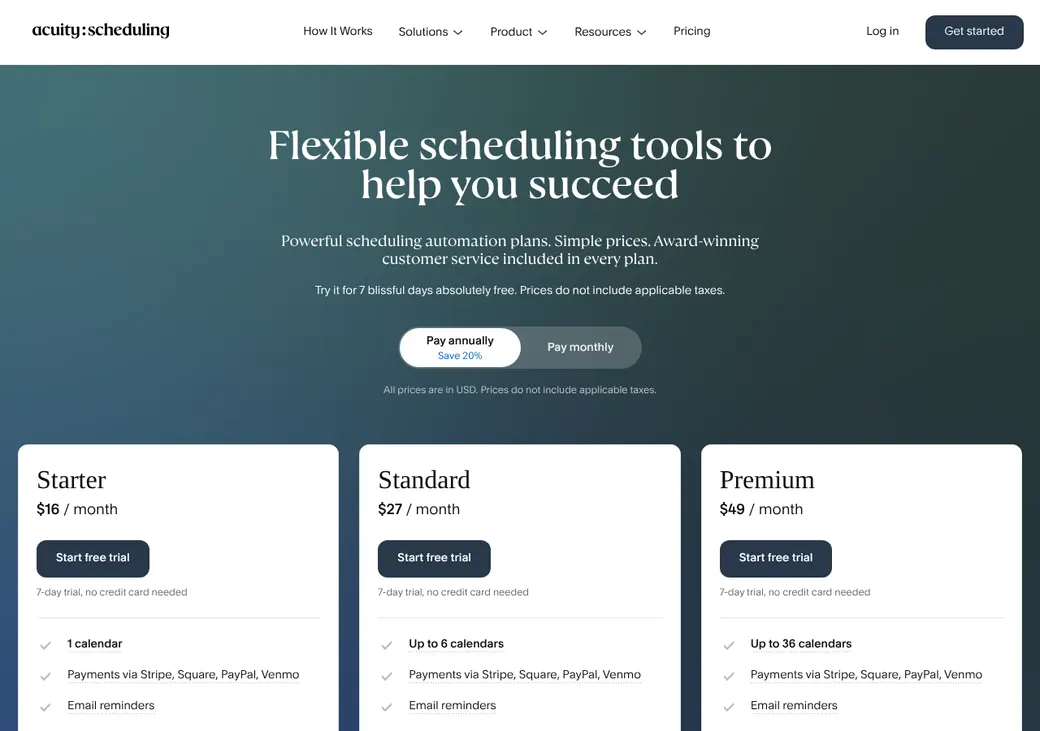
| Plan | Billed yearly | Billed monthly | What it adds |
|---|---|---|---|
| StarterOne agent with one calendar | $16 | $20 | Unlimited appointment types, intake forms, email reminders and payments |
| StandardAgents who want text remindersWhere most agents start | $27 | $34 | Up to six calendars, text reminders, a waitlist and packages |
| PremiumHealth agents who need a BAA | $49 | $61 | Up to 36 calendars, the API, custom CSS, staff time zones and the BAA option |
| Enterprise100 or more calendars or several accounts | Quote only | Quote only | Central admin across accounts, enterprise support and single sign-on |
Prices are per account each month, not per person, as of October 2026, from acuityscheduling.com/pricing. Taxes are extra.
Good to know before you buy
- There's no free plan. Clients can't book once the trial ends unless you subscribe.
- Subscribing inside the mobile app costs more than on the web.
- Standalone Acuity allows unlimited staff logins. An account tied to a Squarespace site follows that site's limit.
- Card processing fees are separate and set by the processor you connect.
Which plan has it
| Feature | Starter | Standard | Premium |
|---|---|---|---|
| Booking page and website embed | |||
| Calendars | 1 | 6 | 36 |
| Intake forms | |||
| Email reminders | |||
| Follow-up emails per appointment | 1 | Up to 6 | Up to 6 |
| Text reminders | |||
| Shared team calendars | |||
| Take payments and deposits | |||
| Waitlist | |||
| Packages and payment plans | |||
| Webhooks | |||
| API access | |||
| Staff in different time zones | |||
| Custom CSS and no Acuity logo | |||
| HIPAA BAA |
Enterprise is priced on request for 100 or more calendars or several Acuity accounts. It adds central admin and single sign-on.
Getting started
Start the free trial
You get seven days without a card, or 14 if you attach Acuity to a Squarespace website. That choice can't be changed later. Trial accounts can't send emails or texts.
Connect your calendar
Link Google, Outlook or iCloud so your own meetings block booking times. Pick the calendar where new appointments go.
Set up your appointment types
Set up a type for each meeting you hold, such as a quote review or an annual review. Attach an intake form with the questions you want answered first.
Share your link
Share the link by email, text or in your signature. On your website you can add the scheduler, a button or a booking bar.
Choose a plan before the trial ends
Pick Standard if you want text reminders or shared team calendars, or Premium if you need a BAA.
Setup is self-serve, with help guides and a startup webinar. Support is by live chat and email, and Enterprise gets an account manager.
Booking and calendars
Booking pages and links
Clients book from a hosted page or from your website, using an embedded scheduler, a button or a booking bar. Pages come in 12 languages, including Spanish, one language per page. Private links can be forwarded and reused, so they don't limit booking to one client.
Intake questions
Forms can ask as many questions as you need, with dropdowns, checkboxes, yes or no answers, addresses and file uploads up to 5 MB. Links can fill in answers for the client, and a custom field can record which lead source sent them. Answers show in the appointment with the date and time.
Calendar sync
- Works with
- Google Calendar, iCloud and Outlook, including Office 365, Exchange and Outlook.com
- Calendars checked
- Google and Outlook can check several calendars. Events you mark as free in Google or Outlook don't block time
- Where bookings go
- One calendar you choose for each staff calendar
- Changes you make
- Moving or canceling in Acuity updates your calendar. Edits made only in Google or Outlook are overwritten at the next sync
- Sync speed
- Google is usually instant. Outlook and iCloud can take up to 10 minutes
- Other calendars
- A one-way feed of your Acuity appointments
Mobile app
The iPhone and Android apps let you see your schedule, book, move or cancel appointments, block time and take payments. Some advanced settings need a browser. Clients book from the mobile site, since the client app was retired in February 2026.
Team routing
Standard and up can pool several calendars behind one appointment type, so clients see every open time across your team. If no one is free at a time, that time isn't offered.
Fewest appointments that day
Acuity gives the booking to the open producer with the fewest appointments that day.
Priority order
Acuity follows the calendar order you set. When a client picks Any Available, it can fall back to alphabetical order.
Licenses are on you. Acuity can't route by state, line, language, form answer or CRM owner. It won't stop a booking going to a producer who isn't licensed or appointed, so that takes a separate workflow.
Reminders and texts
Reminders and no-shows
Every plan sends booking, change and cancellation emails, plus up to three email reminders. Starter sends one follow-up email per appointment and Standard and up send up to six. You mark no-shows yourself, and follow-up emails skip them, so rebooking a no-show is up to you.
Text message rules
- Plans
- Standard and Premium
- Timing
- One text, sent anywhere from 15 minutes to 14 days before
- Client consent
- Clients check a box for each booking. Staff can opt a client in with permission, and clients can book without opting in
- Sending number
- A number Acuity assigns through its texting provider, not your office line. It becomes yours alone once verification clears
- Opt-outs
- STOP blocks reminders from every business that uses Acuity. START turns them back on, and clients can also opt out for one appointment
- Cost
- No extra Acuity fee. The client's carrier may charge message rates
Integrations
| Connects to | Type | How | From plan | What it does |
|---|---|---|---|---|
| Google Calendar | Calendar | Built in | All plans | Checks busy times and adds bookings |
| Outlook, Office 365 and Exchange | Calendar | Built in | All plans | Checks busy times and adds bookings to one calendar |
| iCloud | Calendar | Built in | All plans | Checks busy times and adds bookings |
| HubSpot | CRM | Zapier | All plans | Creates or updates contacts, deals or tickets from appointments |
| Salesforce | CRM | Zapier | All plans | Creates or updates records from appointments |
| AgencyZoom | Agency CRM | Zapier | All plans | Can add a note to a lead with a matching email. You build the Zap yourself |
| HighLevel | CRM | Zapier | All plans | Pairs with LeadConnector in Zapier |
| Zoho CRM | CRM | Third-party connector | Third-party app | Links Zoho CRM. Appointment outcomes don't flow back |
| Zoom, Google Meet and GoToMeeting | Video | Built in | All plans | Adds a meeting link and updates it when the appointment moves |
| Stripe, Square, PayPal and Venmo | Payments | Built in | All plans | Takes payments, deposits and tips at booking |
| Webhooks | Developer | Built in | All plans | Tells another system about bookings and changes |
| API | Developer | API | Premium | Creates, moves and cancels appointments from another system |
Zapier connections need a Zapier account, which is billed separately. Zapier can't be used on a HIPAA-enabled account.
Security and HIPAA
HIPAA and health data
Premium can be HIPAA-enabled once you sign a separate BAA for each Acuity account, before any health details come in. Outlook and iCloud sync and Zapier must be off, and the BAA doesn't cover other Squarespace features. You also remove health details from email and text templates yourself.
Security
- Staff roles from view only to admin
- Access limited to assigned calendars
- Export permission set separately
- Change and notification history on each appointment
- Two-factor sign-in and encryption in transit
- Single sign-on with Enterprise
Contract terms
- Billing
- Monthly or yearly. Enterprise terms are negotiated
- Renewal
- Renews on its own for the same period until you cancel
- Price at renewal
- Fees can change with advance notice. New fees don't apply to time already paid
- Canceling
- Cancel any time. The account stays active to the end of the billing period unless you choose to end it now
- Refunds
- Generally none. Yearly plans canceled within 14 days get a full refund
- Your data
- You own your content, including intake answers. Export appointments and clients as CSV, and client data can still be exported after you cancel
From the Squarespace terms of service dated March 27, 2025, which cover Acuity.
What users say
What reviewers say most often, as of October 2026.
What users like
- Clients find it easy to book
- Lots of ways to customize
- Reminders and time zone handling
- Calendar sync
What users dislike
- Limits on features and integrations
- Calendar setup can get complicated
- Useful features need a higher plan
- No phone support
Acuity Scheduling alternatives
- CalendlyFree plan. Paid from $10 a seat per monthFree plan, routing forms and built-in HubSpot and Salesforce
- Zoho BookingsFree for one user. Paid from $6 a user per monthWeighted and priority round robin with a native Zoho CRM plugin
- SetmoreFree for up to four users. Pro from $5 a user per monthFree for up to four users, with built-in HubSpot and Salesforce
- SimplyBook.meFree plan. Paid from $11.90 a month per accountPriced by bookings, with a BAA on request from Standard
- Square AppointmentsFree plan. Plus is $49 a location per monthBuilt into Square payments and priced per location
See every option in appointment scheduling software.
Frequently asked questions
How much does Acuity Scheduling cost?
Starter is $16 a month billed yearly or $20 billed monthly. Standard is $27 or $34, and Premium is $49 or $61, each for the whole account.
Does Acuity Scheduling sign a BAA for HIPAA?
Yes, on Premium. You sign a separate BAA for each Acuity account and turn on its HIPAA settings before any health details come in.
Does Acuity Scheduling do round robin?
Yes, on Standard and up. Shared calendars give each booking to the open producer with the fewest appointments that day, or follow a priority order you set.
Does Acuity Scheduling work with AgencyZoom or HubSpot?
Only through Zapier. HubSpot and Salesforce can get new or updated records from appointments, and AgencyZoom can get a note on a lead with a matching email.
Can Acuity Scheduling send text reminders?
Yes, on Standard and Premium, to clients who opt in. It sends one text per appointment at no extra Acuity fee.
Do I need a Squarespace website to use Acuity Scheduling?
No. Acuity works on its own with a hosted page or on any website, or you can attach it to a Squarespace site when you sign up.
How we researched this review. We based this review on the pricing, terms and product pages published by Acuity Scheduling, reviewed in October 2026, together with our team's experience working with insurance agents and agency owners since 2008.
Corrections
Vendors change their pricing all the time and they don't email us when they do. So if you see a price on here that's gone up, a plan Acuity Scheduling quit selling or a contract term that reads different now, let us know and send the link to the page where Acuity Scheduling has it. Somebody here pulls up that page and checks it before we change anything on ours.