
OnceHub review for insurance agents: pricing, features and integrations
OnceHub lets clients and prospects book time with you from a link or your agency website. It checks your calendars so people only see open times, then adds the meeting and sends reminders.
Solo agents can start on Basic or Schedule. Agencies use Route to ask a few questions first and send each client to the right producer or to their owner in the CRM.
- Best for
- Agencies that screen clients with a few questions and send them to the right producer
- Price
- Free Basic plan. Paid plans from $10 a seat per month, billed yearly
- Free trial
- 14 days of Engage. No card needed
- Team scheduling
- Round robin and routing forms on Route and up
- Reminders
- Email on every plan. Text on Schedule and up, with credits you buy
- CRM connections
- Salesforce and HubSpot built in. Redtail, Wealthbox, AgencyBloc and HighLevel through Zapier
- HIPAA BAA
- Any paid plan, with the Security and Compliance add-on
- Apps
- Web and mobile browser. A native app is in development
Our take
OnceHub is a good fit for an agency that wants clients to answer a few questions before booking, then land with the right producer. It connects to Salesforce and HubSpot directly and to Redtail, Wealthbox and AgencyBloc through Zapier.
Schedule is the plan most solo agents need, since it adds unlimited links and calendars, text reminders and CRM connections. Route makes sense once you share appointments across producers and want routing forms or round robin.
Medicare and health agents can get a BAA with the Security and Compliance add-on. Check what it leaves out before you send health details by text.
Pros
- Routing forms can send clients by their answers or CRM contact owner
- Round robin can spread meetings evenly, by open time or by priority
- Any paid plan can add a BAA
- Moving or deleting a calendar event updates the booking on Schedule and up
- The API and webhooks cover bookings, reassignments and no-shows
- Redtail, Wealthbox and AgencyBloc connect through Zapier
Cons
- Routing forms and round robin need Route or higher
- Texts use credits you buy separately
- The BAA doesn't cover texts, AI features or support tickets
- No native mobile app yet
- Refunds only if you ask within 3 days (monthly) or 2 weeks (yearly), and OnceHub decides
- Users say it takes time to learn and set up
Plans and pricing
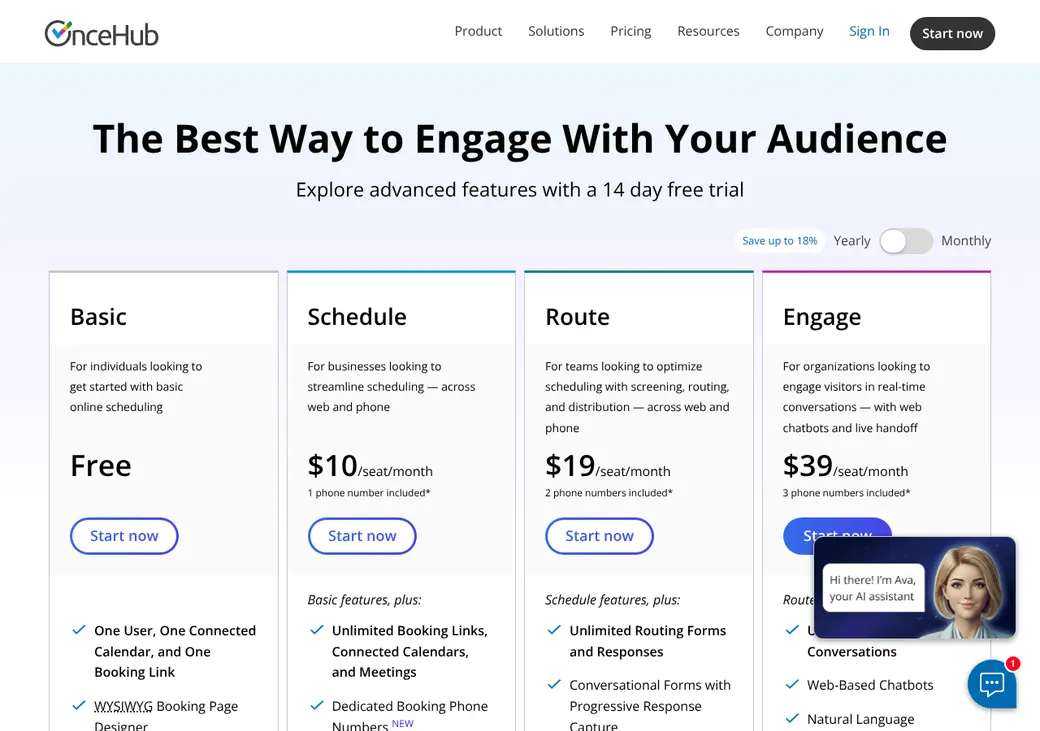
| Plan | Billed yearly | Billed monthly | What it adds |
|---|---|---|---|
| BasicTrying it out alone | $0 | $0 | One user, one calendar and one booking link |
| ScheduleMost solo agentsWhere most agents start | $10 | $12 | Unlimited links and calendars, website embed, text reminders, payments, Salesforce and HubSpot |
| RouteAgencies sharing appointments | $19 | $23 | Routing forms, round robin and routing to the CRM contact owner |
| EngageAgencies that want website chat | $39 | $47 | Chatbots, AI conversations, live chat and instant handoff to a producer |
| EnterpriseAgencies with 30 or more users | Quote only | Quote only | The Security and Compliance add-on, a custom contract and a dedicated success manager |
| Security and ComplianceAdd-on for a BAA | $5 | $6 | BAA, single sign-on and user provisioning on any paid plan |
Prices are per seat each month, as of October 2026, from oncehub.com/pricing. Only people who take meetings need a paid seat.
What it would cost you
Cost per month
First-year cost
Cost per booked appointment
Uses the seat prices in the table. The Security and Compliance add-on and text credits cost extra.
Good to know before you buy
- Schedule includes one phone number clients can call to book with an AI assistant, Route two and Engage three. Extra numbers are $4 a month each.
- After the trial, an account with no plan is locked for 30 days until you buy a plan, drop to Basic or delete it.
Text message credits
Texts use credits you buy. One credit covers one text of 160 characters or fewer, and each account starts with 25 free credits in the US, Canada and a few other countries.
| Credits | Price |
|---|---|
| 100 | $15 |
| 200 | $25 |
| 500 | $50 |
| 1,000 | $90 |
| 2,000 or more | $0.08 a credit |
Which plan has it
| Feature | Basic | Schedule | Route | Engage |
|---|---|---|---|---|
| Booking page | ||||
| Booking links | 1 | Unlimited | Unlimited | Unlimited |
| Connected calendars | 1 | Unlimited | Unlimited | Unlimited |
| Website embed | ||||
| Email confirmations and reminders | ||||
| Your own email and text reminders | ||||
| Calendar changes update the booking | ||||
| Take payment when booking | ||||
| Salesforce and HubSpot | ||||
| API, webhooks and Zapier | ||||
| Routing forms | ||||
| Round robin | ||||
| Route to the CRM contact owner | ||||
| Chatbots and live chat | ||||
| BAA, single sign-on and user provisioning | Add-on | Add-on | Add-on | |
| 24/7 email and live chat support |
Enterprise has the routing features and includes the Security and Compliance add-on.
Getting started
Start the free trial
You get 14 days of Engage without a card.
Connect your calendar
Pick the calendars that should block time and the one calendar that gets new bookings.
Set up your appointment types
OnceHub calls each one a Booking Calendar. Set its length, buffers and intake questions, such as for a quote review or an annual review.
Share your link
Share it by email or text. Website embeds start on the Schedule plan.
Choose a plan before the trial ends
If you don't, login is locked for 30 days until you buy a plan, drop to Basic or delete the account.
Schedule and up include setup templates and 24/7 email and live chat support. Basic has the help center.
Booking and calendars
Booking pages and links
Clients can book from a OnceHub page on any plan, or from your website on Schedule and up. Booking Hubs put several appointment types on one page. One-time links close after one booking, which suits a one-off review.
Intake questions
Booking forms can ask text, single-choice and multiple-choice questions. Schedule and up let clients upload up to five files and add up to 10 guests. Prefilled links can fill in answers, and booking pages come in nine languages, though routing forms stay in English.
Calendar sync
- Works with
- Google Workspace, Microsoft 365 and Outlook, Exchange and iCloud
- Calendars checked
- Your main calendar plus any extra calendars you pick. iCloud all-day events can't block time
- Where bookings go
- One calendar you choose
- Changes you make
- On Schedule and up, moving or deleting the event in Google, Microsoft 365 or Exchange updates the booking when that setting is on
- Time zones
- Shows times in the client's time zone, or in one you fix
Mobile app
There's no native app yet. In a mobile browser you can view, move, cancel and reassign meetings, mark no-shows and share links.
Team routing
Route and higher can share appointments across producers. You pick how OnceHub decides who gets each one.
Equal round robin
Spreads new appointments evenly across the team.
Maximum availability
Shows clients every open time across the team.
Priority-based
Offers the appointment to the producers you rank first.
Routing forms
A routing form asks questions first, then sends the client to the right appointment type or producer. Rules can use current or past answers, contact details, the CRM contact owner and producer attributes. Partial answers are saved even when a client doesn't finish.
An existing client goes to their owner in Salesforce or HubSpot, then their OnceHub owner, then the normal rotation. If that owner has no open times, the client sees none rather than being sent to someone else.
Reminders and texts
Reminders and no-shows
Every plan sends email confirmations and up to five reminders, plus notices when a meeting changes or is canceled. Schedule and up let you write your own emails and add text reminders. You mark no-shows yourself, and a webhook can pass that to your other systems.
Text message rules
- Client consent
- Turning on texts adds a consent checkbox, and OnceHub keeps the date and time of consent
- Sending number
- 1-844-200-5585 in the US. Every text ends with Sent by OnceHub
- Opt-outs
- STOP and similar replies end texts in the US and Canada. Required service messages can still go out
- Credits
- Bought in packs. See text message credits
Integrations
| Connects to | Type | How | From plan | What it does |
|---|---|---|---|---|
| Google Workspace | Calendar | Built in | All plans | Checks busy times and adds bookings |
| Microsoft 365, Outlook and Exchange | Calendar | Built in | All plans | Checks busy times and adds bookings |
| iCloud | Calendar | Built in | All plans | Checks busy times and adds bookings |
| Salesforce | CRM | Built in | Schedule | Creates or updates leads and contacts and logs an event or case. Owner routing on Route |
| HubSpot | CRM | Built in | Schedule | Creates or updates contacts and fields. Owner routing on Route |
| AgencyBloc | Agency management | Zapier | Schedule | Finds the client and logs an activity from a booking |
| Redtail | CRM | Zapier | Schedule | Sends bookings to Redtail |
| Wealthbox | CRM | Zapier | Schedule | Creates Wealthbox events from new bookings |
| HighLevel | CRM | Zapier | Schedule | Sends bookings, cancellations and completed meetings to LeadConnector |
| Stripe | Payments | Built in | Schedule | Takes a fixed payment when the client books |
| API and webhooks | Developer | API | Schedule | Books, moves, reassigns and cancels meetings and sends booking events, including no-shows |
Video meetings can use Zoom, Google Meet, Microsoft Teams, GoTo Meeting or Webex. Make, n8n and other automation tools also connect on Schedule and up. Zapier connections need a Zapier account, which is billed separately.
Security and HIPAA
HIPAA and health data
OnceHub signs a BAA on any paid plan with the Security and Compliance add-on, which is $5 a seat per month billed yearly. Enterprise includes it. The BAA doesn't cover AI features, texts or support tickets, so keep health details out of those.
Data you can't collect
OnceHub's terms ban bank and card numbers, credit scores, income or debt details, government ID numbers and passwords. Leave those out of your booking questions.
Security
- SOC 2 Type 2, PCI DSS Level 1 and CSA STAR Level 1
- Encrypted in transit and at rest
- Two-factor login, password rules and session controls
- Login and meeting audit trails
- Single sign-on and user provisioning with the add-on or Enterprise
Contract terms
- Billing
- Monthly or yearly
- Renewal
- Renews on its own for the same term
- Price at renewal
- The prices in effect at renewal
- Canceling
- Delete the account any time. You still owe fees for the current period
- Refunds
- Ask within 3 days of a monthly period or 2 weeks of a yearly one. OnceHub decides case by case
- Your data
- Export contacts as CSV and activity as CSV or Excel before you cancel or the trial ends
- Governing law
- Delaware
From OnceHub's master services agreement, version 3.6, updated September 28, 2026.
What users say
What reviewers say most often, as of October 2026.
What users like
- Flexible scheduling options
- Booking pages look professional
- Calendar connections
- Reminders and customization
What users dislike
- Takes time to learn
- Setup and navigation can be complex
- A lot to configure for a solo agent
- Changing plans can be awkward
OnceHub alternatives
- CalendlyFree plan. Paid from $10 a seat per monthRound robin and routing forms on Teams, but no BAA
- Chili PiperFrom $15,000 a year with 15 seatsBuilt for sales teams, with 15 seats included and instant calls with a producer
- Cal.comFree for one user. Teams from $12 a user per monthSelf-hosting option, routing forms on Teams and a BAA add-on
- GRemindersFree Basic plan. Paid from $8 a month, with one user includedBuilt for advisors, with AgencyBloc and NextAgency connections and a BAA
- Acuity SchedulingFrom $16 a month per account. No free planTakes payments and offers a BAA on Premium
See every option in appointment scheduling software.
Frequently asked questions
How much does OnceHub cost?
Basic is free for one user, one calendar and one booking link. Schedule is $10 a seat per month billed yearly or $12 billed monthly, and Route is $19 or $23.
Does OnceHub sign a BAA for HIPAA?
Yes, on any paid plan with the Security and Compliance add-on, and Enterprise includes it.
Does OnceHub do round robin?
Yes, on Route, Engage and Enterprise. It can spread meetings evenly, show every open time or follow your priority order.
Can OnceHub send text reminders?
Yes, on Schedule and up, using text credits you buy. A pack of 100 credits costs $15.
Does OnceHub work with Redtail, Wealthbox or AgencyBloc?
Yes, through Zapier on Schedule and up. A booking can log an activity in AgencyBloc or create an event in Wealthbox.
Does OnceHub work with Salesforce or HubSpot?
Both connect directly on Schedule and up and create or update contacts. Route can also send an existing client to their contact owner.
How we researched this review. We based this review on the pricing, terms and product pages published by OnceHub, reviewed in October 2026, together with our team's experience working with insurance agents and agency owners since 2008.
Corrections
Vendors change their pricing all the time and they don't email us when they do. So if you see a price on here that's gone up, a plan OnceHub quit selling or a contract term that reads different now, let us know and send the link to the page where OnceHub has it. Somebody here pulls up that page and checks it before we change anything on ours.