
Salesforce Financial Services Cloud review for insurance agencies: pricing, lead routing and integrations
Salesforce Financial Services Cloud is Salesforce's CRM for banks, wealth firms and insurers. Its Insurance Brokerages package adds policy records, broker of record tracking, carrier placement and producer splits for P&C and benefits brokerages.
You pay per user, billed yearly. Leads arrive from website forms, the API and imports, and rules you build assign them.
- Best for
- Larger P&C and benefits brokerages with an admin or partner to set up Salesforce
- Price
- $325 to $700 a user per month, billed yearly
- Free trial
- 30 days, no card
- Lead intake
- Website forms, vendor posts through the API and CSV imports
- Assignment
- Rules on any field, or routing by agent capacity. State and license rules are yours to build
- Texting and calling
- Paid add-ons for the dialer, phone service and texting
- Agency systems
- Applied Epic, AMS360 and Sagitta through connector apps
- Contract
- Set in your order form, renewing yearly
Our take
Financial Services Cloud suits a larger brokerage that wants leads, policies, placements and producer splits on one platform. It needs an administrator or a setup partner.
Sales Advanced is the first edition with the Insurance Brokerages package. Routing by state, line or license is yours to build.
Pros
- Insurance brokerage data models for policy lifecycles, broker of record, carrier placement and producer splits
- Assignment rules on any field, plus routing by agent capacity
- Exact and fuzzy duplicate matching that can block or flag a duplicate
- Direct-bill commission statement processing
- Applied Epic and AMS360 connections through Salesforce apps
Cons
- High per-user prices, billed annually
- Implementation is a separate project, usually with a partner
- State, line and license routing must be built by your team
- Dialer, telephony, automated follow-up sequences (cadences) and AMS360 Connect cost extra
- Annual terms renew yearly, and quantities can't be reduced during a term
Plans and pricing
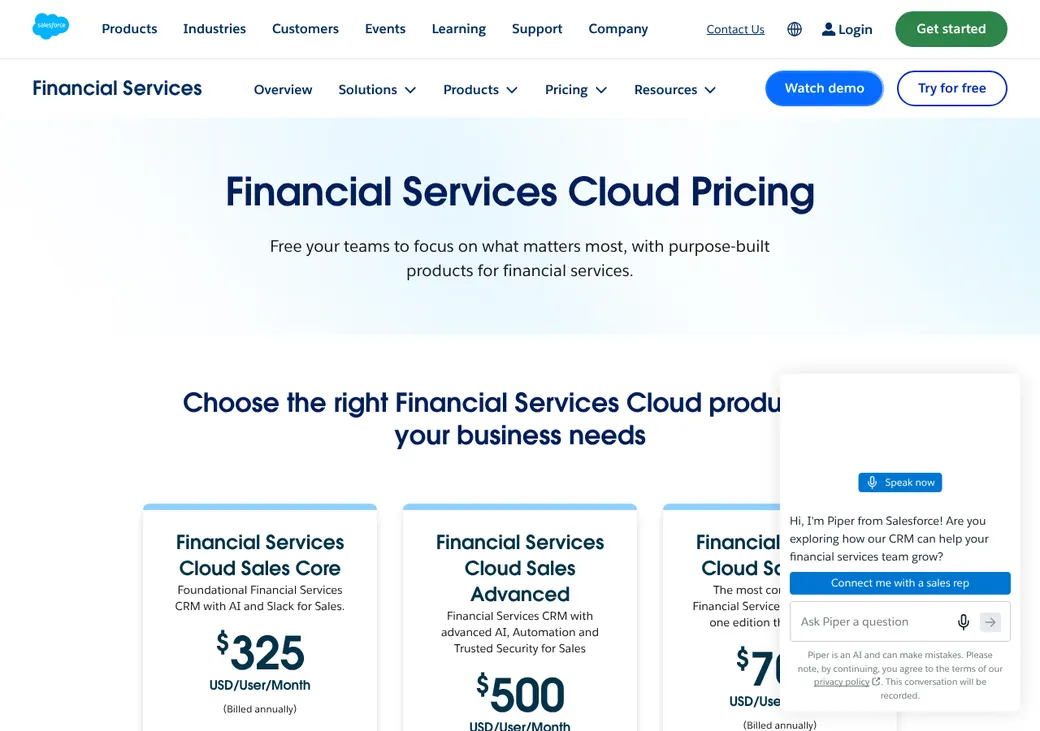
| Edition | Per user per month | What it adds |
|---|---|---|
| Sales CoreBase CRM | $325 | Financial services data model, goals, segments and some AI, Slack and data credits |
| Sales AdvancedAdds the Insurance Brokerages packageWhere most brokerages start | $500 | Insurance Brokerages, more AI, automation and security, a full test copy, backups and Premier support |
| Sales MaxEverything | $700 | Agentforce for Industries, Scheduler, performance management and Digital Insurance |
Per user per month, billed yearly, as of October 2026, from salesforce.com/financial-services/pricing. Service editions cost the same.
What it would cost you
Cost per month
First-year cost
Software cost per lead
Uses the yearly-billed edition prices. Add-ons and setup are extra.
Add-ons
| Add-on | Price |
|---|---|
| Sales Engagement (cadences and work queues) | $50 per user per month |
| Salesforce Dialer | from $5 per user per month |
| Voice with partner phone service | from $50 per user per month |
| Scheduler | $25 per user per month |
| AMS360 Connect | from $40 per user per month |
| Text messages | Message credits per text |
| Setup | Quoted by Salesforce or a partner |
Getting started
Try it
Start a 30-day free trial with no card, or book a demo.
Scope the setup
Salesforce Professional Services or a partner quotes the setup and timeline.
Set your fields
Settle lead source and status values, and add state, line and license fields for routing.
Move your data
Data Loader moves up to five million records, plus tasks, notes and files.
Connect your AMS
Add Applied Epic for Salesforce, AMS360 Connect or Sagitta Connect.
Standard support doesn't plan or run a data move. Your team or a partner maps the old AMS data.
Lead intake
Website forms create leads directly and lead files import by CSV. Vendors and partners post through the REST API (a direct system link).
- Ways leads come in
- Web-to-Lead forms, API posts and CSV import
- Duplicates
- Exact or loose matching against leads and contacts. Block the duplicate or allow it with an alert, then merge
Assignment rules
Rules on any field
Assignment rules read standard and custom fields and send a lead to a user or a queue.
By capacity
Omni-Channel, Salesforce's capacity routing, gives work to agents who are online and have room.
By state, line or license
Works once your team adds the fields and builds the rules or flows.
By hours
Flows can route by time of day.
Follow-up and calling
Agents follow up with tasks, email, texts, calls, cadences, booking and reminders. Converting a lead creates or links an account, contact and opportunity.
- Calling
- Salesforce Dialer or partner phone service, both paid add-ons
- Consent
- Each phone or email can hold its consent status, source and dates. The vendor or form must send it
- Opt-outs
- Email Opt Out and Do Not Call fields. Enhanced SMS honors STOP words on its own, while standard SMS needs setup
- Texting registration
- You register numbers with 10DLC, the US business texting registry. You also keep proof of consent
Client and policy records
Financial Services Cloud models households through relationship groups, and the Insurance Brokerages package adds policy, participant, coverage, asset, benefit, rate and version records. Without an AMS, Salesforce can hold the brokerage's working policy records. With AMS360 Connect or Sagitta Connect, the AMS stays the policy system of record and sends policy data to Salesforce.
Renewals, retention and cross-sell
Renewing a policy, with the same carrier or a new one, carries forward the covered people, beneficiaries and coverage, and policy versions keep the history. Action Plans, saved task checklists, cover renewals and service.
With Applied Epic for Salesforce, renewal opportunities can open a set number of days before expiration. The paid CRM Analytics for Financial Services package finds cross-sell candidates from premium, policy type, tenure and life events.
Connections
| Connects to | Type | How | What it does |
|---|---|---|---|
| Applied Epic for Salesforce | Agency system | Partner app | Shares accounts, contacts, policies, activities, files and commission schedules. A converted lead opens an opportunity in Epic |
| AMS360 Connect | Agency system | Marketplace app | Two-way sync of accounts, contacts, opportunities, policies and activities, with invoices nightly. Paid add-on |
| Sagitta Connect | Agency system | Partner app | Two-way account and contact sync. Sagitta sends policy numbers and details back |
| Salesforce Dialer | Dialer | Built in | Calling add-on |
| Voice with partner phone service | Phone | Built in | Connects an outside phone provider |
| Agency Billing | Accounting | Built in | Premium, tax, fee, invoice, payment and ledger work |
Commissions
Direct-bill commission processing imports carrier statements by CSV and matches them to policies. It compares expected and actual pay and creates producer commission records.
Producer splits can be set by person or role on the account or policy, as percentages or flat amounts.
Client portal and mobile app
The Salesforce app for iPhone and Android shows Financial Services Cloud records, with some offline access.
A client portal, bought and set up separately, shows policy and claim summaries. Clients can upload documents, ask for proof of insurance, request changes and report a claim.
Reporting
Reports you get
- Lead source kept on every lead
- Leads by source and status
- Lead volume and conversion
- Lead age and response time
- Activities and calls
- Pipeline and cadence results by source
What users say
Themes from user reviews, as of October 2026.
What users like
- Consolidated client view
- Automation
- Customizable dashboards and reporting
- Team collaboration
What users dislike
- Time-consuming implementation
- Training and administrator expertise requirements
- Costs that rise with add-ons
- Integration complexity
- Sometimes cluttered interface
Contract and cancellation
- Term
- Set in your order form
- Renewal
- Renews a year at a time unless the order form says otherwise
- Notice
- At least 30 days before renewal
- Refunds
- Fees aren't refunded, and you can't cut users mid-term
- Your data
- Ask for an export within 30 days of the end, after which Salesforce can delete it
From Salesforce's main services agreement.
Salesforce Financial Services Cloud alternatives
- InsuredMineFrom $106 a user per month, billed yearlyInsurance CRM with AMS syncs and a client app at a smaller agency price
- AgencyZoomFrom $119.20 a month for up to 7 users, billed yearlyP&C sales and retention tool that works with most AMS products
- LeadSquaredFrom $60 a user per month, billed yearlyLead routing and sales CRM with published per-user prices
- AgencyBlocQuote onlyAgency system and CRM built for life, health and benefits agencies
See every option in insurance lead management software.
Frequently asked questions
How much does Salesforce Financial Services Cloud cost?
Sales Core costs $325 per user per month, Sales Advanced $500 per user per month and Sales Max $700 per user per month, with annual billing.
Which edition includes the Insurance Brokerages package?
Sales Advanced and Sales Max.
Does Salesforce connect to Applied Epic or AMS360?
Yes. Applied Epic connects through Applied Epic for Salesforce, and AMS360 through the paid AMS360 Connect app.
How we researched this review. We based this review on the pricing, terms and product pages published by Salesforce Financial Services Cloud, reviewed in October 2026, together with our team's experience working with insurance agents and agency owners since 2008.
Corrections
Vendors change their pricing all the time and they don't email us when they do. So if you see a price on here that's gone up, a plan Salesforce Financial Services Cloud quit selling or a contract term that reads different now, let us know and send the link to the page where Salesforce Financial Services Cloud has it. Somebody here pulls up that page and checks it before we change anything on ours.