
TidyCal review for insurance agents: pricing, features and integrations
TidyCal gives you a booking page where clients pick a time with you. It checks your Google, Microsoft or Apple calendar so people only see open times, then adds the meeting and sends reminders.
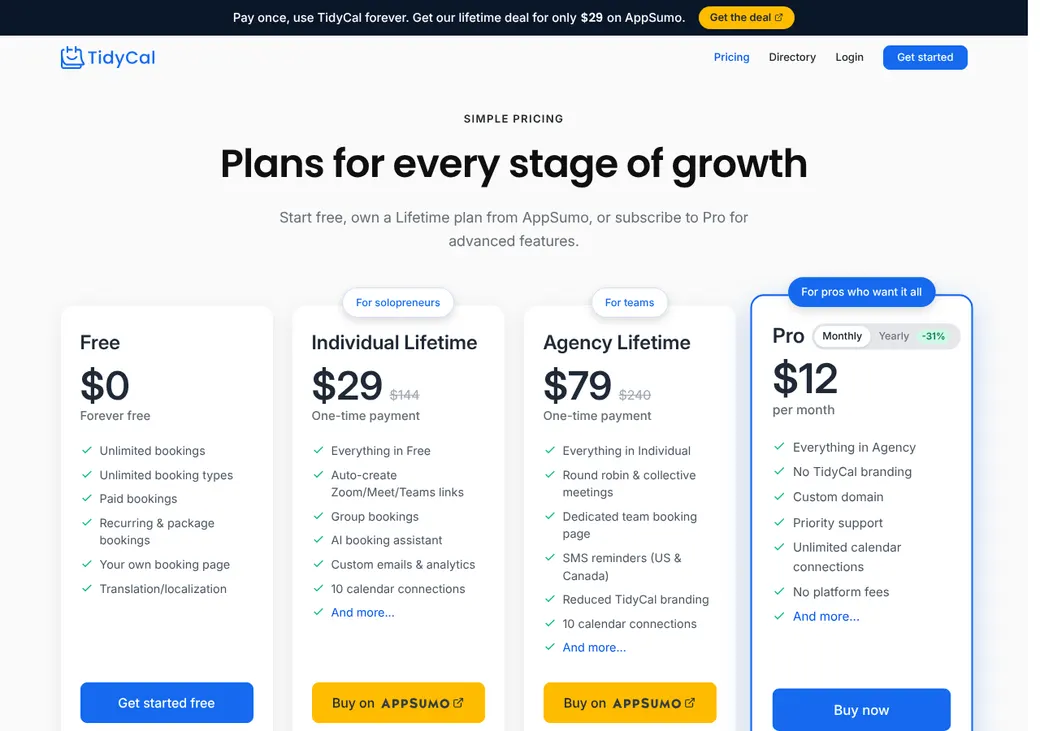
Solo agents can run it on the Free plan or a one-time Individual Lifetime purchase. Small teams that share appointments need Agency Lifetime or Pro.
- Best for
- Solo agents and small teams that want a booking link without a monthly bill
- Price
- Free plan. Lifetime plans from $29 once, or Pro at $12 a month
- Team scheduling
- Round robin and a team booking page on Agency Lifetime and Pro
- Reminders
- Email on every plan. Text on paid plans, US and Canada only
- CRM connections
- HubSpot and Salesforce through Zapier on paid plans
- HIPAA BAA
- Not offered
- Apps
- Web only. No iPhone or Android app
Our take
TidyCal is a good fit for an agent who wants a booking link and intake questions without a monthly bill. Even the Free plan has unlimited appointment types, intake questions and payments.
Individual Lifetime is the plan most solo agents need, since one payment adds text reminders, ten calendars and Zapier. Agency Lifetime covers up to four people with round robin, and Pro suits a bigger team because its seats are unlimited.
For Medicare work, note that TidyCal has no BAA. Booking questions should stay free of health details and Medicare numbers.
Pros
- The Free plan has unlimited bookings, appointment types and intake questions
- Lifetime plans are paid once, with no monthly bill
- Google, Microsoft and Apple calendars block busy time and receive bookings
- Stripe and PayPal payments work on every plan
- Text reminders cost nothing extra on paid plans
- Pro covers any number of seats for one price
Cons
- No BAA for health data
- No iPhone or Android app
- Round robin goes by priority and chance, not an even count
- Routing can't use state, line or CRM owner
- HubSpot and Salesforce connect only through Zapier, and there are no webhooks
- Texts are one-way and reach only the US and Canada
Plans and pricing
| Plan | Price | How you pay | What it adds |
|---|---|---|---|
| FreeTrying it out with one calendar | $0 | No charge | Unlimited bookings and appointment types, intake questions, payments and email reminders |
| Individual LifetimeMost solo agentsWhere most agents start | $29 | Once, through AppSumo | Ten calendars, text reminders, Zapier and API, video links, custom emails and booking approval |
| Agency LifetimeTeams of up to four | $79 | Once, through AppSumo | Four seats including the owner, round robin, collective and managed team types and a team booking page |
| ProLarger teams | $12 a month | Monthly, or $99 a year | Unlimited seats and calendars, a custom domain, priority email support and no 1% Stripe fee |
Prices are per account, not per seat, as of October 2026, from tidycal.com/pricing. Pro billed yearly works out to $8.25 a month.
Good to know before you buy
- Lifetime plans are paid once through AppSumo. Pro is a subscription.
- Pro has no seat charge, so the whole team shares one price.
- Stripe bookings carry a 1% TidyCal fee on every plan except Pro. PayPal bookings don't.
- Stripe and PayPal still charge their own processing fees.
- On Pro, TidyCal can set custom pricing once Stripe bookings pass $10,000 a month.
Text reminders
Paid plans send up to two text reminders per appointment type, with no charge per text. Texts go to US and Canada numbers only, and the Free plan has none.
Which plan has it
| Feature | Free | Individual Lifetime | Agency Lifetime | Pro |
|---|---|---|---|---|
| Booking page and website embed | ||||
| Unlimited appointment types | ||||
| Intake questions | ||||
| Email confirmations and reminders | ||||
| Take payment when booking | ||||
| TidyCal fee on Stripe bookings | 1% | 1% | 1% | None |
| Calendars checked | 1 | 10 | 10 | Unlimited |
| Text reminders | ||||
| Zapier and API | ||||
| Automatic Zoom, Meet and Teams links | ||||
| Custom emails, booking caps and approval | ||||
| Cancel and no-show fees | ||||
| CSV export of contacts and bookings | ||||
| Team seats | 4 | Unlimited | ||
| Round robin and team booking page | ||||
| Custom domain |
Agency Lifetime figures are for purchases on or after September 1, 2026. Earlier Agency purchases keep unlimited seats, 25 calendars and a custom domain.
Getting started
Create a free account
You get a booking page at tidycal.com as soon as you sign up. The Free plan doesn't expire, so you can try it with real clients.
Connect your calendar
Pick which calendars should block time. New bookings go to your main calendar or one you choose for each appointment type.
Set up your appointment types
Create a separate type for quote reviews, renewals and any other meeting. Add your intake questions.
Share your link
Add it to your email signature, send it in texts or embed it on your site.
Upgrade when you need more
Individual Lifetime adds texts and more calendars. Agency Lifetime or Pro adds team scheduling.
Support is by email, in-app chat and the help center, with email replies in about 8 hours. Pro gets priority email support.
Booking and calendars
Booking pages and links
Clients book from your tidycal.com page or a calendar embedded on your website. Links and embeds can fill in a client's name and email. You can also send a booking invite that the client confirms through a secure link.
You can add buffer time, minimum notice and a limit on how far ahead clients book. Paid plans add daily or weekly booking caps and let you approve each request before it's confirmed.
Intake questions
Every plan can ask intake questions, from short or long text to dropdowns, dates and phone numbers. Answers can't be filled in ahead from a link. Booking pages come in more than 30 languages.
Calendar sync
- Works with
- Google Calendar, Microsoft 365 or Outlook and Apple iCloud
- Calendars checked
- One on Free. Ten on the lifetime plans. Unlimited on Pro
- What blocks time
- Busy events. Outlook tentative and out-of-office events block time too
- Where bookings go
- Your main calendar, or a calendar you choose for each appointment type
- If a connection breaks
- TidyCal keeps blocking the busy times it last saw for 30 days
- iCloud
- Connects with an app-specific password
Mobile app
TidyCal has no iPhone or Android app. You and your clients use it in a phone browser, though some settings are easier to reach on a computer.
Team routing
Agency Lifetime and Pro let several producers share appointments. You choose how TidyCal decides who gets each one.
Round robin
TidyCal books the free producer with the highest priority. Ties are settled at random, so it doesn't keep the count even.
Collective
Finds a time when every producer you add to the appointment is free.
Team booking page
Clients see your team and book with the producer they choose.
Managed team types
Set up an appointment type once and share it across the team.
No routing by license. TidyCal can't send a client to a producer by state, line or CRM owner. You need a separate step to make sure the producer is licensed and appointed.
Reminders and texts
Reminders and no-shows
Every plan sends confirmation emails and email reminders. Paid plans let you change their timing and wording and add text reminders. You mark no-shows yourself, and paid Stripe bookings can charge a no-show fee, but TidyCal doesn't send a rebooking message.
Text message rules
- Plans
- Individual Lifetime, Agency Lifetime and Pro
- Where
- US and Canada numbers only
- Reminders
- Up to two per appointment type
- Sending number
- A one-way number from Vonage. Clients can't reply, and it isn't your own number
- Phone number
- Collected with a booking question
- Opt-outs
- STOP and HELP apply under TidyCal's terms
- Cost
- No charge per text
Integrations
| Connects to | Type | How | From plan | What it does |
|---|---|---|---|---|
| Google Calendar | Calendar | Built in | All plans | Checks busy times and adds bookings |
| Microsoft 365 and Outlook | Calendar | Built in | All plans | Checks busy, tentative and out-of-office times and adds bookings |
| Apple iCloud | Calendar | Built in | All plans | Checks busy times and adds bookings |
| HubSpot | CRM | Zapier | Individual Lifetime | Creates or updates a contact from a new booking |
| Salesforce | CRM | Zapier | Individual Lifetime | Creates or updates contacts when a booking is made, moved or canceled |
| Zoom, Google Meet and Microsoft Teams | Video | Built in | Individual Lifetime | Adds a meeting link to the booking |
| Stripe and PayPal | Payments | Built in | All plans | Takes payments, deposits, packages and subscriptions |
| Zapier | Automation | Zapier | Individual Lifetime | Sends new, changed and canceled bookings to other apps |
| TidyCal API | Developer | API | Individual Lifetime | Creates bookings for free appointment types, up to 60 requests a minute |
Zapier connections need a Zapier account, which is billed separately. TidyCal has no webhooks, and agency systems such as AgencyZoom need Zapier or the API. Google Meet needs Google Calendar as the booking calendar, and Teams links need a Business or Education account.
Security and HIPAA
HIPAA and health data
TidyCal doesn't offer a BAA. Don't ask for Medicare numbers or health details when clients book.
Security
- Encrypted in transit and at rest
- Email codes to sign in on a new device
- Owner, Admin and User roles on Agency Lifetime and Pro
- GDPR tools and a data processing agreement
- reCAPTCHA spam protection
Contract terms
- Billing
- Pro is monthly or yearly through Stripe. Lifetime plans are paid once through AppSumo
- Renewal
- Pro renews until you cancel
- Canceling
- Cancel Pro anytime in the billing portal. You keep access to the end of the period
- Refunds
- Pro has a full refund within 7 days. Lifetime plans follow AppSumo's 60-day policy
- Your data
- CSV export of contacts and bookings on paid plans. Your data stays if you downgrade
- Governing law
- Texas
From TidyCal's terms of service and refund policy, checked October 2026.
TidyCal alternatives
- CalendlyFree plan. Paid from $10 a seat per monthBuilt-in HubSpot and Salesforce, plus routing forms on Teams
- Cal.comFree for one user. Teams from $12 a user per monthRouting forms on Teams and a BAA for health data
- Acuity SchedulingFrom $16 a month per account. No free planOffers a BAA on Premium and pools team calendars
- YouCanBookMeFree plan. Paid from $8.10 a monthRound robin that keeps the count even, and built-in HubSpot
- SetmoreFree for up to four users. Pro from $5 a user per monthFree for up to four users, with a BAA through Setmore Health
See every option in appointment scheduling software.
Frequently asked questions
How much does TidyCal cost?
The Free plan costs nothing, and the lifetime plans are a one-time $29 for Individual or $79 for Agency. Pro is $12 a month or $99 a year.
Does TidyCal sign a BAA for HIPAA?
No. TidyCal doesn't offer a BAA, so it doesn't fit a workflow that needs one.
Does TidyCal do round robin?
Yes, on Agency Lifetime and Pro. It books the free producer with the highest priority and breaks ties at random.
Does TidyCal work with Google Calendar and Outlook?
Yes. It checks Google, Microsoft 365 or Outlook and iCloud calendars for busy time and adds new bookings to the calendar you pick.
Does TidyCal connect to my CRM?
HubSpot and Salesforce connect through Zapier on paid plans, creating or updating a contact from each booking. AgencyZoom and other agency systems aren't on its integration list, so they need Zapier or the API.
Can TidyCal send text reminders?
Yes, on Individual Lifetime, Agency Lifetime and Pro, with up to two texts per appointment type. Texts go only to US and Canada numbers, at no charge per message.
How we researched this review. We based this review on the pricing, terms and product pages published by TidyCal, reviewed in October 2026, together with our team's experience working with insurance agents and agency owners since 2008.
Corrections
Vendors change their pricing all the time and they don't email us when they do. So if you see a price on here that's gone up, a plan TidyCal quit selling or a contract term that reads different now, let us know and send the link to the page where TidyCal has it. Somebody here pulls up that page and checks it before we change anything on ours.