
Setmore review for insurance agents: pricing, features and integrations
Setmore lets clients book time with you or one of your agents from a booking page, a website button or a link in an email or text. It gives each agent a calendar and link, takes payments and sends reminders.
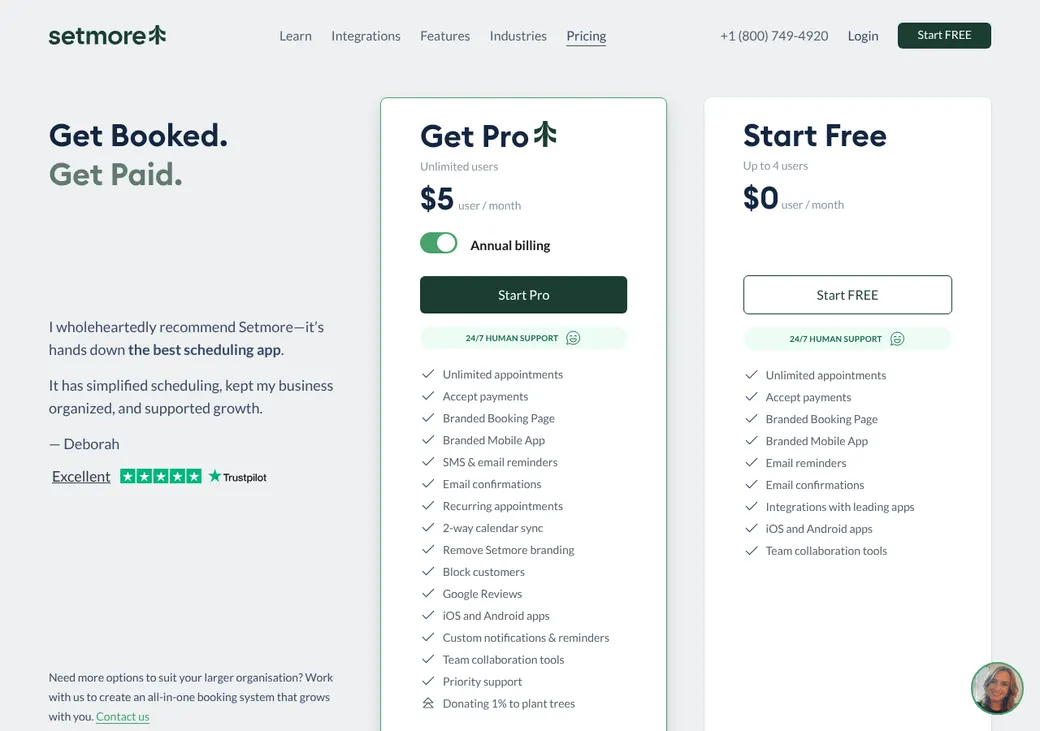
An office of up to four people can run it on the Free plan. Pro adds text reminders, Google and Office 365 sync and room for more agents.
- Best for
- Solo agents and small offices that want a free booking page for up to four people
- Price
- Free for up to four users. Pro from $5 a user per month, billed yearly
- Free trial
- 14-day trial in the iPhone app. Web Pro has a 30-day refund
- Team scheduling
- Clients pick an agent or the first one free. No round robin
- Reminders
- Email on every plan. Text on Pro
- CRM connections
- HubSpot, Salesforce and Zoho CRM built in. AgencyBloc and HighLevel through Zapier
- HIPAA BAA
- Through a Setmore Health account on Pro, chosen at sign-up
- Apps
- Web, iPhone, iPad and Android
Our take
Setmore is a good fit for a small office that wants clients to book a specific agent or the first one free. The Free plan covers up to four people with unlimited appointments, so a small office can start without paying.
Pro is the plan most agents end up on, since text reminders and calendar sync both need it. Setmore has no round robin, so it suits an office where clients book the agent they already know.
Medicare and health agents need a Setmore Health account for a BAA. You choose it when you sign up, and an ordinary account can't be switched later.
Pros
- Free for up to four people with unlimited appointments
- Each agent gets a link, and one-time links expire after a booking
- HubSpot contacts stay in step both ways
- Apps let agents book, move appointments and take payments
- A BAA is available through Setmore Health
- Phone, chat and email support around the clock
Cons
- Text reminders and Google or Office 365 sync need Pro
- No round robin or routing forms
- Every staff profile is billed on Pro, even one no one signs in to
- Clients get one text reminder per appointment
- Setmore doesn't store a timestamped text consent record
- Setmore Health must be chosen at sign-up and turns off some features
Plans and pricing
| Plan | Billed yearly | Billed monthly | What it adds |
|---|---|---|---|
| FreeOffices of up to four people | $0 | $0 | A booking page, unlimited appointments, payments, email confirmations, one email reminder and the mobile apps |
| ProMost agents and growing agenciesWhere most agents start | $5 | $12 | Unlimited team members, text reminders, two-way Google and Office 365 sync, recurring appointments, Zoom and no Setmore branding |
| EnterpriseLarger teams | Quote only | Quote only | Custom setup and terms through sales |
| Live ReceptionistAgencies that want calls answered | Monthly only | $99 a month | People answer your calls around the clock and book, move or cancel appointments. Includes Pro. US only |
Pro prices are per user each month, as of October 2026, from setmore.com/pricing. Every staff profile counts as a user, even one that never signs in.
What it would cost you
Cost per month
First-year cost
Cost per booked appointment
Uses the Pro prices in the table. Teams of four or fewer can stay on the Free plan.
Good to know before you buy
- Web Pro is paid up front, with a 30-day money-back guarantee.
- Every staff profile is billed, including a calendar no one signs in to.
- Payment processor fees are separate. Stripe instant payouts add 1.5% in the US.
- Subscriptions bought in the iPhone or Android app are billed and refunded by Apple or Google.
- Live Receptionist charges $2.25 a minute beyond its included minutes.
Text message credits
Pro includes 500 text credits for each team member every month. Setmore's fair-use policy sets no fixed overall cap, and you can buy more credits in the app.
Which plan has it
| Feature | Free | Pro |
|---|---|---|
| Team members | 4 | Unlimited |
| Appointments | Unlimited | Unlimited |
| Booking page and website button | ||
| Online and in-person payments | ||
| Deposits | ||
| Email confirmations | ||
| Email reminders per appointment | 1 | 2 |
| Text reminders | ||
| Two-way Google and Office 365 sync | ||
| Recurring appointments and classes | ||
| Zoom meeting links | ||
| Hidden service categories | ||
| API access | With approval | |
| Remove Setmore branding | ||
| Priority support and setup help | ||
| Mobile apps |
A Setmore Health account with a BAA needs Pro and must be chosen when you sign up.
Getting started
Decide on Setmore Health first
If you will ever need a BAA, pick Health when you create the account. An ordinary account can't be switched later.
Add your agents and services
Give each producer a staff profile and assign the services they handle. Set working hours, breaks and buffers.
Connect calendars and payments
On Pro, link each agent's Google or Office 365 calendar. Add Stripe, Square or PayPal if you take payments.
Share your link
Send your booking page or an agent's own link in emails and texts, or add a Book Now button to your website.
Upgrade when you need texts or sync
The Free plan covers four people. Move to Pro for text reminders, calendar sync and more people.
Chat, email and phone support run around the clock on every plan. Pro adds priority support and help setting up integrations.
Booking and calendars
Booking pages and links
Clients book from your Setmore page, a Book Now button or popup on your website, or Facebook, Instagram and Reserve with Google. You can share an agent's own link or one that picks the service and agent for the client. One-time links show up to 30 open times and expire after one booking.
Intake questions and hours
You choose which contact fields are required, and the client's name always is. Don't use custom fields for bank or card details. Booking pages come in 32 languages and show times in the client's own time zone.
You set working hours, breaks, time off, minimum notice, how far ahead clients can book and how late they can cancel. Buffers block time around a meeting without changing the length the client sees.
Calendar sync
- Works with
- Google Calendar and Office 365 both ways on Pro. Outlook and Apple calendars get a read-only feed
- Calendars checked
- One Google or Office 365 calendar per agent, on Pro
- Where bookings go
- The calendar you pick for each agent
- Changes you make
- Moving a meeting in Google or Office 365 reschedules it in Setmore. Google changes can take a few minutes
- Office 365 limits
- Recurring and multi-day events don't block time in Setmore
Mobile app
The iPhone, iPad and Android apps let you book, move and cancel appointments, manage clients and team calendars, take payments and get alerts. Reports are on the web only.
Team routing
Setmore has no round robin. Each agent has their own calendar and link, and clients either pick an agent or let Setmore choose.
Client picks the agent
Clients choose a named producer, or you send them a link that already has their agent selected.
Any team member
When the client skips the agent step, Setmore gives the booking to the first free agent in the order you rank them.
Licensing isn't checked. Setmore won't stop a booking from going to an agent who isn't licensed in the client's state or appointed with the carrier. You decide which agents handle each service.
Reminders and texts
Reminders and no-shows
Every plan sends email confirmations when a meeting is booked, moved or canceled. Free sends one email reminder, and Pro sends two emails and one text to the client. You mark no-shows yourself.
Text message rules
- Client consent
- Clients see a notice about appointment messages when they book. Keep your own consent records, since Setmore doesn't store a separate timestamped one
- Opt-outs
- The appointment shows when a client has opted out of texts
- Credits
- 500 per team member each month on Pro. More can be bought in the app
Integrations
| Connects to | Type | How | What it does |
|---|---|---|---|
| Google Calendar | Calendar | Built in | Blocks busy times and adds bookings. Moves made in Google update Setmore. Needs Pro |
| Office 365 | Calendar | Built in | Blocks busy times and adds bookings. Moves made in Office 365 update Setmore. Needs Pro |
| Outlook and Apple Calendar | Calendar | Feed | Shows your Setmore bookings in a read-only calendar |
| HubSpot | CRM | Built in | Keeps new contacts and contact changes in step both ways |
| Salesforce | CRM | Built in | Sends new contacts to Salesforce. Doesn't work with Salesforce Enterprise |
| Zoho CRM and Insightly | CRM | Built in | Sends new contacts to the CRM |
| AgencyBloc | Agency management | Zapier | Creates individuals or activities from contacts and appointments |
| HighLevel | CRM | Zapier | Sends appointment events to contacts, opportunities or workflows, and books from a pipeline change |
| Zoom | Video | Built in | Adds a meeting link, with one Zoom user per agent. Needs Pro |
| Google Meet | Video | Built in | Adds a meeting link at no extra cost |
| Stripe, Square, PayPal and LawPay | Payments | Built in | Takes payment when the client books, on every plan. Deposits need Pro |
| QuickBooks Online | Accounting | Built in | Sends payment and invoice details |
| API | Developer | API | Books and reads appointments once Setmore approves access. Needs Pro |
Zapier connections need a Zapier account, which is billed separately. Appointment triggers in Zapier need Pro.
Security and HIPAA
HIPAA and health data
Setmore signs a standard BAA only for a Setmore Health account on Pro. You pick Health when you sign up, and the choice is permanent. Health hides client details in notifications and turns off classes, client reviews and the cancel and reschedule links in messages.
Security
- Two-factor sign-in with email codes, and passkeys on the web
- No Access, Standard, Enhanced and Admin roles for staff
- Encryption in transit
- Extra encryption for client records on Setmore Health
- Data deletion and export on request
Contract terms
- Billing
- Monthly or yearly, per staff profile. Live Receptionist is month to month
- Renewal
- Renews on its own at the billing term you chose
- Price at renewal
- Setmore can change its fees under the terms
- Canceling
- Takes effect right away when you cancel or downgrade on the web, with no refund for unused time
- Refunds
- A 30-day money-back guarantee on web Pro. Yearly plans can be refunded only in the month you upgrade or renew
- Your data
- Contacts export to CSV and appointment history to XLS. You can request staff and appointment records by email, answered within 30 days
- Governing law
- North Carolina
From Setmore's terms of service, as of October 2026.
What users say
What reviewers say most often, as of October 2026.
What users like
- Easy to set up and use
- Clients book for themselves
- Good value
- Services and links are easy to customize
- Notifications
- Recurring appointments
What users dislike
- Calendar sync glitches
- Trouble with integrations and support
- Recurring bookings take time to learn
- Changes to the Zoom connection
Setmore alternatives
- CalendlyFree plan. Paid from $10 a seat per monthRound robin and routing forms that check the CRM owner
- Acuity SchedulingFrom $16 a month per account. No free planGives pooled bookings to the agent with the fewest that day
- Square AppointmentsFree plan. Plus is $49 a location per monthUnlimited staff calendars for one price per location
- Zoho BookingsFree for one user. Paid from $6 a user per monthRound robin, weighted and priority distribution plus routing forms
- SimplyBook.meFree plan. Paid from $11.90 a month per accountOne account price covers up to five providers on Basic
See every option in appointment scheduling software.
Frequently asked questions
How much does Setmore cost?
The Free plan costs nothing for up to four people. Pro is $5 a user per month billed yearly or $12 billed monthly, and every staff profile counts as a user.
Does Setmore sign a BAA for HIPAA?
Yes, for a Setmore Health account on Pro. You pick Health when you create the account.
Does Setmore do round robin?
No. Clients pick an agent, or Setmore gives the booking to the first free agent in the order you rank them.
Does Setmore work with AgencyBloc or HubSpot?
HubSpot is built in and keeps contacts in step both ways. AgencyBloc connects through Zapier, where a booking can create an individual or an activity.
Can Setmore send text reminders?
Yes, on Pro. Each appointment gets one text reminder, and Pro includes 500 credits per team member each month.
Does Setmore sync with Google Calendar and Outlook?
Pro syncs both ways with Google Calendar and Office 365. Other Outlook and Apple calendars get a read-only feed of your bookings.
How we researched this review. We based this review on the pricing, terms and product pages published by Setmore, reviewed in October 2026, together with our team's experience working with insurance agents and agency owners since 2008.
Corrections
Vendors change their pricing all the time and they don't email us when they do. So if you see a price on here that's gone up, a plan Setmore quit selling or a contract term that reads different now, let us know and send the link to the page where Setmore has it. Somebody here pulls up that page and checks it before we change anything on ours.