Cal.com review for insurance agents: pricing, features and integrations
Cal.com lets clients book with you from a link, a routing form or your agency website. It checks your calendars, books the meeting and logs it in Salesforce or HubSpot.
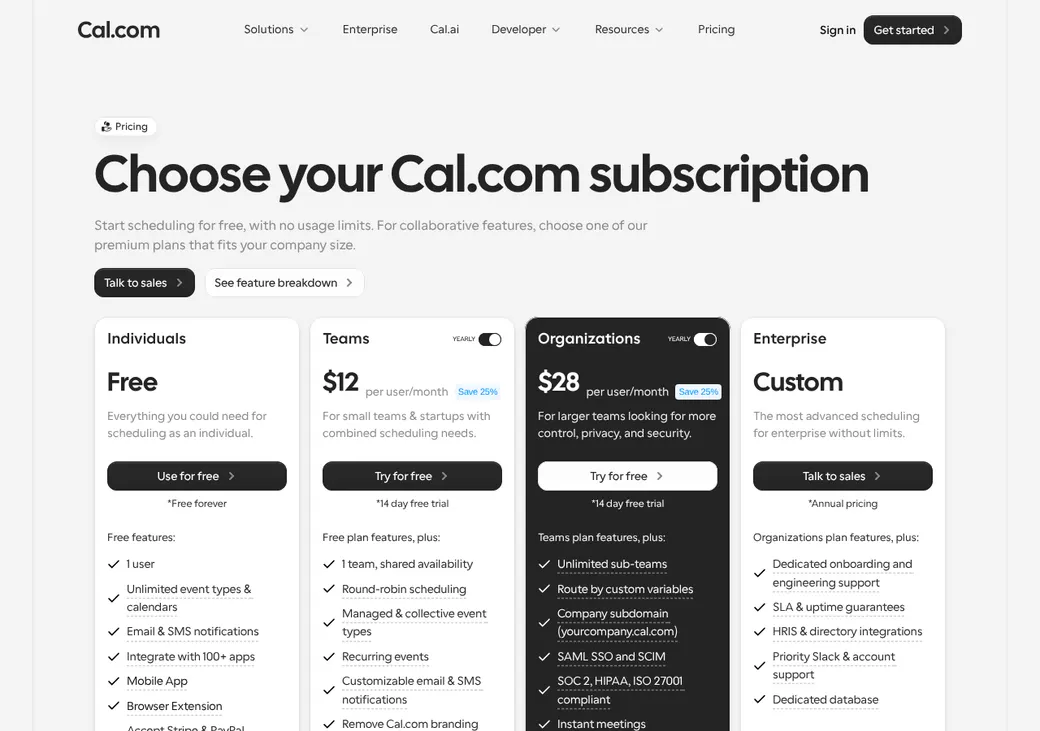
One agent can use it free on the Individual plan. Agencies use Teams to share appointments, or Organizations to send each client to a producer by state, line or language.
- Best for
- Agencies that send each client to a producer by state, line or CRM owner
- Price
- Free for one user. Teams from $12 a user per month, billed annually
- Free trial
- 14 days of Teams or Organizations
- Team scheduling
- Round robin and routing forms on Teams. Routing by producer details on Organizations
- Reminders
- Email and text on paid plans. Texts in the US and Canada are free on Teams
- CRM connections
- Salesforce, HubSpot and Pipedrive built in
- HIPAA BAA
- Included on Enterprise and on Organizations with 15 or more users. $300 a month on Teams
- Apps
- Web, iPhone and Android
Our take
Cal.com is a good fit for an agency that wants control over who gets each appointment. Routing forms and CRM owner lookups can send each client to the right producer.
Teams is the plan most agencies need, at $12 a user per month billed yearly. Organizations makes sense once you route by state, line or language, since producer details only work there.
Medicare and health agents can get a BAA, though it costs extra on Teams. Plan on some setup time to get the routing right.
Pros
- Free Individual plan with unlimited appointment types and calendars
- Routing forms and CRM owner routing on Teams
- Routing by state, line or language on Organizations
- Salesforce and HubSpot built in on every plan
- Free texts in the US and Canada on Teams
- BAA available, and included on larger Organizations
Cons
- Deleting the event in your calendar doesn't cancel the booking
- License details are entered by hand and not checked
- Exchange calendars are read only
- No refunds on paid plans
- The free Individual plan gets no text credits
Plans and pricing
| Plan | Billed yearly | Billed monthly | What it adds |
|---|---|---|---|
| IndividualOne agent | $0 | $0 | One user, unlimited appointment types and calendars, payments and Salesforce and HubSpot sync |
| TeamsAgencies sharing appointmentsWhere most agents start | $12 | $16 | Round robin, routing forms, group events, email and text reminders and 750 text credits per person |
| OrganizationsAgencies routing by territory or line | $28 | $37 | Routing by producer details, subteams, single sign-on, audit logs and 1,000 credits per person |
| EnterpriseLarge agencies and distributors | Quote only | Annual only | Dedicated onboarding, uptime guarantees, unlimited credits and a BAA at no extra cost |
Prices are per user each month, as of October 2026, from cal.com/pricing.
What it would cost you
Cost per month
First-year cost
Cost per booked appointment
Uses the seat prices in the table.
Good to know before you buy
- Cal.com bills seats in one of two ways. Peak billing counts the most members you had during the period. Active billing counts only members who host or attend a booking, so ask Cal.com which one your plan uses.
- Cal Pay charges 2.3% for cards, 1% for ACH and 2.7% for PayPal and Cash App. Cal.com adds no commission.
- A free edition you host yourself is also available, but it has no team features and you run the servers.
Text message credits
Each person gets 750 credits a month on Teams, 1,000 on Organizations and unlimited on Enterprise. The free Individual plan gets none.
| Texts sent to | Cost |
|---|---|
| United States and Canada, on Teams | Free |
| Other countries | The text provider's cost plus 80%, at $0.01 a credit |
Which plan has it
| Feature | Individual | Teams | Organizations | Enterprise |
|---|---|---|---|---|
| Booking link and website embed | ||||
| Appointment types and calendars | Unlimited | Unlimited | Unlimited | Unlimited |
| Take payment when booking | ||||
| Salesforce and HubSpot | ||||
| Round robin | ||||
| Group events with several hosts | ||||
| Routing forms | ||||
| Custom email and text reminders | ||||
| Text credits per person each month | 0 | 750 | 1,000 | Unlimited |
| Routing by producer details | ||||
| Subteams | ||||
| Single sign-on and automatic user setup | ||||
| Audit log | ||||
| Dedicated onboarding |
Getting started
Start free or start a trial
One person can use the Individual plan free. Teams and Organizations come with a 14-day trial.
Connect your calendar
Cal.com checks every connected calendar for conflicts unless you pick a shorter list. Choose the calendar where new bookings go.
Set up your appointment types
Build one for each service you offer, such as a quote review or a renewal. Add your intake questions, buffers and minimum notice.
Share your link
Share it by email or text, add it to your signature or show it on your site inline or as a popup.
Choose a plan
Pick Teams to share appointments across producers, or Organizations to route by territory, line or language. A trial with billing details on file turns paid unless you cancel.
Setup is self-serve, with a help center and support@cal.com. Enterprise adds dedicated onboarding and engineering support.
Booking and calendars
Booking pages and links
Clients book from a producer's link, a routing form or your website, using an inline page or a popup. Links can be single-use, expiring or private, which suits a one-off review. Booking pages work in more than 65 languages.
Intake questions
Forms take short and long answers, phone numbers, checkboxes and dropdowns, and can show a question only when an earlier answer calls for it. Prefilled links fill in the client's name, email and answers. You can also hold a booking until you accept or decline it.
Calendar sync
- Works with
- Google Calendar, Outlook and Microsoft 365, Apple iCloud and Zoho Calendar
- Exchange
- Reads busy times only
- Calendars checked
- Every connected calendar by default, or a list you pick for each appointment type
- Where bookings go
- One calendar you choose
- Changes in your calendar
- Deleting the event or declining it in Gmail doesn't cancel the booking. Cancel from Cal.com or the link in the confirmation email
Mobile app
The iPhone and Android apps show your bookings and availability and send an alert for new, moved and canceled appointments. You can also accept or decline booking requests from the app.
Team routing
Teams and higher can share appointments across producers. You pick how Cal.com decides who gets each one.
Round robin
Cal.com can pick by availability or whoever was booked least recently. You can also set weights or priorities so some producers get more.
CRM owner
Salesforce or HubSpot ownership can send a client to the producer who owns the record. When Salesforce shows no owner, it falls back to your other rules.
Routing forms
A routing form asks screening questions first, then sends the person to the right appointment type, another page or a message. On Organizations and Enterprise it can match answers to producer details you keep, such as state, line, language or license. Clients who match no rule go to a backup group you choose, and admins can see why each producer was picked.
Routing doesn't verify licenses. You can route by a license detail you enter for each producer, but Cal.com doesn't check it. Keep those details current yourself.
Reminders and texts
Reminders and no-shows
Paid plans let you build email, text and WhatsApp reminders and follow-ups around bookings, changes and cancellations. You mark no-shows yourself, and that can start a follow-up message.
Text message rules
- Phone numbers
- Collected with a required phone field or a custom question
- Sender name
- You can set the sender name or ID
- Credits
- 750 per person each month on Teams, 1,000 on Organizations and unlimited on Enterprise. See text message credits
Integrations
| Connects to | Type | How | From plan | What it does |
|---|---|---|---|---|
| Google Calendar | Calendar | Built in | All plans | Checks busy times and adds bookings |
| Outlook and Microsoft 365 | Calendar | Built in | All plans | Checks busy times and adds bookings |
| Apple iCloud and Zoho Calendar | Calendar | Built in | All plans | Checks busy times and adds bookings |
| Exchange | Calendar | Built in | All plans | Reads busy times |
| Salesforce | CRM | Built in | All plans | Logs meetings, contacts, mapped fields and no-shows. Reads the record owner for routing |
| HubSpot | CRM | Built in | All plans | Logs meetings on the contact, with reschedules and cancellations. Reads the contact owner for routing |
| Pipedrive | CRM | Built in | All plans | Adds an activity to the person and updates it when the meeting moves |
| Zoom, Google Meet, Microsoft Teams and Cal Video | Video | Built in | All plans | Adds a meeting link to the booking |
| Cal Pay, Stripe and PayPal | Payments | Built in | All plans | Takes payment before the booking is made |
| Webhooks | Developer | Built in | All plans | Sends booking, payment and no-show changes |
| API | Developer | API | Teams | Books meetings from other systems |
Security and HIPAA
HIPAA and health data
Cal.com signs a BAA, which you need before collecting any health information. It's included on Enterprise and on Organizations with 15 or more users, and costs extra on Teams and smaller Organizations. Check that each connected app is also safe for health data.
Security
- SOC 2 Type II and ISO 27001
- Encrypted in transit and at rest
- Two-factor sign-in
- Outside penetration tests every year
- Single sign-on and automatic user setup on Organizations and up
- Audit log on Organizations, viewable but not exportable
Contract terms
- Billing
- Monthly or yearly, paid in advance. Enterprise is yearly
- Renewal
- Renews on its own on the same terms unless you cancel
- Price at renewal
- Fee changes come with notice and start at the next billing cycle
- Canceling
- Through your account or support
- Refunds
- None, unless the law requires one
- Your data
- Export or delete through your account or by email, with at least 30 days to export after you close
From Cal.com's terms, effective April 14, 2021, under United Kingdom law.
What users say
What reviewers say most often, as of October 2026.
What users like
- Lots of ways to customize
- Flexible booking pages
- API and developer options
- Clean design
- Integrations
- Convenient scheduling
What users dislike
- Setup takes work
- Rough edges in the mobile app
- Slow or unhelpful support
Cal.com alternatives
- CalendlyFree plan. Paid from $10 a seat per monthAgencyZoom and AgencyBloc through Zapier, but no BAA
- OnceHubFree Basic plan. Paid from $10 a seat per monthConnects to Redtail, Wealthbox and AgencyBloc through Zapier
- SavvyCalFree to set up and test. Paid from $10 a user per monthAgencyZoom connector and round robin by availability or even spread
- Zoho BookingsFree for one user. Paid from $6 a user per monthWeighted and priority round robin with a native Zoho CRM plugin
- Acuity SchedulingFrom $16 a month per account. No free planPriced per account by calendars, with a BAA on Premium
See every option in appointment scheduling software.
Frequently asked questions
How much does Cal.com cost?
The Individual plan is free for one user. Teams is $12 a user per month billed yearly or $16 billed monthly, and Organizations is $28 or $37.
Does Cal.com sign a BAA for HIPAA?
Yes. It's included on Enterprise and on Organizations with 15 or more users, and costs $300 a month extra on Teams and smaller Organizations.
Can Cal.com route appointments by state or license?
Yes, on Organizations and Enterprise, using details you enter for each producer. Cal.com doesn't check the license itself, so keep those details current.
Does Cal.com work with Salesforce and HubSpot?
Yes, both are built in on every plan. Cal.com logs meetings in the CRM and can send a client to the producer who owns the record.
Does deleting a calendar event cancel the Cal.com appointment?
No. Deleting it in your calendar or declining it in Gmail leaves the booking in place, so cancel from Cal.com or the link in the confirmation email.
Can Cal.com send text reminders?
Yes, on paid plans. Teams includes 750 text credits per person each month, and texts in the US and Canada are free on Teams.
How we researched this review. We based this review on the pricing, terms and product pages published by Cal.com, reviewed in October 2026, together with our team's experience working with insurance agents and agency owners since 2008.
Corrections
Vendors change their pricing all the time and they don't email us when they do. So if you see a price on here that's gone up, a plan Cal.com quit selling or a contract term that reads different now, let us know and send the link to the page where Cal.com has it. Somebody here pulls up that page and checks it before we change anything on ours.