
meetergo review for insurance agents: pricing, features and integrations
meetergo lets clients and prospects book time with you from a link or your agency website. It checks your calendars so people only see open times, then adds the meeting, sends reminders and can pass the booking to your CRM.
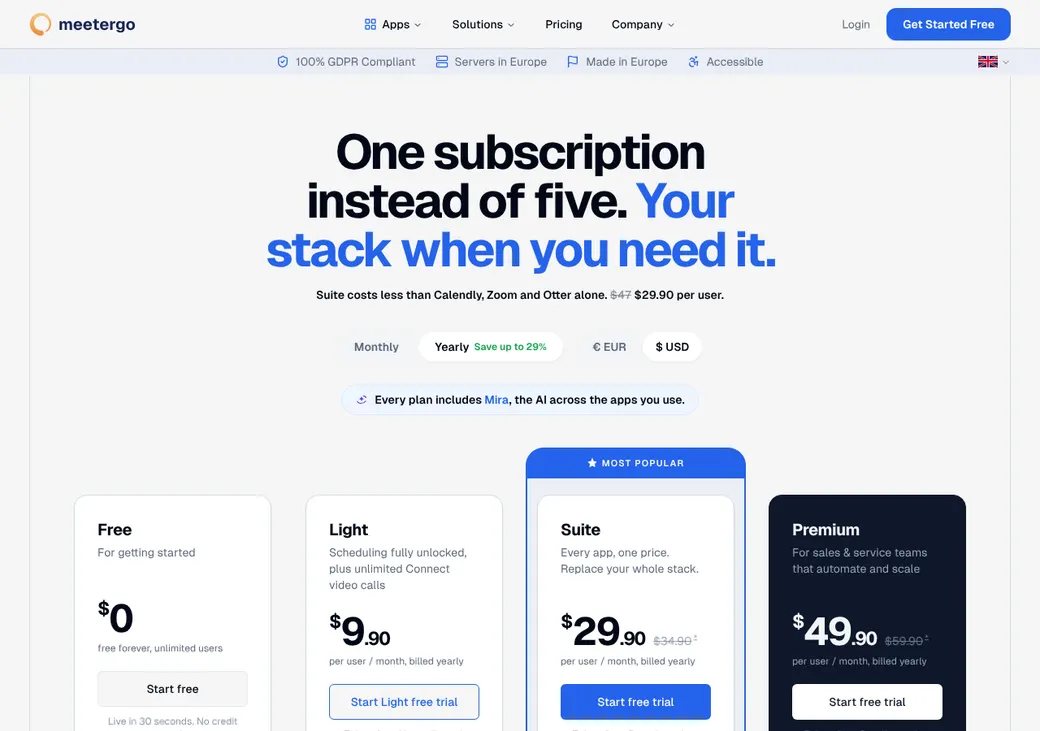
Solo agents can run it on the Free or Light plan. Agencies that share appointments across producers need Suite for round robin and text reminders.
- Best for
- Solo agents and agencies that want bookings to reach their CRM
- Price
- Free plan. Paid plans from €9.90 a user per month, billed yearly before VAT
- Free trial
- Seven days of Premium. No card needed
- Team scheduling
- Round robin and routing forms on Suite and up
- Reminders
- Email on Light and up. Text on Suite and up
- CRM connections
- HubSpot and Pipedrive on Light and up. Salesforce on Premium
- HIPAA BAA
- Not offered on any plan
- Apps
- Web, iPhone, iPad and Android
Our take
meetergo is a good fit for an agent who wants clients to pick a time from a link and have the booking land in both the calendar and the CRM. It's a German product, so prices are in euros and your data is hosted in the EU.
Light is the plan most solo agents need, since it adds booking questions, email reminders and HubSpot or Pipedrive sync. Agencies that share appointments need Suite for round robin, routing forms and text reminders, and Premium to send a client to their owner in Salesforce or HubSpot.
meetergo won't sign a BAA, so it doesn't fit Medicare intake. Ask clients only for contact details and a time.
Pros
- You choose which calendars block time and which one gets bookings
- Round robin can rotate by availability or balance by booking count
- Routing forms can sort clients by answers, language or postal code
- HubSpot and Pipedrive sync start on Light
- Single-use and prefilled links suit one-off reviews and lead follow-up
- The Free plan allows unlimited users and bookings
Cons
- The Free plan has no booking questions or automated reminders
- Text reminders, round robin and routing forms need Suite or higher
- Salesforce and routing by CRM owner need Premium
- Suite and Premium prices rise after the first year
- One plan covers the whole account, so every user is on the same plan
- No BAA for health data
Plans and pricing
| Plan | First year | After the first year | What it adds |
|---|---|---|---|
| FreeTrying it out | €0 | €0 | Three appointment types, one calendar per user, unlimited users and bookings |
| LightMost solo agentsWhere most agents start | €9.90 | €9.90 | Unlimited appointment types, six calendars, booking questions, email reminders, payments and HubSpot or Pipedrive |
| SuiteAgencies sharing appointments | €29.90 | €34.90 | Team booking pages, round robin, routing forms, text reminders and no meetergo branding |
| PremiumAgencies that route by CRM owner | €49.90 | €59.90 | Salesforce, routing to the CRM owner, WhatsApp, waitlists, your own domain and priority support |
| EnterpriseLarge agencies | Quoted by sales | Quoted by sales | SSO, user provisioning, audit log, a custom contract and onboarding help |
Prices are per user each month, billed yearly, in euros before VAT, as of October 2026, from meetergo.com/en/pricing. The first-year price applies to users added when the account starts. After 12 months they move to the regular price.
Good to know before you buy
- Payment processing fees, API usage and other apps you connect can add cost. meetergo adds no fee of its own on payments.
- The Free plan keeps meetergo branding on your booking page.
- Canceling a booking doesn't refund a Stripe payment on its own.
Text message credits
One credit covers one text segment, so a long text can use more than one. You can buy more, but package prices aren't listed. Bought credits expire after six months.
| Plan | Credits per user a month |
|---|---|
| Free and Light | 0 |
| Suite | 8 |
| Premium | 20 |
| Enterprise | 100, unless your contract says otherwise |
Which plan has it
| Feature | Free | Light | Suite | Premium | Enterprise |
|---|---|---|---|---|---|
| Booking link and website embed | |||||
| Appointment types | 3 | Unlimited | Unlimited | Unlimited | Unlimited |
| Calendars checked per person | 1 | 6 | 6 | 6 | 6 |
| Booking questions | |||||
| Take payment when booking | |||||
| Automated email workflows | 3 | Unlimited | Unlimited | Unlimited | |
| HubSpot and Pipedrive | |||||
| Zapier, Make and webhooks | |||||
| Team booking pages and round robin | |||||
| Routing forms | |||||
| Text reminders | |||||
| No meetergo branding | |||||
| Salesforce | |||||
| Route to the client's CRM owner | |||||
| WhatsApp reminders | |||||
| Single sign-on and user provisioning |
Getting started
Start the free trial
You get seven days of Premium features without a card. Texts and WhatsApp messages aren't sent during the trial.
Connect your calendar
Pick which calendars should block time and the one calendar that gets new bookings.
Set up your appointment types
Create one per meeting type, such as a policy review, a claims appointment or a new client consultation. Add your booking questions.
Share your link
Send it by email or text, or embed it on your website.
Choose a plan before the trial ends
If you don't upgrade, the account drops to the Free plan with three appointment types and one calendar.
Help comes from the help center and support email. Premium adds priority support, and Enterprise includes onboarding and a dedicated success manager.
Booking and calendars
Booking pages and links
Clients can book from a meetergo page or from your own website, using an inline calendar, a button or a floating widget. Reusable links work for everyday booking. Single-use links close after one booking and expire after 30 days if unused.
Intake questions
Light and up can ask booking questions, including required, hidden and conditional fields, file uploads and a signature box. Prefilled links can fill in a client's name, email, phone and answers for them. Booking pages come in 10 languages, but you translate your own questions and emails.
Calendar sync
- Calendars checked
- One per person on Free. Up to six on paid plans
- Where bookings go
- One calendar you choose. Your other calendars don't get a copy
- Changes you make
- Changes and cancellations in meetergo update your calendar. Deleting the event in Google or Outlook can cancel the booking when that setting is on
- What blocks time
- Outlook tentative and out-of-office events and iCloud all-day events can block booking
Mobile app
The iPhone, iPad and Android apps let you manage appointments, share booking links and move or cancel meetings.
Team routing
Suite and higher can share appointments across producers. You pick how meetergo decides who gets each one.
Maximize availability
Clients see every open time across the team and bookings rotate. You can give producers one to three stars to set who comes first.
Load balancing
The open producer with the fewest bookings that day, week or month gets the next one. Clients can't pick a producer in this mode.
Routing forms
A routing form asks a few questions first, then applies your rules in order. Rules can use the client's answers, language, region or postal code and phone prefix. On Premium it can also send an existing client to their owner in HubSpot, Salesforce or Pipedrive.
When no rule matches, the form can show a message or send the client to another page. If the matching producers have no open times, the client sees none.
Reminders and texts
Reminders and no-shows
Every plan sends booking confirmations with links to move or cancel. Light and up add timed email reminders, Suite adds text reminders and Premium adds WhatsApp. Canceling stops pending reminders and rescheduling resets them.
You mark no-shows yourself after the start time, even for one person in a group meeting. You can then send a quick message or a scheduled follow-up, and no-shows appear in reports and exports.
Text message rules
- Client consent
- A checkbox on the booking form can ask for consent in your own words. You are responsible for having permission to text each client
- Sending service
- Texts go through a separate texting service, and the data passes to the United States. Enterprise can set a custom sender
- Credits
- 8 per user each month on Suite, 20 on Premium and 100 on Enterprise. See text message credits
- Extra credits
- Sold in packages with no listed price. Bought credits expire after six months
Integrations
| Connects to | Type | How | From plan | What it does |
|---|---|---|---|---|
| Google Calendar | Calendar | Built in | All plans | Checks busy times and adds bookings |
| Outlook and Exchange | Calendar | Built in | All plans | Checks busy times and adds bookings |
| iCloud and other CalDAV calendars | Calendar | Built in | All plans | Checks busy times and adds bookings |
| HubSpot | CRM | Built in | Light | Creates contacts, companies, activities or deals and fills fields from booking answers |
| Pipedrive | CRM | Built in | Light | Creates or updates people and deals. Doesn't log activities |
| Salesforce | CRM | Built in | Premium | Creates contacts, accounts or leads and a meeting. A canceled booking marks the meeting canceled |
| Zapier | Automation | Zapier | Light | Starts other automations when someone books |
| Make | Automation | Built in | Light | Starts other automations, by invitation only |
| Webhooks | Developer | Webhook | Light | Sends booking changes to other systems. Missed events aren't resent |
| API | Developer | API | All plans | Checks open times and books, moves or cancels meetings |
| Stripe, PayPal and Mollie | Payments | Built in | Light | Takes payment when the client books |
Video meetings can use Zoom, Microsoft Teams, Google Meet or meetergo's own video, which is limited to 45 minutes on Free. Zapier and other connected apps are billed separately.
Security and HIPAA
HIPAA and health data
meetergo doesn't offer a BAA on any plan. Its European data agreement covers GDPR, which doesn't replace a BAA. So keep health details and Medicare numbers off meetergo forms.
Security
- Encrypted in transit and at rest
- Two-factor login and passkeys
- Hosted in Germany and the EU. Texts pass through a texting service in the US
- Data centers certified to ISO 27001
- Role-based permissions. Staff see each other's bookings until you limit it
- Single sign-on, user provisioning and audit log on Enterprise
Contract terms
- Billing
- Monthly or yearly, paid in advance
- Renewal
- Renews on its own for the same term
- Price at renewal
- Suite and Premium move to the regular price after the first 12 months. Any price change starts one month after meetergo announces it
- Notice
- None needed to drop to the Free plan
- Canceling
- Switch to the Free plan in Billing. Paid features last until the period ends. Deleting the account is a separate step
- Refunds
- None when you drop to Free. Moving between paid plans credits the unused amount to your account
- Your data
- You own it. Suite and up can export up to 10,000 bookings as CSV, and data is returned or deleted within 30 days after the contract ends
- Governing law
- German law. The German version of the terms controls
From meetergo's terms dated November 10, 2023 and its July 2026 data processing agreement.
What users say
What reviewers say most often, as of October 2026.
What users like
- Easy for clients to book
- Less back and forth by email
- All your open times in one place
- Reminders
- Helpful support
What users dislike
- Takes time to learn and set up
- Some features are missing
- Limits in some integrations
- Reports and exports can be awkward
meetergo alternatives
- CalendlyFree plan. Paid from $10 a seat per monthPriced in dollars, with AgencyZoom and AgencyBloc through Zapier
- Acuity SchedulingFrom $16 a month per account. No free planOffers a BAA on Premium and connects to AgencyZoom
- Cal.comFree for one user. Teams from $12 a user per monthRouting forms on Teams and a signed BAA for health data
- OnceHubFree Basic plan. Paid from $10 a seat per monthRoutes by CRM owner and connects to Redtail and Wealthbox
- ZeegFree plan. Paid from €10 a user per month, before VATAnother German scheduler, with phone booking and no-show recovery
See every option in appointment scheduling software.
Frequently asked questions
How much does meetergo cost?
The Free plan costs nothing. Light is €9.90 a user per month billed yearly, and Suite is €29.90 in the first year and €34.90 after that, all before VAT.
Does meetergo sign a BAA for HIPAA?
No. meetergo doesn't offer a BAA on any plan, so it doesn't fit a workflow that needs one.
Does meetergo do round robin?
Yes, on Suite, Premium and Enterprise. It can rotate bookings among open producers or give the next one to whoever has the fewest.
Can meetergo send text reminders?
Yes, on Suite and up. Suite includes 8 text credits per user each month and Premium includes 20. You can buy more, and texts aren't sent during the free trial.
Does meetergo work with HubSpot or Salesforce?
HubSpot and Pipedrive sync on Light and up, and Salesforce needs Premium. Premium can also send an existing client to their owner in the CRM.
Can I cancel meetergo and get a refund?
You cancel by switching to the Free plan in Billing, and paid features last until the period ends. There's no refund for the time left.
How we researched this review. We based this review on the pricing, terms and product pages published by meetergo, reviewed in October 2026, together with our team's experience working with insurance agents and agency owners since 2008.
Corrections
Vendors change their pricing all the time and they don't email us when they do. So if you see a price on here that's gone up, a plan meetergo quit selling or a contract term that reads different now, let us know and send the link to the page where meetergo has it. Somebody here pulls up that page and checks it before we change anything on ours.