
Zeeg review for insurance agents: pricing, features and integrations
Zeeg lets clients book time with you from a link or your agency website. It checks your calendars for open times, adds the meeting and can send email and text reminders.
Solo agents can start on Starter or Professional. Agencies use Business to share appointments by round robin, by the client's answers or by who owns the contact in the CRM.
- Best for
- Agencies that route clients by their answers or by CRM owner
- Price
- Free plan. Paid plans from €10 a user per month, billed yearly, before VAT
- Free trial
- 14 days of Business. No card needed
- Team scheduling
- Round robin, routing forms and CRM owner routing on Business and up
- Reminders
- Email and text workflows on paid plans
- CRM connections
- HubSpot, Salesforce and Pipedrive built in on Business and up
- HIPAA BAA
- Not offered
- Apps
- Web and phone browser. No iPhone or Android app yet
Our take
Zeeg is a good fit for an agency that wants to send each client to the right producer. Routing forms can ask about state, line or language first, and existing clients can go straight to the producer who owns them in your CRM.
Professional covers most solo agents, with unlimited booking pages, workflows and text reminders. Business is the plan for a team, since it adds round robin, routing forms and the HubSpot, Salesforce and Pipedrive connections.
Zeeg doesn't offer a BAA, so it's a poor fit for Medicare intake. Ask clients only for contact details on its booking pages.
Pros
- Routing forms send clients by state, line or language
- CRM owner routing with HubSpot, Salesforce, Pipedrive or Zeeg's own contact list
- Round robin can favor open times or keep the count even
- Text credits are included on paid plans
- No-show follow-ups with a link to rebook
- An optional AI voice agent books appointments by phone
Cons
- No BAA for health data
- Round robin and routing forms need Business or higher
- Routing doesn't check producer licenses or carrier appointments
- Handing a booking to another producer doesn't check their calendar
- Prices are in euros, before VAT
- No iPhone or Android app yet
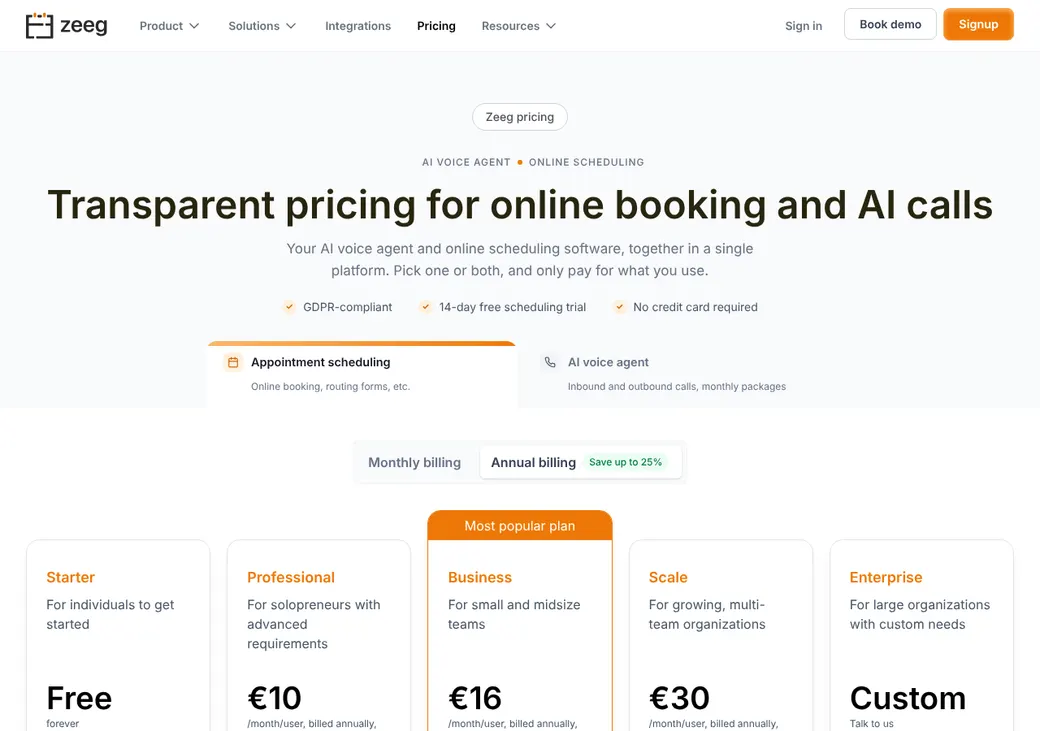
Plans and pricing
| Plan | Billed yearly | Billed monthly | What it adds |
|---|---|---|---|
| StarterTrying it out | €0 | €0 | Two one-on-one booking pages, unlimited bookings, notifications and video links |
| ProfessionalMost solo agentsWhere most agents start | €10 | €12 | Unlimited booking pages, email and text workflows, payments, group meetings, API and webhooks |
| BusinessAgencies sharing appointments | €16 | €20 | Round robin, routing forms, CRM owner routing and HubSpot, Salesforce and Pipedrive |
| ScaleLarger agencies | €30 | €40 | Everything in Business plus single sign-on, user provisioning, custom objects and priority support |
| EnterpriseCustom terms | Quote only | Quote only | Activity log, flexible invoicing and a dedicated account manager |
Prices are per user each month in euros, before VAT, as of October 2026, from zeeg.me/en/pricing.
Good to know before you buy
- Every user needs a seat. Removing a seat stops its charge at the next billing cycle.
- Monthly billing has no long-term commitment.
- Yearly billing saves up to 25%.
- Phone booking by the AI voice agent is sold separately and works without a paid scheduling plan.
- Enterprise can set two or three-year terms.
Text message credits
Paid plans include 100 credits per user each month, shared across the workspace. A US text uses one credit per message segment, and unused credits expire at the end of each month.
AI voice agent
Monthly minute packages, billed apart from scheduling. Each account gets five free test minutes, and packages go up to 9,000 inbound minutes a month.
| Minutes a month | Billed yearly | Billed monthly |
|---|---|---|
| 250 inbound or 178 outbound | €49 | €59 |
| 750 inbound or 535 outbound | €99 | €119 |
| 1,550 inbound or 1,107 outbound | €199 | €239 |
| 2,500 inbound or 1,785 outbound | €299 | €359 |
Which plan has it
| Feature | Starter | Professional | Business | Scale |
|---|---|---|---|---|
| One-on-one booking pages | 2 | Unlimited | Unlimited | Unlimited |
| Email notifications | ||||
| Video meeting links | ||||
| Microsoft 365, Outlook and Exchange calendars | ||||
| Email and text workflows | ||||
| Text credits per user each month | 0 | 100 | 100 | 100 |
| Take payment through Stripe or PayPal | ||||
| Group and collective meetings | ||||
| API and webhooks | ||||
| Round robin | ||||
| Routing forms | ||||
| HubSpot, Salesforce and Pipedrive | ||||
| Route by CRM owner | ||||
| Zapier | ||||
| Single sign-on and user provisioning | ||||
| Priority support |
Enterprise includes everything in Scale, plus an activity log, flexible invoicing and a dedicated account manager.
Getting started
Start the free trial
A normal sign-up gives you 14 days of Business without a card. Choosing Starter on the pricing page skips the trial.
Connect your calendar
Pick which calendars should block time and which one gets new bookings.
Set up your booking pages
Each kind of meeting gets its own, such as an auto quote or a life review. Add your intake questions.
Share your link
Send it in emails and texts, add it to your signature or embed it on your site.
Choose a plan before the trial ends
If you don't upgrade, the workspace moves to Starter with two one-on-one booking pages.
Paid plans include email support. Scale adds priority support, and Enterprise adds a dedicated account manager.
Booking and calendars
Booking pages and links
Clients book from a Zeeg page or your website without making an account, and Zeeg shows times in their own time zone. Prefilled links can fill in contact details and answers, and single-use links expire after one booking. You can set up a separate page for each line, such as auto, life, health or commercial.
Paid plans can take payment through Stripe or PayPal when a client books. A booking made by the AI voice agent doesn't collect payment during the call.
Intake questions
Questions can be short or long text, dropdowns, checkboxes or radio buttons, and you can require a mobile number. Booking pages come in English, Spanish, French, German, Finnish, Dutch and Polish.
Calendar sync
- Works with
- Google Calendar, Microsoft 365 and Outlook, Exchange, Apple iCloud, Proton Calendar, ICS feeds and CalDAV
- Microsoft and Exchange
- Paid plans only
- What blocks time
- Busy events in Google. Busy, tentative and away events in Outlook
- Where bookings go
- One calendar you choose. Proton and ICS feeds are checked but don't receive bookings
- Changes in Zeeg
- Zeeg updates or cancels the events it created in Microsoft 365 and Exchange. Google shows canceled bookings as canceled
- Changes you make
- Deleting or declining the event in Google or Outlook can cancel the booking when that setting is on
Mobile app
There's no iPhone or Android app yet, though Zeeg says one is in development. Booking pages and Zeeg's own screens work in a phone browser.
Team routing
Business and higher can share appointments across producers. You pick how Zeeg decides who gets each one.
Most available times
Clients see the most open times. Zeeg then picks by priority and who was booked least recently, with a random tie-break.
Equal count
Zeeg keeps the count even. A producer who is three or more meetings ahead is hidden until the others catch up.
Routing forms
A routing form asks questions first, such as state, line or language, then sends the client to the right booking page, another page or a web address. A fallback route catches answers that don't match a rule.
Routing by CRM owner
Zeeg can look up a client's email or company domain in Zeeg's own contact list (Zeeg CRM), HubSpot, Pipedrive or Salesforce and book with the owner. When there's no match, it falls back to normal round robin. If you hand a booking to another producer, check their calendar yourself, since Zeeg doesn't.
Answers, not licenses. Zeeg routes on the answers you set up. It won't stop a booking from going to a producer who isn't licensed in the client's state or appointed with the carrier.
Reminders and texts
Reminders and no-shows
Starter sends booking notifications. Paid plans add workflows that email or text the client or you before a meeting, after it or when it's canceled. You mark no-shows yourself, and a workflow can send a follow-up with a link to rebook.
Text message rules
- Client consent
- A required checkbox on the booking form saves consent with the appointment
- Credits
- 100 per user each month on paid plans, shared across the workspace. See text message credits
- US texts
- One credit per message segment
- Unused credits
- Expire at the end of each month
Integrations
| Connects to | Type | How | From plan | What it does |
|---|---|---|---|---|
| Google Calendar | Calendar | Built in | All plans | Checks busy times and adds, changes or cancels bookings |
| Apple iCloud | Calendar | Built in | All plans | Checks busy times and adds bookings |
| Microsoft 365 and Outlook | Calendar | Built in | Professional | Checks busy, tentative and away times and adds, changes or cancels bookings |
| Microsoft Exchange | Calendar | Built in | Professional | Checks busy times and adds, changes or cancels bookings |
| HubSpot | CRM | Built in | Business | Adds new contacts, logs meetings and routes to the contact owner |
| Salesforce | CRM | Built in | Business | Creates or updates contacts and events and routes to the record owner |
| Pipedrive | CRM | Built in | Business | Creates or updates people and meetings and routes to the owner |
| Zoom, Google Meet, Microsoft Teams and Webex | Video | Built in | All plans | Adds a meeting link to the booking |
| Stripe and PayPal | Payments | Built in | Professional | Takes payment when a client books |
| Zapier | Automation | Zapier | Business | Sends new and canceled bookings to other apps |
| Make | Automation | Webhooks | Professional | Sends Zeeg events into a Make scenario |
| API and webhooks | Developer | API | Professional | Creates bookings and sends booking, cancellation and no-show events |
Zapier connections need a Zapier account, which is billed separately. Changing a meeting in HubSpot or Pipedrive doesn't change it in Zeeg. Campaign codes and up to ten custom fields can travel into each booking.
Security and HIPAA
HIPAA and health data
Zeeg doesn't offer a BAA and says it doesn't act as a HIPAA business associate. It offers a GDPR data processing agreement instead. Use contact fields only, with no Medicare numbers or health details.
Security
- Encrypted in transit and at rest, and sensitive appointment details get an extra layer of encryption
- Data stored in Germany and the Netherlands
- Two-factor sign-in that admins can require
- Single sign-on and user provisioning on Scale and Enterprise
- Activity log on Enterprise
- Client details can be hidden in host emails and calendar events marked private
Contract terms
- Billing
- Monthly or yearly. Enterprise can set two or three-year terms
- Renewal
- Renews on its own for the same period
- Notice
- Cancel a monthly plan before the period ends. A yearly plan needs written notice at least six weeks (42 days) before the term ends
- Canceling
- In the dashboard. Paid access lasts to the end of the period, then the workspace moves to Starter
- Refunds
- None for part of a billing period
- Your data
- Export CRM records to CSV or Excel. Zeeg deletes your data within seven days of closing the account, and the terms make backups your job
- Unused free accounts
- A Starter account with no booking or login for three months can be suspended, then deleted a month later
- Governing law
- Germany, with Berlin courts
From Zeeg's terms, checked October 2026.
What users say
What reviewers say most often, as of October 2026.
What users like
- Easy to set up
- Less back and forth to book a meeting
- Good-looking booking pages
- Support
- Calendar connections
- Booking by phone
What users dislike
- Takes time to learn
- Some don't like the interface
Zeeg alternatives
- CalendlyFree plan. Paid from $10 a seat per monthPriced in dollars, with iPhone and Android apps
- OnceHubFree Basic plan. Paid from $10 a seat per monthA BAA add-on and AI phone booking on paid plans
- YouCanBookMeFree plan. Paid from $8.10 a monthTexts from your own local or toll-free number
- meetergoFree plan. Paid from €9.90 a user per month before VATAnother German scheduler, with HubSpot and Pipedrive on Light
See every option in appointment scheduling software.
Frequently asked questions
How much does Zeeg cost?
Starter is free. Professional is €10, Business €16 and Scale €30 a user per month billed yearly, or €12, €20 and €40 monthly. VAT is added on top.
Does Zeeg sign a BAA for HIPAA?
No. Zeeg doesn't offer a BAA, so it doesn't fit a workflow that needs one.
Can Zeeg route appointments by state or insurance line?
Yes, on Business and up. A routing form can ask the client's state or line and send them to the right page, but it won't check licenses or carrier appointments.
Does Zeeg work with HubSpot or Salesforce?
Yes, on Business and up. Zeeg logs contacts and meetings in HubSpot, Salesforce or Pipedrive and can book a known client with the CRM owner.
Can Zeeg send text reminders?
Yes, on paid plans, with 100 text credits per user each month. A workflow can also follow up after a no-show with a link to rebook.
Can Zeeg book appointments by phone?
Yes, through its AI voice agent, which is billed separately and works without a paid scheduling plan. It doesn't take payment during the call.
How we researched this review. We based this review on the pricing, terms and product pages published by Zeeg, reviewed in October 2026, together with our team's experience working with insurance agents and agency owners since 2008.
Corrections
Vendors change their pricing all the time and they don't email us when they do. So if you see a price on here that's gone up, a plan Zeeg quit selling or a contract term that reads different now, let us know and send the link to the page where Zeeg has it. Somebody here pulls up that page and checks it before we change anything on ours.