
LeadSquared review for insurance agencies: pricing, lead routing and integrations
LeadSquared is a sales CRM with an insurance edition used by insurers, brokers, agencies and call centers. It captures leads from forms, email, calls and files, then hands them out by rotation, weight, state, line or workload.
It suits teams that need fine control over who gets each lead. Sales plans are priced per user and billed yearly.
- Best for
- Larger agencies, insurers and call centers that want detailed rule-based lead distribution and automation
- Price
- Sales Pro $60 a user per month, billed yearly
- Lead intake
- Web forms, landing pages, a lead API, email, calls and CSV imports
- Assignment
- Round robin, weighted, by state, line, hours or workload, with a default user as backup
- Texting and calling
- Texts and email built in. Calling through phone systems such as RingCentral, Aircall and Five9
- Agency systems
- No named AMS connection. The API or Zapier can link one
- Contract
- Term set in your order form, renewing for at least a year
Our take
Choose LeadSquared if you run a larger agency, carrier or call center and want detailed rules for who gets each lead, with a default user when nobody qualifies. Each lead's history shows the rule that placed it.
Sales Pro already includes the distribution rules. Reassigning missed leads needs the paid Distribution Engine.
Contracts renew for at least a year and can't be ended early, and no agency system connects directly.
Pros
- Distribution by rotation, weighting, state, line, hours or workload, with a default user when nobody qualifies
- Each lead's history names the rule that assigned it, and the paid Distribution Engine reassigns late first responses
- Duplicate blocking on up to three fields and merging of up to 20 records
- Lead source and UTM tracking with conversion reports by source
- Typical launch takes 2 to 4 weeks
Cons
- Annual billing, and terms renew for at least a year unless you give notice
- No early termination, and fees aren't refunded
- Email sync and the Distribution Engine (it reassigns missed leads) are paid add-ons
- No named agency management system or rater connection
- No built-in federal or state Do Not Call scrub
Plans and pricing
| Plan | Price | Billing | What it adds |
|---|---|---|---|
| Sales ProMost agency sales teamsWhere most teams start | $60 a user per month | Yearly | Unlimited contacts, lead distribution, workflows, Gmail and Outlook email and duplicate blocking |
| Sales SuperTeams with heavy automation | $100 a user per month | Yearly | Unlimited workflows, more storage and email, unlimited permission templates and 30 webhooks |
Prices as of October 2026, from leadsquared.com/sales-crm-pricing. Custom plans are available from sales.
What it would cost you
Cost per month
First-year cost
Software cost per lead
Uses the yearly per-user prices in the table. Setup and add-ons are extra.
Good to know before you buy
- Setup and implementation are set in your order form.
- Distribution rules are included. Email Sync and the Distribution Engine (it reassigns missed leads) are paid add-ons.
- Invoices are due in 15 days, and late balances add 1.5% a month.
- You can't cancel mid-term, and remaining fees stay due.
Which plan has it
| Feature | Sales Pro | Sales Super |
|---|---|---|
| Contacts | Unlimited | Unlimited |
| Lead distribution rules (basic and advanced) | ||
| Workflow automation | Unlimited | |
| Gmail and Outlook email | ||
| Duplicate blocking | ||
| Emails included | 50,000 | 100,000 |
| Storage | 2GB plus 20MB a user | 10GB plus 20MB a user |
| Permission templates | 7 | Unlimited |
| Custom reports per user | 2 | 2 |
| Webhooks | 3 | 30 |
| Distribution Engine, reassigns missed leads | Add-on | Add-on |
Getting started
Book a demo
Sales maps your process and quotes.
Map your process
The onboarding team sets up stages, fields and workflows.
Build distribution rules
Set who gets which leads before you import any.
Import your data
Leads, accounts, opportunities and activity history come in by CSV.
Train the team
Documentation and training, with phone and email support.
Typical go-live is 2 to 4 weeks, or 6 to 10 weeks for large projects.
Lead intake
Lead vendors and partner sites post to the REST API, and your own forms and landing pages feed in directly. CSV imports take 25,000 rows by default.
- Ways leads come in
- Website widgets, landing pages, WordPress forms, API, email, inbound calls, CSV and portals
- Email leads
- The paid Email Sync add-on turns unknown senders into leads
- Duplicates
- Blocks repeats on up to three fields, usually email, phone and mobile. Merge up to 20 records at once
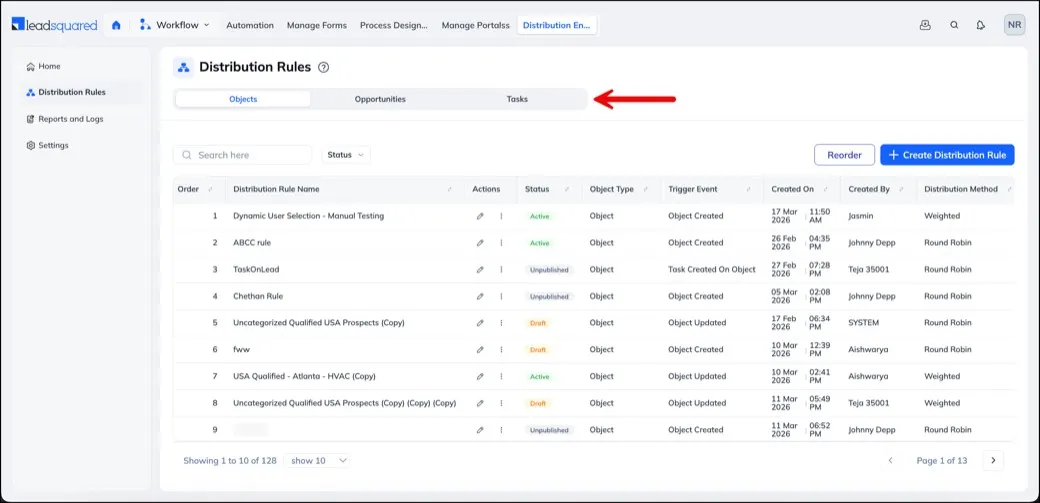
Assignment rules
Round robin
Leads rotate evenly among the agents in a rule.
Weighted
Give some agents a bigger share.
By state or line
Rules built from lead and agent fields send each lead to the right team.
By hours or workload
Skip agents who are off shift or already busy.
Named user
Send a lead to one agent.
- If nobody qualifies
- A default user you pick gets the lead
- If a lead goes untouched
- The paid Distribution Engine reassigns it after a missed first response, up to three times by default
- Who got what
- Each lead's history shows the rule that assigned it and any fallback reason
It doesn't check licenses. State and line rules use fields you keep current. LeadSquared has no license lookup.
Follow-up and calling
Agents work leads with tasks, email, texts, calls, sequences, booking and reminders. Automations stop when a lead meets an exit condition you set.
- Calling
- Through phone systems such as Twilio, RingCentral, Aircall, Five9, Genesys, JustCall and Dialpad
- Email opt-outs
- Saved with date and origin, and they block further email
- Do Not Call
- Calls aren't placed to leads marked Do Not Call. No national or state registry check
- Consent
- Consent requests save their status on the lead
Client and policy records
Leads become customers and keep their activity, tasks, notes and documents. Opportunities can be renamed Policies and set up for insurance products.
- Business accounts
- Accounts hold a business and its contacts once turned on
- Agency system
- LeadSquared runs beside your AMS, which keeps the policies
Renewals, retention and cross-sell
Renewals
A renewal date can send client reminders, agent alerts and follow-up tasks.
Cross-sell
Automations can use the products a client owns, site visits and stated interest.
Win-backs
Former customers can be contacted again on a schedule.
Connections
| Connects to | Type | How | What it does |
|---|---|---|---|
| Salesforce | CRM | Built in | Syncs leads, activities, tasks and custom records both ways |
| HubSpot | CRM | Built in | Runs beside HubSpot |
| Twilio, RingCentral, Aircall, Five9, Genesys, JustCall and Dialpad | Phone | Built in | Calling tools listed by LeadSquared |
| Exotel and Knowlarity | Phone | Built in | Click to call and inbound calls, with logs and recordings saved. Unknown callers can become leads |
| Acuity Scheduling | Calendar | Built in | Bookings create or update leads, and changes sync |
| Calendly | Calendar | Built in | Listed scheduling connection |
| Gmail and Microsoft 365 | Add-on | Email Sync logs email and can create leads | |
| API and webhooks | Automation | API | Moves leads and activity in or out. Limits vary by plan |
| Zapier | Automation | Zapier | One way to link an agency system |
Zapier needs its own account, which Zapier bills separately.
Client portal and mobile app
- Apps
- iPhone and Android
- What the app does
- Leads, opportunities, accounts and tasks. Android works offline with some limits
- Client portal
- Web portals where clients submit and track applications, upload documents and pay
Reporting
Reports you get
- Lead source kept on every lead, with UTM campaign fields
- Leads and sales by source
- Assigned and unassigned leads, and which rules matched
- Lead flow, calls, activities and revenue in SIERA, the custom report builder
Contract and cancellation
- Term
- Set in your order form, paid in advance
- Renewal
- Renews for the same term or one year, whichever is longer
- Notice
- Written notice at least 30 days before renewal
- Canceling
- Not before the term ends, and remaining fees stay due
- Refunds
- Fees generally aren't refunded
- Your data
- CSV lead exports are emailed to you. Data is kept 93 days after the end, then deleted
From LeadSquared's terms of service.
LeadSquared alternatives
- Salesforce Financial Services CloudFrom $325 a user per month, billed yearlyInsurance policy records built in, with an AMS360 connector
- HighLevelFrom $80.83 a month, billed yearlyOne price for unlimited users, with texting by use
- AgentCubedQuote onlyRouting by license and territory for health and Medicare
- InsuredMineFrom $106 a user per month, billed yearlyTwo-way sync with AMS360, Applied Epic and HawkSoft
See every option in insurance lead management software.
Frequently asked questions
How much does LeadSquared cost?
Sales Pro costs $60 per user per month and Sales Super $100 per user per month, with annual billing.
What happens when no agent qualifies for a lead?
The lead goes to a default user you choose.
Can I cancel LeadSquared early?
No. The term runs to its end, and you stop renewal with written notice at least 30 days before it.
Does LeadSquared connect to my agency management system?
Not directly. An agency system can be linked through the API or Zapier.
Can LeadSquared route leads by state?
Yes. Rules built from lead and agent fields can route by state or line, but it doesn't check licenses.
How we researched this review. We based this review on the pricing, terms and product pages published by LeadSquared, reviewed in October 2026, together with our team's experience working with insurance agents and agency owners since 2008.
Corrections
Vendors change their pricing all the time and they don't email us when they do. So if you see a price on here that's gone up, a plan LeadSquared quit selling or a contract term that reads different now, let us know and send the link to the page where LeadSquared has it. Somebody here pulls up that page and checks it before we change anything on ours.