Kixie review for insurance agents: pricing, dialing and compliance
Kixie is a cloud phone system with a power dialer that logs every call and text to your CRM. It dials one line at a time or up to four at once, and it handles inbound calls with queues and a phone menu.
It suits agencies that already live in HubSpot, Salesforce, Pipedrive, Zoho or HighLevel. Seat prices come from sales after a 7-day trial.
- Best for
- Agencies whose producers call and text from HubSpot, Salesforce, Pipedrive, Zoho or HighLevel
- Type
- Power dialer and business phone system
- Price
- Quote only for seats. Add-ons from $20 a user per month
- Dialing
- One line, or up to four lines at once on Multi-Line PowerDialer
- Texting
- Every plan, after carrier registration
- Recording
- Every plan, kept while the account is open
- CRM connections
- HubSpot, Salesforce, Pipedrive, Zoho and HighLevel built in
- Free trial
- 7 days, no card
Our take
Kixie fits agencies whose producers already work in a general CRM and want calls and texts logged there without typing. Solo producers can use the one-line dialer. Teams calling fresh leads can step up to four lines at once.
Every plan includes the phone system, texting and recording, so you choose a plan by how fast you want to dial. You will need a quote, because Kixie doesn't publish seat prices.
Read the terms before you sign. There are no refunds, yearly seats can only be cut near the end of the term and Kixie may keep de-identified call data after you leave.
Pros
- Built-in two-way logging to HubSpot, Salesforce, Pipedrive, Zoho and HighLevel
- Multi-line dialing up to four lines for fresh lead lists
- Texting, recording and live coaching on every plan
- Queues with callbacks that hold the caller's place
- A text STOP blocks calls and texts across the whole account
- Two Party mode can skip recording in states that need everyone's consent, though not for Medicare calls
Cons
- Seat prices are quote only
- Default business hours allow calls at any hour until you change them
- The Do Not Call add-on estimates listed numbers rather than checking your subscription
- No refunds, and canceling takes an email and a rep
- Recordings and numbers are gone once you cancel
Plans and pricing
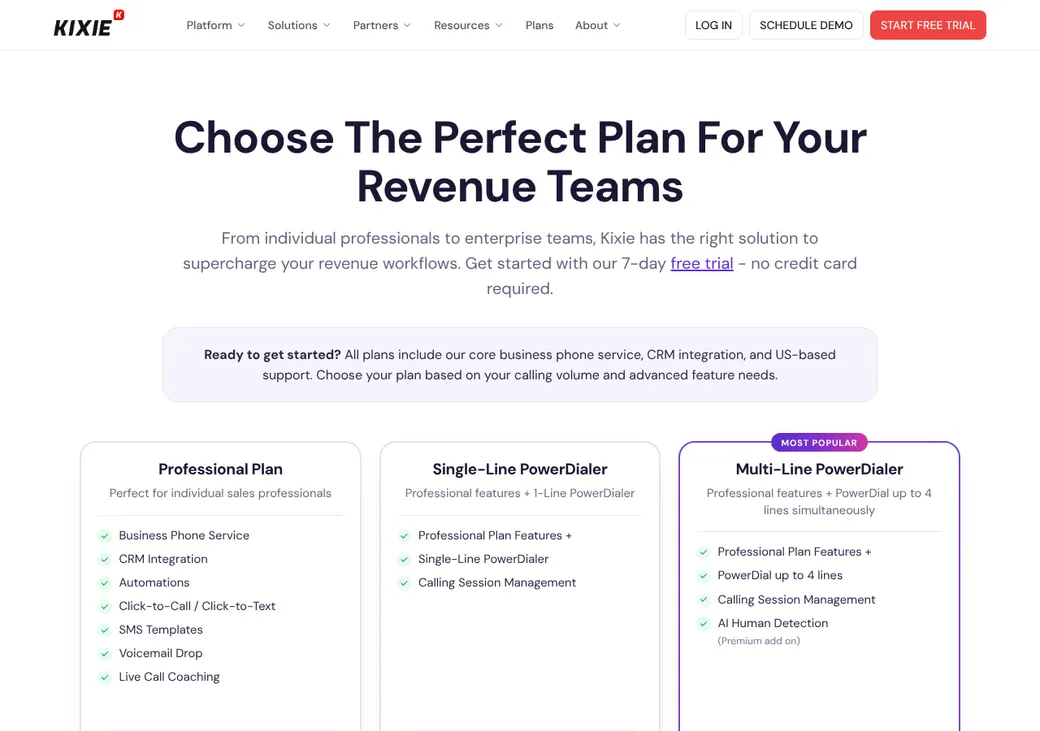
| Plan | Price | What it adds |
|---|---|---|
| ProfessionalAgencies that need a phone system | Quote only | Phone service, CRM logging, texting, voicemail drop, phone menu, queues, recording and live coaching |
| Single-Line PowerDialerSolo producers working lists | Quote only | Everything in Professional plus a one-line power dialer |
| Multi-Line PowerDialerTeams calling fresh leads | Quote only | Everything in Professional plus dialing up to four lines at once |
Kixie doesn't print seat prices on kixie.com/pricing. Every plan includes unlimited calling to most of the US and Canada. Add-on and usage prices below are from Kixie's help center, as of October 2026.
Good to know before you buy
- Billing can be monthly, quarterly or yearly.
- A $50 prepaid balance is charged when you add a card. It pays for texts and higher-cost calls and refills below $25.
- Your first agent number is free.
- A failed card payment cancels the account after 7 days. Coming back costs a month of service.
- No setup fee.
Usage and add-on charges
| Item | Price |
|---|---|
| Texts in the US and Canada | $0.01 to $0.013 each |
| Extra agent number | $5 a month |
| Phone menu number | $1 local or $5 toll-free a month |
| DNC Algorithm | $20 a user a month |
| ConnectionBoost | $50 a user a month |
Which plan has it
| Feature | Professional | Single-Line | Multi-Line |
|---|---|---|---|
| Phone system with phone menu and queues | |||
| Unlimited US and Canada calling | |||
| Two-way CRM logging | |||
| Texting and team texting | |||
| Voicemail drop | |||
| Call recording | |||
| Listen, whisper and barge | |||
| Developer API | |||
| Power dialer | 1 line | Up to 4 lines | |
| Answering-machine detection by AI | Add-on |
Dialing modes
| Mode | What it does | Lines per agent | Plan |
|---|---|---|---|
| Manual and click-to-call | Dial a number or click one in your CRM | 1 | All plans |
| Single-Line PowerDialer | Works through a PowerList one call at a time | 1 | Single-Line PowerDialer |
| Multi-Line PowerDialer | Dials several numbers at once and connects the first person who answers | Up to 4 | Multi-Line PowerDialer |
- Answered calls when several ring
- An optional AI voice check screens out machines. A PowerList can cap how many numbers each agent dials at once
- No-answer timeout
- Moves to the next set of numbers after 30 seconds by default
- Call outcomes
- Required before the next dial by default. Rules can drop a number, move it to another list or assign the CRM owner
- Voicemail drop
- Pick a recorded message and move on while Kixie plays it
- Ringless voicemail
- Not offered. Kixie calls it a legal gray area
Inbound calls and transfers
Kixie works as a full phone system, so inbound calls get the same routing tools a call team uses. Callers can ask for a callback and keep their place in the queue.
- Routing
- Next free agent, ring all, in order or round robin. Also by CRM owner, deal value, status or contact history
- Queues
- Send calls to the next free agent, with callbacks that hold the caller's place
- Phone menu
- Routes to agents, ring groups, other menus or queues
- After hours
- Separate business-hours and after-hours destinations
- Transfers
- Live transfer to an agent or a queue. Hold and cold transfer to another agent
Phone numbers and spam labels
- Who supplies numbers
- You buy them in the Kixie dashboard or port your own
- Porting in
- Usually 7 to 10 business days. You can place outbound calls on a verified number before the port finishes
- Taking numbers with you
- Port them out before you cancel. Kixie releases every number at cancellation
- Local presence
- ConnectionBoost uses a pool of local numbers that route callbacks to you
- Number rotation
- ConnectionBoost and Reputation Manager rotate numbers and can replace flagged ones
- Call signing (STIR/SHAKEN)
- Submitted automatically after Business Identity approval, in about 72 hours
- Spam label monitoring
- Voice Integrity registers your numbers with carrier analytics firms within 24 to 48 hours of approval. ConnectionBoost adds First Orion and Hiya
- Branded caller ID
- Through a separate First Orion account with its own billing
Do Not Call, calling hours and consent
- National Do Not Call list
- The DNC Algorithm add-on flags numbers likely to be on the list, then blocks the call or text or warns the agent. It is Kixie's estimate, not a scrub against your own subscription
- Your own do-not-call list
- Managers can block a number for chosen contact methods
- Calling hours
- PowerLists dial in each contact's time zone, but the default business hours run all day, every day. Set your own window
- Attempt limits
- PowerLists default to two attempts a day and 10 in total. Manual calls aren't held to the daily cap
- Consent records
- Kept by you. Kixie's guide says to save the number, time, source, form and exact consent wording
- Opt-outs
- A STOP-type text reply blocks calls and texts across the whole account, including automations
Check the defaults Out of the box, Kixie's business hours allow calls at any hour. Set your calling window, and keep your own federal and state Do Not Call subscriptions, before the first dial session.
Texting and registration
- Plans with texting
- Every plan, with one-to-one and shared team texting
- Price
- $0.01 to $0.013 per text in the US and Canada. Incoming texts are free
- Pictures
- Up to 10 files and 4.6 MB a message
- Carrier registration
- Kixie files the 10DLC registration (US carrier registration for business texting) with your agency as the registered brand
- What you supply
- Legal name, EIN, address, website, privacy policy, terms and campaign details
- Time to approve
- About 1 to 2 weeks
- Watch out for
- Kixie's guide lists third-party lead generation among the business types carriers refuse
- Toll-free texting
- Needs separate verification after Business Identity approval
Call recording and Medicare
- Recording
- On or off for the account or each user. Outbound calls can be left out
- Recording notice
- Add a recorded greeting for inbound calls. On outbound calls the agent gives the notice
- Two-party states
- Two Party mode turns recording off by the called number's area code for states you choose
- Pause
- Agents can pause and resume during a call
- How long it's kept
- For as long as the account is open. Calls older than 18 months move to an archive you reach through support
- Export
- Play or download from call history. CSV exports and CRM logs carry recording links
- Transcripts
- Conversation Intelligence add-on, with summaries, keywords and sentiment
- After you cancel
- Removed from Kixie. Links already logged in your CRM keep working
CMS's rule for the 2027 plan year asks for six years of Medicare sales calls, recorded in full. Don't use Two Party mode on those calls, since it turns recording off. Kixie keeps recordings only while you stay a customer, so save the audio files yourself.
CRM and agency system connections
| Connects to | Type | How | What moves |
|---|---|---|---|
| HubSpot | CRM | Built in | Calls, texts, outcomes, notes and recording links. AI call summaries land on the contact timeline |
| Salesforce | CRM | Built in | Calls, texts, outcomes and notes as Tasks with a recording link |
| Pipedrive | CRM | Built in | Calls, texts, outcomes and recording links. Contact details show in the dialer |
| Zoho | CRM | Built in | Calls, texts, outcomes and recording links. Some fields update from the dialer |
| HighLevel | CRM | Built in | Calls, recordings, texts and outcomes. Call results can start HighLevel workflows |
| Webhooks and API | Automation | API | Call and text details after each call, including outcome and recording link |
| Zapier | Automation | Zapier | Links Kixie to other apps |
Every built-in connection is on every current plan. Zapier is billed separately. Kixie also lists Make.
Reporting and coaching
Reports
- Live and past calling numbers by agent, team and date
- Dials, answers and connection rates
- Outcomes and daily dialing
- Queue status
- AI Dashboard summaries and custom reports
Coaching
- Listen in, whisper or join the call
- Calls scored against your playbook
- Talk time, sentiment and monologue signals
- Managers see the whole team, agents see their own
Getting started
Start the trial
Seven days, no card. Ask sales for seat pricing before it ends.
Submit Business Identity
Approval takes about a day and unlocks texting, Voice Integrity and call signing.
Buy or port numbers
A port takes 7 to 10 business days. You can dial out on a verified number while it runs.
Register for texting
Send your 10DLC details from the Compliance page and allow 1 to 2 weeks.
Connect your CRM
Turn on the built-in connection and set call outcomes and calling hours.
Porting goes through Kixie's porting team or an onboarding specialist. Support is by phone and email, with a help center.
Contract and canceling
- Term
- Monthly, quarterly or yearly
- Renewal
- Bills again on the billing date unless you remove seats or cancel first
- Yearly plans
- Seats can be cut only in the last 30 days of the term
- Refunds
- None, including partly used months and unused minutes
- Canceling
- Email support and fill in the exit survey. Billing runs until a cancellation rep processes it
- Your numbers
- Released at cancellation unless you port them out first
- Your data
- Users, settings and recordings are erased. Call history exports as CSV
- Data use
- The terms let Kixie keep de-identified data from your calls, including transcripts, with no end date
Terms as of October 2026, from Kixie's terms of service and help center.
What users say
What reviewers say most often, as of October 2026.
What users like
- Ease of use
- CRM integration
- Support
- Time savings
- PowerDialer productivity
- Automatic logging
- Call management
What users dislike
- Connection and call-quality issues
- Number or dialer reliability
- Spam labels
- Feature gaps
- Integration depth
- Interface friction
- Contract and pricing complaints
- Outages
- Cancellation and support experiences
Kixie alternatives
- PhoneBurnerFrom $140 a user per month, billed yearlyPublished prices and one-line dialing with a built-in CRM
- JustCallFrom $29 a user per month, billed yearly, 2-user minimumPublished prices for phone and texting, predictive on a quote-only plan
- AircallFrom $30 a user per month, billed yearly, 3-user minimumCloud phone system with power dialing on higher plans
- ReadyModeFrom $199 a license per monthPredictive dialing for larger call teams
- RingCentralPer user, prices on its siteFull business phone system with a separate contact center
See every option in insurance dialers.
Frequently asked questions
How much does Kixie cost?
Kixie quotes seat prices through sales. Published add-ons include the DNC Algorithm at $20 a user per month, and texts cost $0.01 to $0.013 each.
Is Kixie a predictive dialer?
No. Its Multi-Line PowerDialer dials up to four numbers at once per agent and connects the first person who answers. The Single-Line plan dials one at a time.
Does Kixie scrub the Do Not Call list?
Its DNC Algorithm add-on flags numbers it expects are listed. You still need your own federal and state subscriptions.
Does Kixie work with HubSpot and Salesforce?
Yes. Both are built in on every plan and log calls, texts, outcomes and recording links.
Who registers my texting number with Kixie?
Kixie files the registration with your agency as the brand, from the details you supply. Review takes about 1 to 2 weeks.
Does Kixie have a free trial?
Yes, for 7 days with no card.
How we researched this review. We based this review on the pricing, terms and product pages published by Kixie, reviewed in October 2026, together with our team's experience working with insurance agents and agency owners since 2008.
Corrections
Vendors change their pricing all the time and they don't email us when they do. So if you see a price on here that's gone up, a plan Kixie quit selling or a contract term that reads different now, let us know and send the link to the page where Kixie has it. Somebody here pulls up that page and checks it before we change anything on ours.