CloudTalk review for insurance agents: pricing, dialing and compliance
CloudTalk is a cloud phone system with a built-in sales dialer. It routes inbound calls, dials lists one at a time or up to five at once and logs calls to your CRM.
It fits agencies that want service and sales calls in one system. Expert includes the power dialer, and parallel dialing is an add-on on any plan.
- Best for
- Agencies that want inbound service calls and outbound sales calls in one phone system
- Type
- Business phone system with power and parallel dialing
- Price
- From $25 a user per month on Starter, billed yearly
- Dialing
- Power dialer on Expert or as an add-on. Parallel dialing on 2 to 5 lines as an add-on
- Texting
- Every plan, paid per text from credit, after carrier registration
- Recording
- Every plan. Kept 1 month on Starter and with no limit on Essential and Expert
- CRM connections
- Salesforce, HubSpot, Pipedrive and Zoho CRM built in
- Free trial
- 14 days of Expert, no card
Our take
CloudTalk puts the phone system and the dialer in one product, so the same agents can take service calls and work renewal or lead lists. Expert is the plan for teams that dial, since it includes preview and power dialing. Smaller offices can add the dialer to Starter or Essential.
Parallel dialing rings two to five numbers per agent and connects the first answer, as a separate add-on. There is no predictive pacing.
Compliance tools are thin. There is no Do Not Call scrub, no state calling rules and a text opt-out stays on one number.
Pros
- Published prices from one user, with monthly billing
- Parallel dialing with automatic voicemail drop on machines
- No port-out fee
- Recordings kept with no limit on Essential and Expert
- Call flows can route on a lookup to an outside system
Cons
- No Do Not Call scrub or state calling rules
- No texts included, and every text is paid from credit
- Starter keeps recordings only 1 month
- Leaving a yearly plan early makes the rest of the term due
- Recordings are stored in Germany and the EU, which may matter to your carriers or clients
Plans and pricing
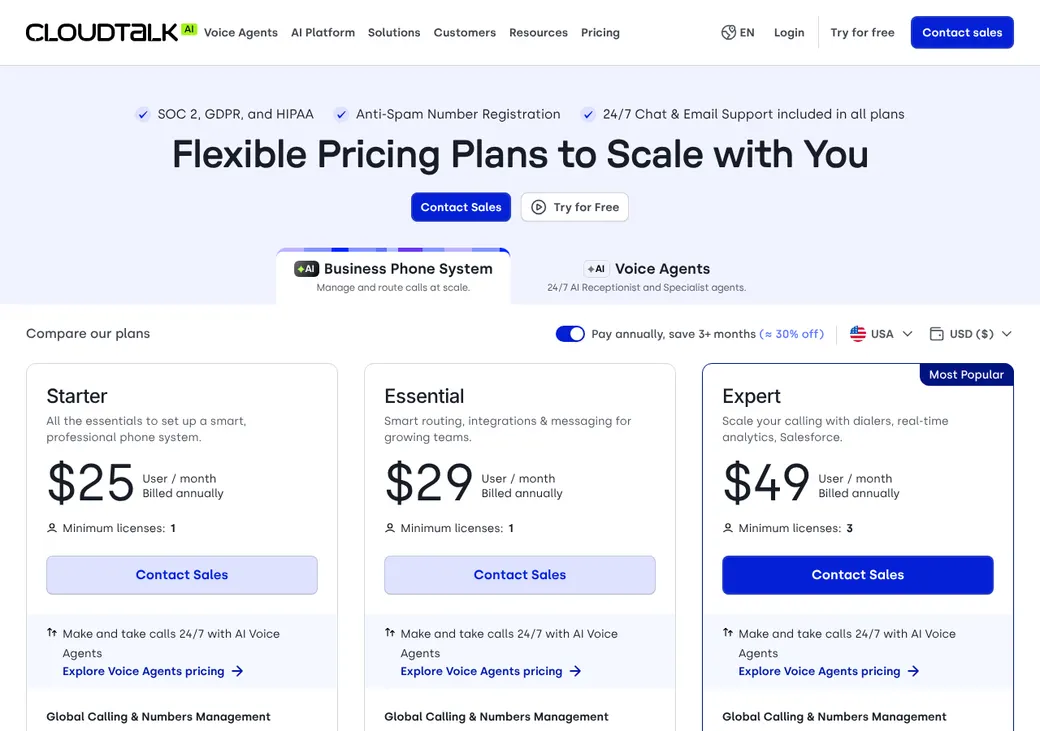
| Plan | Billed yearly | Billed monthly | What it adds |
|---|---|---|---|
| LitePriced in euros only | 19 euros | 27 euros | Calling, phone menu, skill routing and 1 ring group |
| StarterSmall offices replacing phones | $25 | $34 | Calls, phone menu, skill routing, unlimited ring groups, live monitoring and 1 month of recordings |
| EssentialAgencies that need CRM links | $29 | $39 | CRM connections, API, workflows and recordings kept with no limit |
| ExpertTeams of 3 or more that dial listsWhere most agents start | $49 | $69 | Preview and power dialing included, plus the Salesforce package |
Prices are per user each month, as of October 2026, from CloudTalk's pricing help article in dollars. The pricing page shows the same figures in euros, and Lite is priced there in euros only. Expert needs 3 users.
What it would cost you
Cost per month
First-year cost
Cost per live call
Uses the seat prices in the table. Dialer add-ons, texts, numbers and calls outside your package are extra.
Good to know before you buy
- No setup or onboarding fee.
- Phone numbers cost from $6 a month, and an activation fee can show at checkout.
- Unlimited US and Canada calling is capped at 10,000 minutes a seat each month.
- No texts are included. Every text is paid from credit.
- Porting US numbers in costs 30 euros a request plus 2 euros a number.
Add-ons and usage
| Item | Price |
|---|---|
| Power dialer (included on Expert) | $15 a user a month |
| Parallel dialer | $39 a user a month |
| Conversation Intelligence | $9 a user a month |
| Inbound texts | $0.008 each |
| Texting brand registration | $46 once, or $4.50 for low volume |
| Texting campaign | $15 once, then $1.50 to $10 a month |
Which plan has it
| Feature | Starter | Essential | Expert |
|---|---|---|---|
| Calls, phone menu and skill routing | |||
| Live monitoring | |||
| Recordings kept | 1 month | No limit | No limit |
| CRM connections, API and workflows | |||
| Preview and power dialing | Add-on | Add-on | |
| Parallel dialing | Add-on | Add-on | Add-on |
| Salesforce package | |||
| Minimum users | 1 | 1 | 3 |
Dialing modes
| Mode | What it does | Lines per agent | Plan |
|---|---|---|---|
| Web dialer and click-to-call | Dial from the app or your CRM | 1 | All plans |
| Preview | Shows the contact before you dial | 1 | Expert, or the Power add-on |
| Power (sequential) | Works through a campaign one contact at a time | 1 | Expert, or the Power add-on |
| Parallel | Rings several contacts and connects the first person who answers | 2 to 5 | Parallel add-on |
- Dropped calls
- Parallel mode hangs up the other lines once someone answers. There is no predictive pacing
- Fair use
- More than 50 completed calls a day with over 25% abandoned breaks the fair use terms. Federal rules cap abandoned calls far lower, at 3%
- Voicemail drop
- Click to drop a message in power mode. Parallel mode leaves one by itself when it hears a machine
- Next call
- Auto-dialing the next contact is off by default in power mode
Inbound calls and transfers
CloudTalk is a full phone system, so inbound calls get queues, menus and skill routing. A call flow can also look up an outside system mid-call and route on the answer.
- Routing
- By skill, availability, round robin, ring all, least recent, hours or a contact field or tag
- Queues
- With callback
- Phone menu
- Multi-level, with business-hours branches
- Transfers
- Warm, cold and safe transfer, which keeps the caller on until the next person answers
Phone numbers and spam labels
- Who supplies numbers
- CloudTalk, through regulated carriers
- Porting in
- Yes, for 30 euros a request plus 2 euros a local number or 4 euros a toll-free number
- Taking numbers with you
- Yes, with no port-out fee. Keep the account open until the port finishes
- Show your own number
- Virtual Caller ID can display a verified number you already own
- Local presence
- Picks one of your numbers with the same or a nearby area code
- Number rotation
- Smart Rotation avoids reusing a number for the same contact
- Call signing (STIR/SHAKEN)
- B until your business is verified, then A can be requested
- Spam label monitoring
- Registration with carriers and Hiya. A managed removal add-on is offered for US numbers
- Branded caller ID
- US and UK numbers, priced by call volume
Do Not Call, calling hours and consent
- National Do Not Call list
- Not included. You keep your own subscription and scrub
- State rules
- No state list or state calling rules
- Your own do-not-call list
- Block numbers for inbound, outbound or both. A call outcome can add the number
- Calling hours
- An 8 AM to 9 PM filter may apply to the outbound queue. Only support can change it, so ask whose time zone it uses
- Attempt limits
- Campaigns set maximum attempts and a cooldown. The default is one attempt
- Consent records
- Kept by you
- Opt-outs
- STOP blocks texts from that one number. It doesn't block your other numbers or calls
Calling hours are on you CloudTalk lists time-zone calling protection as coming soon. Ask support how your outbound queue filters hours, and build state windows into your lists.
Texting and registration
- Plans with texting
- Every plan, paid from credit. No texts are included
- Pictures
- Yes, from credit
- Carrier registration
- CloudTalk files the 10DLC registration (US carrier registration for business texting) under the business name your clients know
- Fees
- Carrier fees with no markup. See add-ons and usage above
- Before approval
- US texts from a CloudTalk number are blocked until the registration is approved
- Sole proprietors
- Can register in the US and Canada
Call recording and Medicare
- Recording
- Inbound, outbound and internal calls. Admins choose who can hear them
- Recording notice
- Record your own notice in the call flow. There is no state selector
- Pause
- Allowed users can pause. Pausing before a transfer can leave the rest unrecorded
- How long it's kept
- 1 month on Starter, no limit on Essential and Expert
- Where it's stored
- Germany and the EU
- Export
- Download one at a time, as MP3s from analytics or through the API
- After you cancel
- Recordings, history and contacts disappear on the cancellation date
Under CMS's rule for the 2027 plan year, Medicare agencies must hold sales calls for six years. Essential or Expert can hold them while you stay a customer, so pull a copy through the API before you ever cancel.
CRM and agency system connections
| Connects to | Type | How | What moves |
|---|---|---|---|
| Salesforce | CRM | Built in | Contacts in. Calls with outcome, notes and recording link back in 1 to 3 minutes |
| HubSpot | CRM | Built in | Contacts both ways and call activity |
| Pipedrive | CRM | Built in | Contacts both ways and call activity |
| Zoho CRM | CRM | Built in | Contacts both ways and call activity |
| Gong | Coaching | Built in | Recorded calls |
| API and webhooks | Automation | API | Call events, contacts and recordings for a custom CRM or agency system link |
| Zapier | Automation | Zapier | Custom workflows |
Integrations need Essential or Expert. CloudTalk lists no built-in link to an agency management system. Zapier is billed separately.
Reporting and coaching
Reports
- Call, agent, number and queue dashboards
- Campaign attempts and outcomes
- Text reports
- Live wallboards
- CSV and PDF export
Coaching
- Listen, whisper and barge for admins and supervisors
- Call scoring, summaries and sentiment with Conversation Intelligence
Getting started
Start the trial
Fourteen days of Expert with no card, $10 of call credit, 10 texts and one local number.
Verify your business
Send your business details for call signing and texting.
Register for texting
CloudTalk's numbers team files your brand and campaign.
Buy or port numbers
Keep the old service live until the port finishes.
Set up dialing
If the sales dialer is missing from your dashboard, CloudTalk support turns it on.
Support by chat, email and phone, with a help center.
Contract and canceling
- Term
- Monthly, paid in advance, or a 12-month commitment
- Renewal
- Renews for the same length unless either side gives notice
- Notice
- 30 days
- Leaving early
- The rest of the term's fees come due
- Seat minimums
- On monthly billing, you can cut seats below the number you signed for only from the sixth month
- Refunds
- None, including partial months and plan changes
- Your numbers
- Released at cancellation unless you port them out first
- Your data
- Export before the cancellation date. Reopening within 30 days may be possible but isn't promised
Terms as of October 2026, from CloudTalk's terms of service and help center.
What users say
What reviewers say most often, as of October 2026.
What users like
- Setup and everyday calling
- Local numbers and routing
- Call recording and CRM connections
What users dislike
- Call quality and app stability
- Add-on and international charges
- Reporting limits and support wait time
CloudTalk alternatives
- AircallFrom $30 a user per month, billed yearly, 3-user minimumPhone system with a power dialer on Professional
- JustCallFrom $29 a user per month, billed yearly, 2-user minimumPredictive dialing up to 10 lines on SalesPro
- KixieQuote onlyUp to four-line dialing with account-wide opt-outs
- DialpadFrom $15 a user per month, billed yearlyPhone system and contact center with AI coaching
- RingCentralPer user, prices on its siteLarge phone system with a separate contact center
See every option in insurance dialers.
Frequently asked questions
How much does CloudTalk cost?
Starter is $25, Essential $29 and Expert $49 a user per month billed yearly. Monthly billing runs $34 to $69.
Is CloudTalk a predictive dialer?
No. It has power dialing and a parallel add-on that rings 2 to 5 numbers per agent, with no predictive pacing.
Does CloudTalk work with Salesforce and HubSpot?
Yes, on Essential and Expert. Calls log back with the outcome and a recording link.
Can I keep my numbers if I leave CloudTalk?
Yes. CloudTalk charges no port-out fee, but the account has to stay open until the port is done.
Does CloudTalk have a free trial?
Yes, 14 days of Expert with no card.
How we researched this review. We based this review on the pricing, terms and product pages published by CloudTalk, reviewed in October 2026, together with our team's experience working with insurance agents and agency owners since 2008.
Corrections
Vendors change their pricing all the time and they don't email us when they do. So if you see a price on here that's gone up, a plan CloudTalk quit selling or a contract term that reads different now, let us know and send the link to the page where CloudTalk has it. Somebody here pulls up that page and checks it before we change anything on ours.