
ActiveProspect review for insurance agencies: pricing, lead routing and integrations
ActiveProspect, the company behind TrustedForm, makes LeadConduit. It sits between your lead sources and your CRM or dialer, checks each lead for repeats, Do Not Call status and consent, then routes it by your rules.
It suits agencies and call centers that buy from many vendors. You pay a small fee each time a lead runs through a step, with a free account to start and yearly contracts for big buyers.
- Best for
- Agencies and call centers that buy leads from many sources and want them checked and routed before the CRM or dialer
- Price
- $10 monthly minimum, plus $0.15 a lead
- Free trial
- No set trial. A free account and pay-as-you-go billing let you test it
- Lead intake
- Vendor posts, web forms, Facebook and Google lead forms and CSV files
- Assignment
- Rules by state, ZIP code or hours, rotation, A/B splits or in order
- Texting and calling
- None of its own. It hands leads to your dialer or texting tool
- Contract
- Self-Service cancels any time. Professional and Enterprise are annual
Our take
Pick LeadConduit if you buy from several lead vendors and want one gate in front of your CRM or dialer. Every lead is checked for repeats, Do Not Call status and consent, then sent on by state, ZIP code, hours or rotation.
Self-Service is pay as you go. Big buyers move to a yearly contract once volume grows.
It isn't a CRM. Your team still calls and texts from another system, and it has no AMS link.
Pros
- Checks every lead for repeats, Do Not Call status and consent before delivery
- TrustedForm consent records can travel with each lead
- Routing by state, ZIP code, hours and rotation, with a log of every step
- Cost, profit and cost per sale by lead source
- Self-Service pricing with no yearly commitment
Cons
- Not a CRM, so follow-up happens in another system
- Every integration run is charged, even for rejected leads
- No calling, texting or AMS connection of its own
- Larger accounts need a yearly contract
Plans and pricing
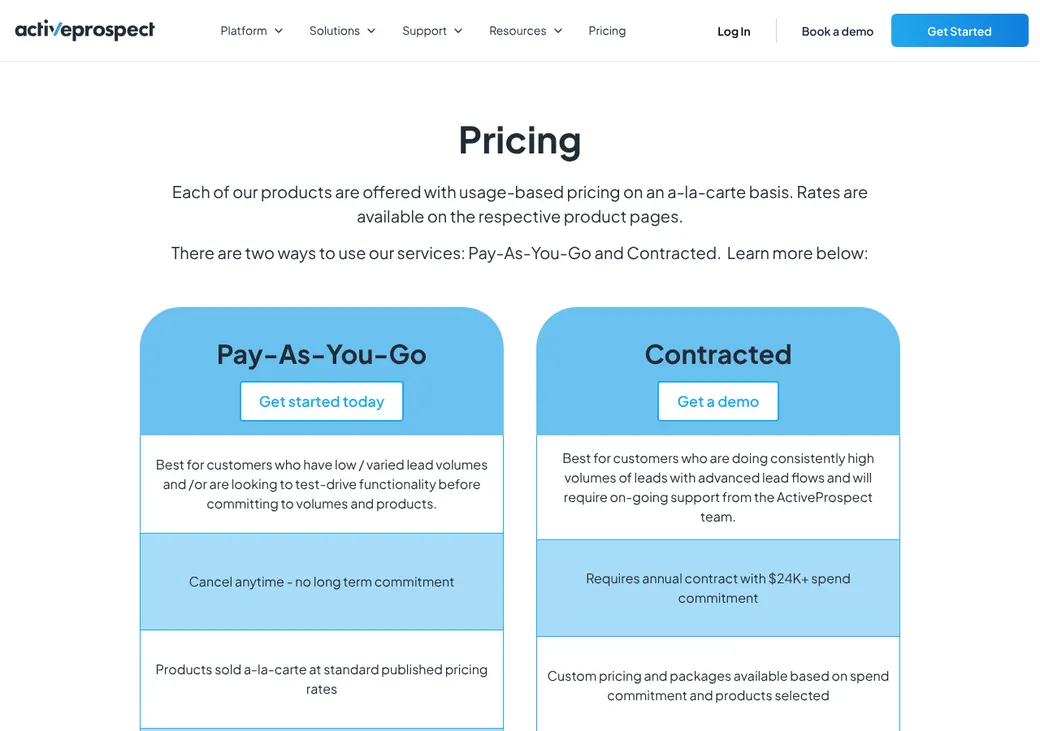
| Level | Price | Commitment | What it adds |
|---|---|---|---|
| FreeTrying it out | $0 | Cancel any time | Community help and the developer portal |
| Self-ServiceAgencies paying as they goWhere most agencies start | from $10 a month | Cancel any time | Email support and payment by card or bank transfer |
| ProfessionalGrowing lead buyers | from $1,000 a month | Yearly | A signed contract and faster email support |
| EnterpriseLarge call centers and buyers | from $5,000 a month | Yearly | Implementation specialists and TrustedForm Insights in your flows |
Levels as of October 2026, from activeprospect.com/levels. The pricing page adds that a contracted account needs a yearly spend of $24,000 or more.
What each lead costs
Every time a lead runs through an integration counts as one transaction, even if the lead is rejected.
| Transactions a month | Price each |
|---|---|
| First 1,000 | $0.15 |
| Next 40,000 | $0.12 |
| Next 50,000 | $0.10 |
| Next 400,000 | $0.06 |
| 500,000 or more | $0.05 |
Checks you add per lead
| Check | Price |
|---|---|
| Duplicate and opt-out check (SuppressionList) | $0.01 a query |
| TrustedForm Insights data point | $0.05 each |
| Partner checks such as Blacklist Alliance or Anura | From $0.01 each |
Good to know before you buy
- Self-Service starts with a $50 wallet top-up.
- Support plans run $499 to $2,999 a month on a 12-month agreement.
- Professional services cost $250 an hour, one hour minimum.
- A flow with several checks costs more per lead than a plain delivery.
Transaction and add-on prices from ActiveProspect's pricing help article and add-on page, as of October 2026.
Getting started
Open a free or Self-Service account
Sign up online and pay as you go, or book a demo for a yearly contract.
Add your lead sources
Each seller gets posting instructions and a free partner account.
Build a flow
Pick the checks each lead runs through, such as duplicates, Do Not Call and consent.
Add recipients and rules
Point the flow at your CRM, dialer or email tool, with rules for who gets which lead.
Send conversions back
Feed sales back in to see cost per sale by source.
Contracted accounts get implementation specialists. Support runs from a help center and developer portal to a named success manager and Slack on paid plans.
Lead intake
Lead sellers post straight to LeadConduit using shared instructions, and get alerts when your intake rules change. Leads that fail a rule or cap are rejected, and the reason can go back to the seller.
- Ways leads come in
- Vendor posts and API, web forms, Facebook Lead Ads, Google Lead Forms, Unbounce, Typeform and CSV files
- Lead vendors
- LendingTree and BuyerZone, plus any seller that can post
- Duplicates
- Checks phone, email or an ID you pick against past leads and can reject repeats in real time
- Bad leads
- Returns are logged with a reason and age limit and can be sent back to the source
- Consent
- A TrustedForm certificate link can travel with each lead
Assignment rules
By state or ZIP code
Rules read the fields a lead arrives with, or data added along the way.
By hours
Each flow has open hours. A lead outside them fails with a time-stamped reason.
Rotation and splits
Spread leads in turn, split them A/B or send them to recipients in order.
- If nobody qualifies
- A recipient whose rules or cap fail is skipped, and the flow moves on to the next one
- Caps
- Limits by source, flow or recipient, down to the minute
- Who got what
- Every step, response and error is logged on the lead
Follow-up and calling
LeadConduit doesn't call, text or email leads itself. It checks each lead and hands it to the CRM, dialer or email tool where your team follows up.
- Do Not Call checks
- dnc.com checks national and state lists, known litigators, reassigned numbers and calling windows
- Opt-outs
- SuppressionList screens your own opt-out and do-not-call lists before delivery
- Consent records
- TrustedForm certificates not kept are deleted after about 90 days. Kept ones stay 5 years unless your contract says otherwise
- Who is responsible
- ActiveProspect's terms leave calling and texting law to you
Connections
| Connects to | Type | How | What it does |
|---|---|---|---|
| LendingTree and BuyerZone | Lead vendor | Built in | Leads post into a flow |
| Facebook Lead Ads and Google Lead Forms | Forms | Built in | Ad form leads post into a flow |
| Unbounce and Typeform | Forms | Built in | Form leads post into a flow |
| Salesforce and LeadPerfection | CRM | Built in | Checked leads go out, and sales can come back to LeadConduit |
| HubSpot, Zoho and Velocify | CRM | Built in | Checked leads go out |
| Convoso, Five9, CallTools, Hatch, Twilio and ReadyMode | Dialer | Built in | Leads go to the call floor, and replies are saved on the lead |
| Teledrip and Speak2Leads | Dialer | Built in | Leads go out for fast calls, texts and booking |
| Mailchimp, ActiveCampaign, SendGrid, Klaviyo and Drips | Built in | Leads go to email, text and mail campaigns | |
| dnc.com and Blacklist Alliance | Compliance | Add-on | Do Not Call and litigator results are added to the lead |
| Trestle, BriteVerify, Webbula and Anura | Data check | Add-on | Phone, email and fraud checks are added to the lead |
| LeadExec | Lead distribution | Built in | Receives leads by post, email, text or live transfer |
| Amazon S3 | Data export | Built in | Streams every lead event to your own storage |
| Custom endpoint | Automation | API | Sends leads to any system that accepts a post |
Add-on checks are billed per use on top of transactions.
Reporting
Reports you get
- Lead source kept on every lead
- Accepted, rejected and failed leads by source and recipient
- Sales and returns sent back from your systems
- Cost, revenue, profit and cost per sale by source
- Shared reports for your lead sellers and buyers
- CSV files, report APIs and a live event stream
What users say
Common points in user reviews, as of October 2026.
What users like
- Customizable flows
- Changing filters
- Keeping unwanted leads out of the CRM
- Organized event data
- Integration flexibility
- Support
- Low learning curve
- Strong developer tools
What users dislike
- Occasional duplicate-filter failures
- Hard setup for older data formats
- A lead delivery problem with the Five9 dialer
- Reports that only go back 90 days
- Configuration upkeep
- Slow with large data sets
- Exports that are hard to use
Contract and cancellation
- Term
- Free and Self-Service cancel any time. Professional, Enterprise and contracted accounts are yearly
- Renewal
- Prices can rise to the current rate at renewal
- Refunds
- Ask for your leftover wallet balance back. Monthly minimums and prepaid service hours are kept
- If they end it
- ActiveProspect can stop service with 30 days notice, or at once for suspected fraud
- Your data
- Export by CSV, API or event stream before you cancel. Social Security number fields can't be exported
From ActiveProspect's terms of service and help center.
ActiveProspect alternatives
- boberdooFrom $1,075 a monthLead distribution with buyer accounts, billing and ping/post
- ConvosoQuote onlyA call center platform that calls leads the moment they arrive
- LeadSquaredFrom $60 a user per month, billed yearlyA full CRM with routing, follow-up and calling in one
- Salesforce Financial Services CloudFrom $325 a user per month, billed yearlyA large CRM with policy records and custom routing
See every option in insurance lead management software.
Frequently asked questions
How much does LeadConduit cost?
Self-Service starts at $10 a month. The first 1,000 transactions cost $0.15 per transaction, falling to $0.05 per transaction at high volume.
Is there a free trial?
There's no set trial, but a free account and pay-as-you-go billing let you test it.
Is LeadConduit the same as TrustedForm?
No. TrustedForm records consent, and LeadConduit takes in, checks and routes leads, carrying TrustedForm records with them.
Can LeadConduit route leads by state?
Yes. Rules can send leads by state, ZIP code or hours, and rotate or split them among recipients.
Can I cancel LeadConduit any time?
Free and Self-Service accounts can. Professional, Enterprise and contracted accounts are yearly.
How we researched this review. We based this review on the pricing, terms and product pages published by ActiveProspect, reviewed in October 2026, together with our team's experience working with insurance agents and agency owners since 2008.
Corrections
Vendors change their pricing all the time and they don't email us when they do. So if you see a price on here that's gone up, a plan ActiveProspect quit selling or a contract term that reads different now, let us know and send the link to the page where ActiveProspect has it. Somebody here pulls up that page and checks it before we change anything on ours.