InsuranceAgencyTools

Mailchimp review: pricing, automations and AMS connections for agents

By the IAT editorial team | Updated October 5, 2026

Mailchimp sends newsletters, birthday notes and yearly reminders to your clients from lists you build yourself. Contacts come in by file import, signup forms, Zapier (a service that links apps) or the API (a link your developer can program), since no agency system connects to it directly.

It suits an agency that writes its own emails. Essentials covers a birthday or renewal flow of up to four steps. Standard is the plan once you want longer flows.

Best for
Agencies that write their own emails and can keep policy dates in a spreadsheet or CRM
Price
Free plan. Paid plans from $13 a month for 500 contacts
Priced by
Contacts stored, including unsubscribed ones
Free plan or trial
Free for up to 250 contacts. 14-day trial of Essentials or Standard
Agency system sync
None built in. Zapier or the API
Renewal emails
Yes, from a renewal date field you import
Insurance content
None. You write your own emails
Texting
Paid add-on from Essentials up

Our take

Mailchimp is a general email tool, not an insurance one. You write every email, and policy details only exist in it if you add them as fields and keep them current.

Standard is the plan most agencies end up on, since it allows long flows with a yearly renewal trigger and more than one trigger per flow. Essentials caps a flow at four steps, which is fine for a newsletter but tight for a renewal sequence.

The limit that matters most is the missing AMS link. Renewal dates have to be exported from your agency system and loaded again, or pushed in through Zapier. Otherwise the reminders go out on stale dates.

Pros

  • Free plan for up to 250 contacts
  • Yearly date trigger can send renewal reminders from any date field
  • Entri can add your DNS records for you
  • Monthly plans you can cancel or pause any time
  • Text consent kept apart from email consent

Cons

  • No insurance content. You write everything
  • No direct AMS connection
  • Unsubscribed contacts still count toward the bill
  • Essentials limits a flow to four steps
  • An email unsubscribe applies to one audience only

Plans and pricing

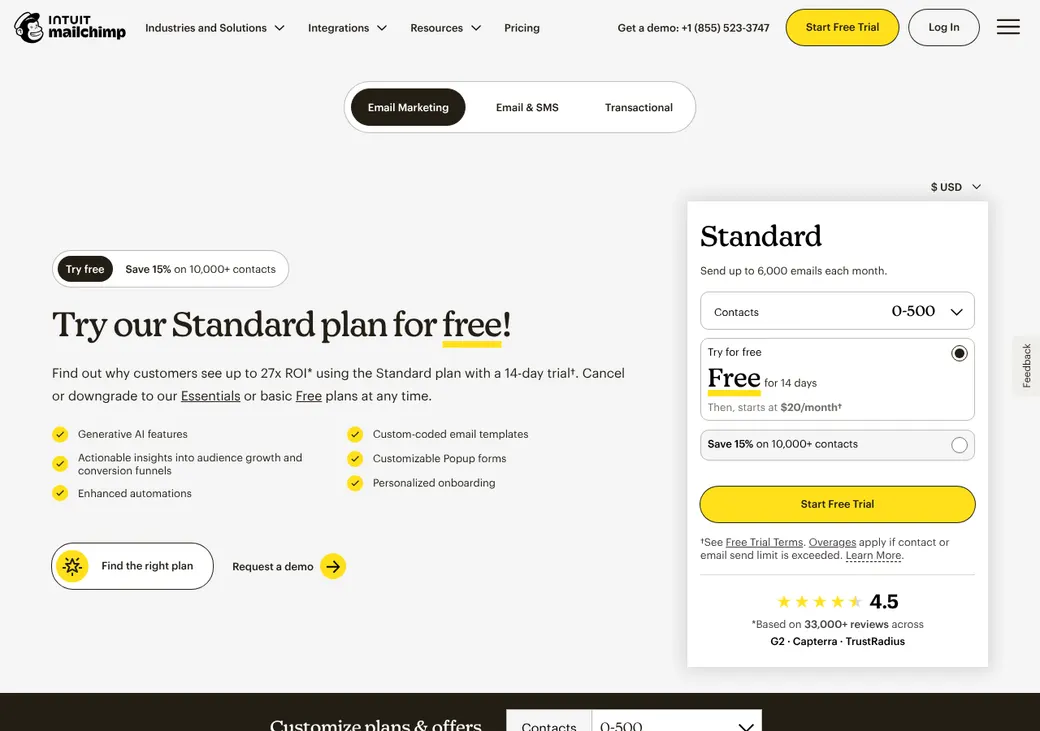
Screenshot of Mailchimp's pricing page at mailchimp.com
Mailchimp's pricing page at mailchimp.com, as it looked on October 8, 2026.
PlanStarting priceContactsEmails a monthWhat it adds
FreeTrying it with a short list$0Up to 250500, at most 250 a dayOne user and one audience. No automations
EssentialsA monthly newsletter$13Up to 50,00010 times your contact tier, so 5,000 at 500 contactsThree users, scheduling and flows of up to four steps
StandardLonger renewal flowsWhere most agencies start$20Up to 100,00012 times your contact tierFive users, flows of up to 200 steps, custom reports and one onboarding call
PremiumLarge books and several staff$35010,000 to 200,00015 times your contact tierUnlimited users, phone support and four onboarding calls

Price by list size

ContactsEssentialsStandard
500$13$20
1,500$26.50$45
5,000$75$100
10,000$110$135
15,000$180$230

Monthly prices as of October 2026, from mailchimp.com/pricing. Premium starts at 10,000 contacts for $350 a month, or $465 at 15,000. Yearly billing for Standard and Premium at 10,000 or more contacts goes through sales.

What counts as a contact

Subscribed, unsubscribed and non-subscribed contacts all count, across every audience. Cleaned, archived and pending contacts don't. Your bill uses the highest count you reached that month.

Good to know before you buy

  • Test emails and transactional emails use up your monthly send allowance.
  • Going over your limit on a monthly plan can pause sending or add extra contact blocks to the bill.
  • Texting and Mailchimp Transactional are separate paid add-ons.
  • Nonprofits can ask for 15% off monthly plans.
  • You can drop back to the Free plan only once.

Which plan has it

FeatureFreeEssentialsStandardPremium
Users135Unlimited
Audiences135Unlimited
Automation flowsUp to 4 stepsUp to 200 stepsUp to 200 steps
Birthday and yearly date triggers
Splits and up to three triggers per flow
Email scheduling
Mailchimp branding removed
Texting add-on
Text step inside a flow
Predictive segments
Custom reports
Onboarding calls14
SupportEmail for 30 days24/7 email and chat24/7 email and chatPhone and priority

AMS and CRM connections

No agency system connects directly. Policy types, carriers and renewal dates reach Mailchimp only as audience fields you import or push in through Zapier or the API.

Connects toHowWhat syncsDirectionHow often
Your AMS or agency CRMZapierSubscribers, tags, unsubscribes and campaign sendsBoth ways, set by each Zapier linkEach time a Zapier link runs
Your own systemsAPIContacts, events and the start of a flowBoth waysOn each call

Zapier is a separate service with its own bill. Mailchimp lists 300 or more other app connections on every plan.

Contacts and policy data

What counts as a contact
Everyone stored in your audiences except cleaned, archived and pending contacts
Policy data it holds
None built in. Add line, carrier and renewal date as audience fields
Where dates come from
File import, signup forms, the API or Zapier. The Birthday field stores month and day only
Segments
Tags, groups and segments on every plan. Predictive segments on Standard and Premium
Field limits
30 fields per contact, or up to 80 on Premium

Automations

Renewal emails
A recurring date trigger sends every year from a renewal date field you keep current
Birthday and other dates
Birthday, signup date and one-time future date triggers
Other triggers
Tag added, signup, group change, field change, link click or a call from the API
What stops a sequence
An exit condition you set, such as a tag or a field change
Plan needed
Essentials for short flows. Standard for longer flows, splits and more than one trigger

A flow only acts on events that happen after you turn it on.

Content and templates

Insurance content

None. Your agency writes every newsletter and reminder. Mailchimp has an article with insurance email ideas, but no ready-to-send insurance emails.

Compliance review

You check everything yourself. Mailchimp's terms leave it to you to decide whether the service meets rules such as HIPAA and GLBA.

Templates
Drag-and-drop templates on every plan. Your own coded templates send on Standard and Premium
AI writing
Intuit Assist, in beta for some Standard and Premium users at no added cost

Sending and deliverability

Sends from
An address on your agency's own domain. Gmail and Yahoo addresses can't be authenticated
Domain setup
Two CNAME records for DKIM and one TXT record for DMARC. These DNS records prove the mail really comes from your agency
Who sets it up
You, or Entri, a setup service built into Mailchimp, adds the records at your DNS host for you. Mailchimp checks them within 48 hours
Shared or dedicated IP
Shared by default. A dedicated address only if Mailchimp offers one
Bounces and list cleanup
Hard bounces and repeat soft bounces become cleaned contacts that stop counting toward your bill

Mailchimp's use policy requires proof of opt-in and bans bought, rented and partner lists. It also bans Social Security numbers and other regulated personal data in your audience.

Texting

Available on
Add-on from Essentials up. A text step inside a flow needs Standard or Premium
Price or credits
Monthly credit blocks that renew on your billing date. Unused credits expire
Number registration
Mailchimp approves your texting application first. One sending number per country is included
Consent and opt-outs
Separate text consent. STOP and similar replies opt the person out everywhere
Quiet hours
Marketing texts are held during quiet hours

You keep your own records of text consent and opt-outs. Carriers can ask for up to six years of them.

Reporting

What it tracks

  • Opens and clicks
  • Bounces and unsubscribes
  • Conversions
  • Custom reports on Standard and Premium

Bot filtering is on by default, so open and click counts drop when automated scanners are removed. Mailchimp itself suggests judging results by bounces, unsubscribes and conversions too.

Getting started

  1. Start free or take the trial

    Use the Free plan or a 14-day trial of Essentials or Standard. The first 100 trial emails need no card.

  2. Add your policy fields

    Create fields for line, carrier and renewal date before you import, so flows can use them.

  3. Import clients who opted in

    Upload a file or connect through Zapier. Leave out anyone who never agreed to hear from you.

  4. Authenticate your domain

    Let Entri add the DKIM and DMARC records, or paste them in at your DNS host.

  5. Build the first flows

    Start with a monthly newsletter, a birthday note and a yearly renewal reminder.

Standard includes one onboarding call and Premium four, with a specialist, within 90 days. Essentials and Standard get 24/7 email and chat support.

Contract and your data

Billing
Monthly. Yearly only through sales for Standard and Premium at 10,000 or more contacts
Renewal
Renews on its own at the current price
Price changes
Mailchimp can change its fees at any time with notice
Canceling
Close a monthly plan from your account any time. A yearly plan closes through sales
Refunds
None on monthly plans. Yearly plans have a 60-day money-back guarantee
Pausing
Monthly plans can be paused from the billing page
Your list after you cancel
Export a ZIP file before you close. Mailchimp may delete the data once the account ends

From Mailchimp's terms and help pages, checked October 2026.

Frequently asked questions

How much does Mailchimp cost for an insurance agency?

At 1,500 contacts, Essentials is $26.50 a month and Standard is $45. The Free plan covers up to 250 contacts.

Does Mailchimp connect to my AMS?

Not directly. Agencies link it to an AMS or CRM through Zapier or the Mailchimp API.

Can Mailchimp send renewal reminders and birthday emails?

Yes, once the dates are on your contacts. Essentials runs flows of up to four steps, and Standard is where longer renewal flows with several triggers start.

Do unsubscribed contacts count toward my Mailchimp bill?

Yes. Delete or archive contacts you no longer email to keep the count down.

Does Mailchimp include insurance email templates?

No. It has general templates and an AI writing helper, and your agency writes the insurance copy.

Can Mailchimp send texts?

Yes, as a paid add-on from Essentials up, after Mailchimp approves your texting application.

How we researched this review. We based this review on the pricing, terms and product pages published by Mailchimp, reviewed in October 2026, together with our team's experience working with insurance agents and agency owners since 2008.

Corrections

Vendors change their pricing all the time and they don't email us when they do. So if you see a price on here that's gone up, a plan Mailchimp quit selling or a contract term that reads different now, let us know and send the link to the page where Mailchimp has it. Somebody here pulls up that page and checks it before we change anything on ours.

Correct this listingClaim this listing