Proton Mail for Business review: plans, pricing and email features for agencies
Proton Mail for Business stores your agency email so that Proton itself can't read it. Any plan can send a client a password-protected message, even if the client uses Gmail.
It fits agencies that put privacy ahead of integrations. Workspace Standard at $12.99 a person a month adds groups, sign-in monitoring and plenty of storage.
- Best for
- Agencies that put the privacy of client email first
- Price
- From $6.99 a person a month billed yearly, or $7.99 month to month
- Free trial
- 14 days, plus a 30-day refund window
- Mailbox size
- 15 GB, 1 TB or 3 TB a person by plan
- Shared inboxes
- Email groups on Workspace plans. No shared mailbox
- Legal hold
- None. Workspace Premium has retention rules
- AMS connections
- None built in. Outlook works through Proton Mail Bridge
- Contract
- Month to month or yearly
Our take
Proton is the privacy pick. Every plan sends password-protected email to any client, and Proton signs a HIPAA BAA on request.
Pick Workspace Standard if you need a group address such as service@, which Mail Essentials lacks. Pick Workspace Premium if you need retention rules.
Proton has no shared mailbox and no legal hold. Outlook works only through a desktop app called Bridge, so test your AMS before you switch.
Pros
- Password-protected email to any client on every plan
- Mail stored so Proton can't read it
- HIPAA BAA on request
- Analysts watch for suspicious sign-ins on Workspace plans
- VPN and a team password manager on Workspace plans
Cons
- No shared mailbox, only groups that forward
- No legal hold or eDiscovery search
- Outlook needs the Bridge app on each computer
- No backup from Proton, so you export your own copy
Plans and pricing
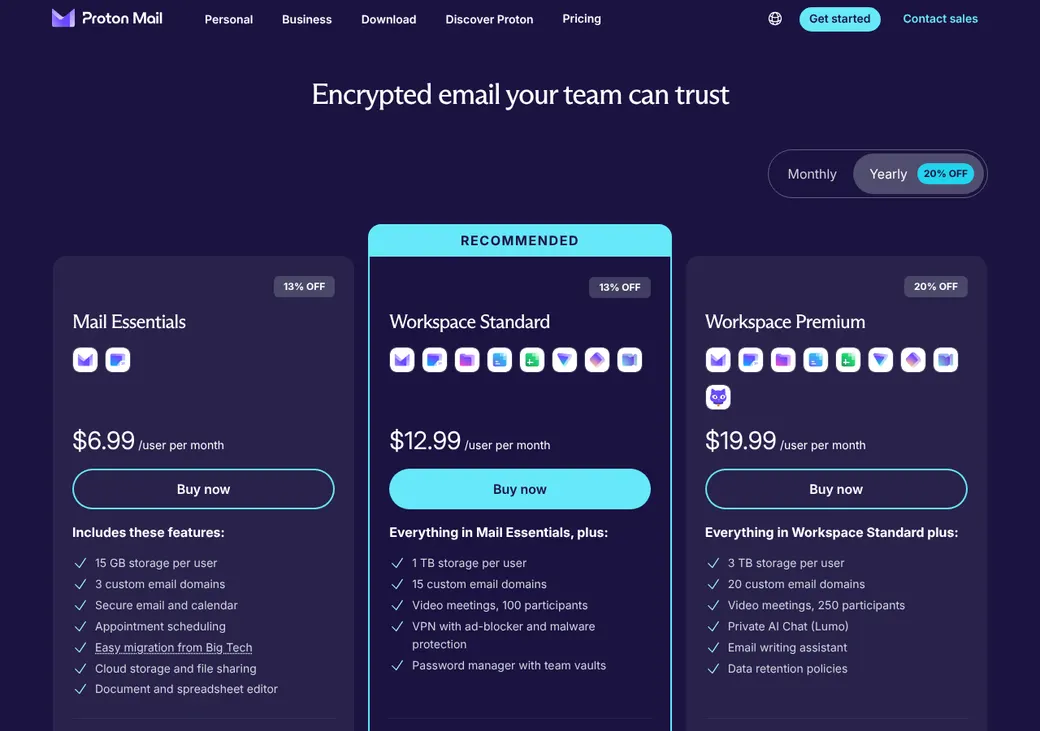
| Plan | Billed yearly | Billed monthly | Mailbox | What it adds |
|---|---|---|---|---|
| Mail EssentialsEmail and calendar only | $6.99 | $7.99 | 15 GB | Encrypted mail and calendar, 3 domains and 1 booking page |
| Workspace StandardAdds email groups | $12.99 | $14.99 | 1 TB | Email groups, sign-in monitoring, VPN and a team password manager |
| Workspace PremiumAgencies that must keep mail | $19.99 | $24.99 | 3 TB | Retention rules and AI writing tools |
| EnterpriseLarger firms | Quote only | Quote only | Custom | All Proton services and an account manager |
Prices are per person each month in US dollars, as of October 2026, from Proton's business pricing page. Monthly prices are from Proton's checkout at account.proton.me, checked October 9, 2026. Yearly plans are paid up front, for example $83.88 a person for Mail Essentials.
What it would cost you
Cost per month
First-year cost
Email cost per client a month
Uses the per-person prices in the table. Email groups need no extra license.
Good to know before you buy
- Storage is pooled, and admins can move it between people.
- Extra addresses cost nothing up to 10 a person on Mail Essentials and 20 on Workspace plans.
- Scribe, Proton's AI writing assistant, is an add-on below Workspace Premium.
- Proton sells no separate mailbox backup.
Which plan has it
| Feature | Mail Essentials | Workspace Standard | Workspace Premium |
|---|---|---|---|
| Storage per person | 15 GB | 1 TB | 3 TB |
| Custom domains | 3 | 15 | 20 |
| Addresses per person | 10 | 20 | 20 |
| Password-protected email to anyone | |||
| Outlook through Proton Mail Bridge | |||
| Email groups | |||
| Sign-in monitoring by Proton analysts | |||
| VPN and team password vaults | |||
| Retention rules | |||
| Legal hold | |||
| Month-to-month billing |
AMS and CRM connections
| Connects to | Type | How | What it does |
|---|---|---|---|
| Microsoft Outlook, Apple Mail and Thunderbird | Mail app | Proton Mail Bridge | A desktop app that lets these programs send and receive Proton mail |
| CRMs, websites and devices | Sending | SMTP token (a password for one app) | Lets a CRM or web form send from your domain address. This mail isn't end-to-end encrypted |
| Zoom | Meetings | Built in | Adds Zoom links to Proton Calendar events |
| Google and Microsoft 365 | Migration | Easy Switch | Imports mail, contacts and calendars |
No agency system connects directly. Proton has no Exchange or Gmail connection, so AMS add-ins that expect them may not work. Test your AMS through Bridge before you move.
Phishing and sign-in protection
- Two-step sign-in
- Authenticator app or security key
- Can the admin require it
- Yes, for admins only or for everyone
- Phishing-resistant keys
- Hardware security keys
- Spam
- Spam detection plus agency-wide block, allow and spam lists
- Suspicious sign-ins
- Proton Sentinel, a monitoring service with analysts watching around the clock, on Workspace plans
- Sign-in log
- Admins see sign-in events for every member, with CSV export
When two-step sign-in is required, a member who hasn't set it up can't use the mailbox until they do.
Encryption for client documents
Encrypted email to clients
Every plan can send a password-protected email to any address. The client opens it in a browser with the password and can reply up to 5 times. It expires after 28 days at most.
Health data
- Proton signs a HIPAA business associate agreement (BAA) on request
- Mail is stored with zero-access encryption, so Proton can't read it
- Mail between Proton users is end-to-end encrypted
Retention, archive and legal hold
- Retention rules
- Agency-wide rules on Workspace Premium. Keep forever or for a set time
- Where kept mail sits
- A Deleted folder only admins can see
- eDiscovery search
- Not offered
- Legal hold
- Not offered
- Private members
- Admins can't read a private member's mail
Backup and recovery
- Provider backup
- Not sold as a separate product
- Independent copy
- Your agency's job, with the Proton Mail Export Tool or a mail app connected through Bridge
- Export format
- Decrypted EML and JSON files on Windows, Mac or Linux
Domain setup and sending limits
- Verification
- A TXT record before mail setup
- SPF
- One record
- DKIM
- Three CNAME records
- DMARC
- Proton suggests the quarantine setting
- Who edits DNS
- Your agency, with a step guide in the admin console
SPF, DKIM and DMARC prove mail from your domain is really yours. DNS changes can take up to 24 hours.
When a producer leaves
Lock the account
An admin can change the password of a member who isn't private.
Read or keep the mail
Admins can sign in to that mailbox. Workspace Premium retention keeps deleted mail.
Keep client mail arriving
Set automatic forwarding to a colleague.
Export and delete
Save the mailbox with the Export Tool, then delete the user and reassign the storage.
A private member must grant access first, so decide on the privacy setting when you add people.
Getting started
Start the 14-day trial
Each plan has one. A 30-day refund also covers your first purchase.
Verify your domain
Add the TXT record, then MX, SPF, DKIM and DMARC.
Add people and groups
Create each member and the groups for service@ and claims@.
Move old mail
Easy Switch imports mail, contacts and calendars from Google, Microsoft 365 and other IMAP hosts. Microsoft 365 shared mailboxes don't move.
Set up Outlook if you need it
Install Proton Mail Bridge on each computer that uses Outlook or Apple Mail.
Organizations with 6 or more members can book a setup call by phone or video.
Admin and support
- Admin console
- Proton admin panel
- Admin roles
- Organization admin, user admin and security admin
- Activity log
- Account monitor with CSV export
- Audits
- ISO 27001 and SOC 2 Type II
- Support
- Help center and support form. Phone or video calls for 6 or more members
- Where you buy it
- Direct from Proton online. Enterprise through sales
Proton is based in Geneva, Switzerland. A non-profit foundation is its main shareholder.
Contract and your data
- Billing
- Monthly, or 12 months paid up front
- Renewal
- Renews on its own for the same length unless canceled first
- Canceling
- Downgrade before the period ends to stop the renewal
- Refunds
- Full refund within 30 days of the first purchase, once per user
- Getting your mail out
- Proton Mail Export Tool, as EML and JSON files
From Proton's terms of service, checked October 2026. Business plans don't get consumer protection rules.
Proton Mail for Business alternatives
- FastmailFrom $3 a user a month billed yearlyLower price, Outlook over IMAP and free shared addresses
- Zoho Mail and WorkplaceFree for 5 people. Paid from $1 a user a montheDiscovery and legal hold on a low-cost plan
- Google WorkspaceFrom $7 a user a month billed yearlyShared group inboxes and EZLynx and HawkSoft links
- Microsoft 365Email only from $4, full suite from $7, a user a month billed yearlyOutlook and Exchange, with Applied Epic's Outlook add-in
See every option in business email providers.
Frequently asked questions
How much does Proton Mail for Business cost?
Billed yearly, Mail Essentials is $6.99, Workspace Standard $12.99 and Workspace Premium $19.99 a person a month. Month to month it runs $7.99 to $24.99.
Does Proton work with Outlook and my AMS?
Outlook works through Proton Mail Bridge, a desktop app. No agency system connects directly, so test your AMS first.
Can clients open encrypted email from Proton without an account?
Yes. They open a password-protected message in a browser and can reply up to 5 times.
Will Proton sign a BAA?
Yes, on request.
Can our team share one inbox on Proton?
Not as a shared mailbox. An email group on Workspace plans sends service@ mail to each member's inbox.
How we researched this review. We based this review on the pricing, terms and product pages published by Proton Mail for Business, reviewed in October 2026, together with our team's experience working with insurance agents and agency owners since 2008.
Corrections
Vendors change their pricing all the time and they don't email us when they do. So if you see a price on here that's gone up, a plan Proton Mail for Business quit selling or a contract term that reads different now, let us know and send the link to the page where Proton Mail for Business has it. Somebody here pulls up that page and checks it before we change anything on ours.