
SchedulingKit review for insurance agents: pricing, features and integrations
SchedulingKit lets clients book a quote meeting or policy review from a link or your agency website. It checks your calendars for open times, adds the booking and sends email and text reminders.
Solo agents can run it on Standard, which adds text reminders and online payments. Agencies that share appointments across producers or send bookings to HubSpot or Salesforce need Pro.
- Best for
- Agencies that book by line of business and assign agents to each line
- Price
- Free plan. Paid plans from $10 a seat per month, billed yearly
- Free trial
- 14 days of Business. No card needed
- Team scheduling
- Round robin and collective meetings on Pro and Business
- Reminders
- Email on every plan. Text on Standard and up
- CRM connections
- HubSpot and Salesforce through Zapier on Pro and up, started from a SchedulingKit webhook
- HIPAA BAA
- Not offered
- Apps
- Web, iPhone, iPad and Android
Our take
SchedulingKit fits an agency that books appointments by line of business. You make an appointment type for each line, such as life, commercial, homeowners or personal auto, and attach the agents who work it.
Standard is enough for a solo agent who wants text reminders and online payments. Pro is the plan for agencies, since it adds round robin, the API and the Zapier route to HubSpot and Salesforce.
There's no BAA from SchedulingKit. Medicare and health agents should ask only for contact details when a client books.
Pros
- Service and agent links send clients to the right line or person
- Busy times update every 10 minutes and get checked again live at booking
- Round robin by random pick or equal distribution on Pro and Business
- Paid plans include unlimited workspaces under one account
- Every paid seat comes with 100 to 500 text credits a month
- Apps for iPhone, iPad and Android
Cons
- The Free plan allows one appointment type, one calendar and 50 bookings a month
- Round robin, the API and CRM connections need Pro
- HubSpot and Salesforce connect only through Zapier, using a webhook
- No BAA, so health details stay out of booking forms
- Moving an event in Google Calendar doesn't change the booking
- Routing doesn't check producer licenses
Plans and pricing
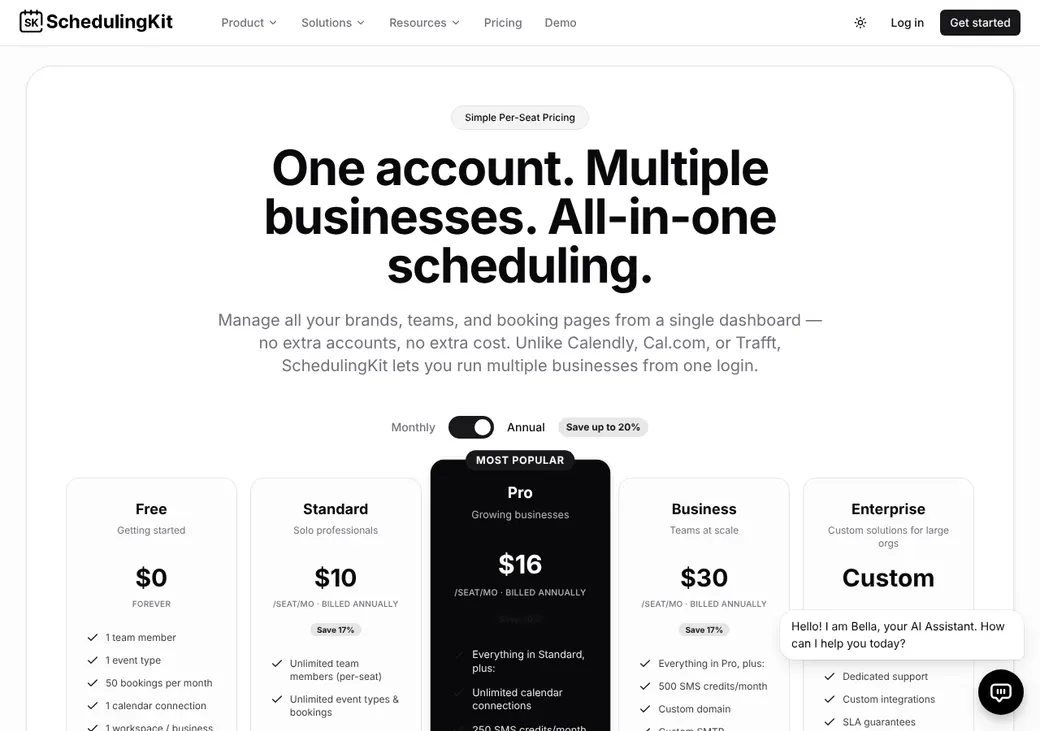
| Plan | Billed yearly | Billed monthly | What it adds |
|---|---|---|---|
| FreeTrying it out on your own | $0 | $0 | One person, one appointment type, one calendar and 50 bookings a month |
| StandardMost solo agentsWhere most agents start | $10 | $12 | Unlimited appointment types and bookings, six calendars, text reminders, payments and the client portal |
| ProAgencies sharing appointments | $16 | $20 | Round robin, unlimited calendars, group and recurring bookings, reports, the API and webhooks |
| BusinessAgencies that want their own branding | $30 | $36 | Everything in Pro plus a custom domain, your own email server, no SchedulingKit branding and priority support |
| EnterpriseLarge agencies and distributors | Quote only | Quote only | Everything in Business plus unlimited texts, dedicated support, custom integrations and volume discounts |
Prices are per active seat each month, as of October 2026, from schedulingkit.com/pricing. The account owner counts as a seat.
What it would cost you
Cost per month
First-year cost
Cost per booked appointment
Uses the seat prices in the table. Extra text credits and add-ons cost more.
Good to know before you buy
- Every active seat is billed, and the account owner counts as one.
- Active team members in every workspace count toward your seats.
- Your payment processor charges its own fees on top of the subscription.
- The AI chatbot is $12 per month on Standard and up. The AI receptionist is $39 per month on Business.
Text message credits
Paid seats come with text credits every month. Extra credits cost $10 for 500, and each text can run to 320 characters.
| Plan | Credits per seat a month |
|---|---|
| Standard | 100 |
| Pro | 250 |
| Business | 500 |
| Enterprise | Unlimited |
Which plan has it
| Feature | Free | Standard | Pro | Business |
|---|---|---|---|---|
| Booking page | ||||
| Appointment types | 1 | Unlimited | Unlimited | Unlimited |
| Bookings a month | 50 | Unlimited | Unlimited | Unlimited |
| Calendar connections | 1 | 6 | Unlimited | Unlimited |
| Workspaces | 1 | Unlimited | Unlimited | Unlimited |
| Email confirmations and reminders | ||||
| Text reminders | ||||
| Take payment when booking | ||||
| Staff profiles and service assignments | ||||
| Client portal | ||||
| Round robin and collective meetings | ||||
| Group and recurring bookings | ||||
| One-off meeting links | ||||
| API and webhooks | ||||
| HubSpot and Salesforce through Zapier | ||||
| Reports | ||||
| Custom domain and no SchedulingKit branding | ||||
| Priority support |
Enterprise includes everything in Business.
Getting started
Start the free trial
You get 14 days of Business without a card.
Connect your calendar
Pick which Google, Outlook or iCloud calendars block time and which one gets new bookings.
Set up services and agents
Make an appointment type for each line, such as personal auto or life, and pick the agents who take it. Add your booking questions.
Share your link
Send service or agent links in emails and texts, or put the booking widget on your website.
Choose a plan before the trial ends
If you don't subscribe, the account drops to the Free plan with one appointment type, one calendar and 50 bookings a month.
Setup is self-serve, with a help center, email support and a demo. Support answers weekdays from 9 AM to 6 PM Eastern, and Business adds priority support.
Booking and calendars
Booking pages and links
Clients book from a SchedulingKit page or from your website, using an inline calendar or a popup button. Service and agent links send a client straight to the right meeting or person. Pro adds one-off links for a single meeting.
Intake questions and hours
Each appointment type can ask required or optional questions as short text, long text, dropdowns, radio buttons or checkboxes. You set working hours, days off, how far ahead clients can book, minimum notice, daily limits and buffers.
On Standard and up, clients get a portal with their booking history and payments. They can move or cancel a booking when your rules allow it.
Calendar sync
- Works with
- Google Calendar, Outlook.com, Microsoft 365 and Apple iCloud
- Calendars checked
- One on Free. Six on Standard. No limit on Pro and up
- How often
- Busy times for the next 60 days update every 10 minutes and get checked again live at booking. Events you mark as free in your calendar don't block time
- Where bookings go
- One calendar you choose
- Changes you make
- Moving or canceling in SchedulingKit updates the Google or Outlook event. Moving or deleting the event in Google doesn't change the booking
Mobile app
The iPhone, iPad and Android apps let you view and manage bookings, edit appointment types and contacts, share links and get booking alerts.
Team routing
Pro and Business can share appointments across producers. Each line, such as life, health, commercial, homeowners or personal auto, gets the agents who work it. Clients pick a named agent or Any Available.
Random
Each booking goes to one of the available agents on that service, picked at random.
Equal distribution
Bookings are spread evenly across the agents on that service.
Routing forms and group meetings
A routing form reads a client's answers and sends them to an agent, an appointment type or another web page. Collective meetings book a time when every agent you name is free.
Check licenses yourself. SchedulingKit won't stop a booking from going to an agent who isn't licensed in the client's state. You choose the agents for each line yourself.
Reminders and texts
Reminders
Every plan sends email confirmations and reminders. Standard and up add texts for reminders, confirmations, reschedules and cancellations. You can set several text reminders for each service and edit the wording.
Text message rules
- Client consent
- Clients agree to texts with a checkbox on the booking form
- Sent through
- SchedulingKit's own text service
- Opt-outs
- STOP ends texts until the client signs up again. HELP works too
- Credits
- 100 a seat each month on Standard, 250 on Pro and 500 on Business. See text message credits
- Length
- Up to 320 characters a text
Integrations
| Connects to | Type | How | From plan | What it does |
|---|---|---|---|---|
| Google Calendar | Calendar | Built in | All plans | Checks busy times and adds bookings |
| Outlook.com and Microsoft 365 | Calendar | Built in | All plans | Checks busy times and adds bookings |
| Apple iCloud | Calendar | Built in | All plans | Adds bookings to the calendar you pick |
| HubSpot | CRM | Zapier | Pro | Adds or updates a contact from a booking |
| Salesforce | CRM | Zapier | Pro | Creates or updates a lead from a booking |
| Slack | Team chat | Built in | All plans | Posts booking alerts to a channel and books with the /schedule command |
| Stripe, PayPal and Square | Payments | Built in | Standard | Takes a payment or deposit when the client books |
| REST API and webhooks | Developer | API | Pro | Creates bookings and sends booking events to other systems |
Zoom, Google Meet and Microsoft Teams add a meeting link to each booking, and Zoom and Teams allow one account per team. Zapier connections need a Zapier account, which is billed separately. SchedulingKit's own app in Zapier won't sign in right now, so you start these from a SchedulingKit webhook instead.
Security and HIPAA
HIPAA and health data
SchedulingKit doesn't offer a BAA. Its privacy policy says not to enter medical history, medications, treatment notes or diagnoses without one. Booking questions should stay free of Medicare numbers and health details.
Security
- AES-256 encryption at rest and TLS 1.3 in transit
- Multi-factor sign-in
- Owner, Admin, Manager and Staff roles, plus custom permissions
- Backups and security logging
- Limited staff access to your data
Contract terms
- Billing
- Monthly or yearly, per active seat. Enterprise terms are agreed with sales
- Renewal
- Renews until you cancel
- Price at renewal
- Can change with the notice the law requires
- Refunds
- The refund policy is shown at checkout. Refunds of client payments follow your processor's rules
- Your data
- Pro and up can pull bookings through the API. Payment records export as CSV
From SchedulingKit's terms of service, effective July 9, 2026.
SchedulingKit alternatives
- CalendlyFree plan. Paid from $10 a seat per monthBuilt-in HubSpot and Salesforce, plus AgencyZoom through Zapier
- Cal.comFree for one user. Teams from $12 a user per monthRoutes by producer details you enter, with a BAA available
- YouCanBookMeFree plan. Paid from $8.10 a monthBuilt-in HubSpot and several team distribution modes
- Acuity SchedulingFrom $16 a month per account. No free planPools agent calendars and offers a BAA on Premium
- SetmoreFree for up to four users. Pro from $5 a user per monthFree for small teams, with a BAA through Setmore Health
See every option in appointment scheduling software.
Frequently asked questions
How much does SchedulingKit cost?
The Free plan costs nothing. Standard is $10 a seat per month billed yearly or $12 billed monthly, and Pro is $16 or $20 on the same terms.
Does SchedulingKit sign a BAA for HIPAA?
No. SchedulingKit doesn't offer a BAA, so it doesn't fit a workflow that collects health information.
Does SchedulingKit do round robin?
Yes, on Pro and Business. It can pick an available agent at random or spread bookings evenly.
Does SchedulingKit work with HubSpot or Salesforce?
Yes, through Zapier on Pro and up, started from a SchedulingKit webhook. A booking can add or update a HubSpot contact or a Salesforce lead.
Can I move a SchedulingKit appointment in Google Calendar?
Move it in SchedulingKit instead. Changes there update the Google event and tell the client, but moving the Google event leaves the booking as it was.
Can SchedulingKit send text reminders?
Yes, on Standard and up, to clients who check the consent box when they book. Each seat gets 100 to 500 text credits a month, depending on the plan.
How we researched this review. We based this review on the pricing, terms and product pages published by SchedulingKit, reviewed in October 2026, together with our team's experience working with insurance agents and agency owners since 2008.
Corrections
Vendors change their pricing all the time and they don't email us when they do. So if you see a price on here that's gone up, a plan SchedulingKit quit selling or a contract term that reads different now, let us know and send the link to the page where SchedulingKit has it. Somebody here pulls up that page and checks it before we change anything on ours.