Schedly review for insurance agents: pricing, features and integrations
Schedly lets clients and prospects book time with you from a link or your agency website. It checks your calendars, adds the meeting and sends email and text reminders.
A solo agent with one kind of appointment can run on the Free plan. Pro adds team scheduling, round robin and unlimited appointment types, and it offers a BAA as an add-on.
- Best for
- Agents and agencies that want detailed control over who gets each appointment
- Price
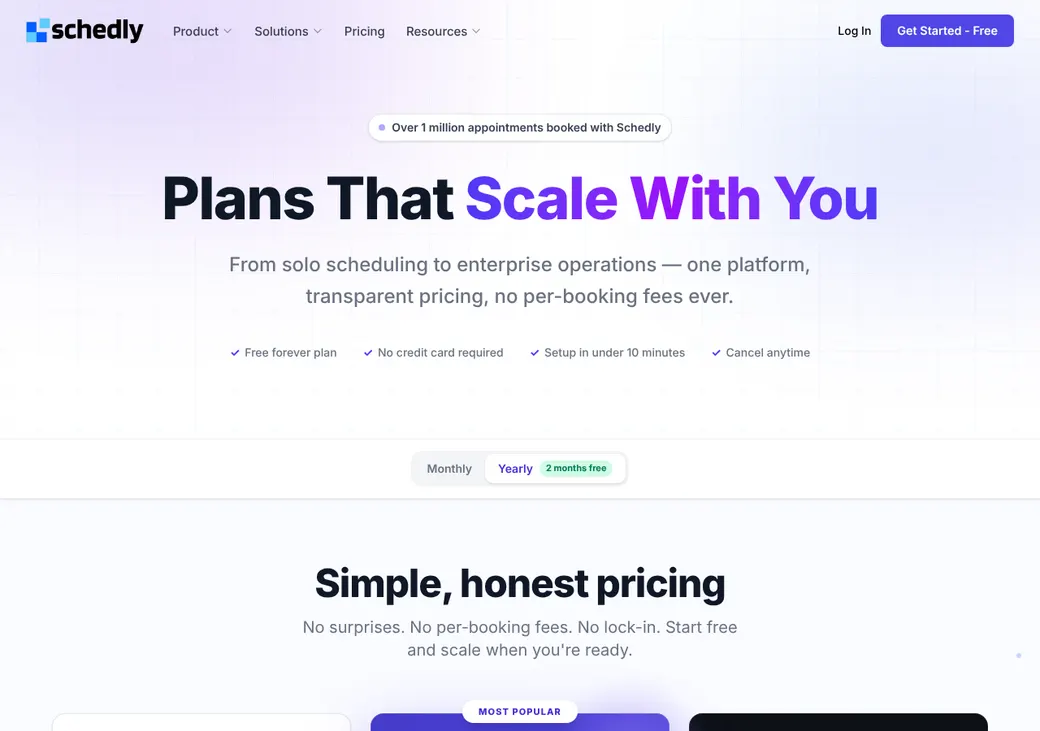
- Free plan. Pro is $7.50 a user per month, billed yearly
- Free trial
- No trial, but the Free plan has no time limit and needs no card
- Team scheduling
- Round robin and routing forms on Pro
- Reminders
- Email and text. Clients can reply to a text to confirm or reschedule, but Schedly lists no plan or price for texts
- HIPAA BAA
- Available as a paid add-on with Pro and Enterprise
- Apps
- Web. Booking pages work on phones
Our take
Schedly is a good fit for an agent who wants clients to book policy reviews and prospect calls from a link, and for agencies that want detailed control over who gets each appointment. Pro includes round robin, routing forms and single sign-on at one per-user price.
Free covers a solo agent with one appointment type and one calendar. Pro is the plan most agents need once they want several appointment types, a team or payment at booking.
Medicare and health agents can add a BAA on Pro. It covers contact details, appointment times and intake answers, and Schedly prices it by quote.
Pros
- Round robin by priority, weights or who was booked least recently
- Routing forms send clients to a backup group when no one matches
- A BAA add-on is available on Pro
- Clients can reply to a text to confirm or reschedule
- The Free plan has no time limit
- Private links can expire or stop after a set number of uses
Cons
- Free covers one user, one appointment type and one calendar
- The BAA and branding removal cost extra and are priced by quote
- HubSpot is the only CRM built in
- No refunds unless Schedly agrees
Plans and pricing
| Plan | Billed yearly | Billed monthly | What it adds |
|---|---|---|---|
| FreeA solo agent with one kind of appointment | $0 | $0 | One user, one appointment type, one location and one calendar, with unlimited bookings and video |
| ProMost agents and agenciesWhere most agents start | $7.50 | $9 | Unlimited appointment types and calendars, team scheduling, round robin, routing forms, payments, workflows, single sign-on and the full API |
| EnterpriseLarge agencies | Quote only | Quote only | A dedicated account manager, white-glove setup, custom integrations and 24/7 US support |
Prices are per user each month, as of October 2026, from schedly.io/pricing. Yearly billing is $90 a user, which works out to two months free.
What it would cost you
Cost per month
First-year cost
Cost per booked appointment
Uses the Pro seat prices in the table. Add-ons are priced by quote.
Good to know before you buy
- The BAA and branding removal are paid add-ons on Pro, priced by quote.
- Schedly charges no per-booking fee.
Which plan has it
| Feature | Free | Pro | Enterprise |
|---|---|---|---|
| Booking page, embeds and calendar sync | |||
| Appointment types | 1 | Unlimited | Unlimited |
| Locations | 1 | Unlimited | Unlimited |
| Calendar connections | 1 | Unlimited | Unlimited |
| Schedly Video | |||
| Integrations | |||
| Team management | |||
| Round robin and routing forms | |||
| Take payment when booking | |||
| Team workflows and automation | |||
| Single sign-on and user provisioning | |||
| Full API | |||
| 24/7 support | |||
| BAA | Add-on | Add-on | |
| Remove Schedly branding | Add-on | White-label add-on | |
| Dedicated account manager |
Getting started
Sign up for the Free plan
No card is needed and there's no time limit. Setup can take under 10 minutes.
Connect your calendar
Pick the calendars that should block time and the calendar each appointment type books into.
Set up your appointment types
Set one up for a policy review or any other meeting you hold. Add buffers, notice time and your intake questions.
Share your link
Send it to clients, or embed it on your website as a page, a pop-up or a button.
Move to Pro when you need more
Pro adds unlimited appointment types, team scheduling, round robin and payments.
Optional concierge setup costs $399, and Enterprise includes white-glove setup. Pro and Enterprise include 24/7 support.
Booking and calendars
Booking pages and links
Clients book from a Schedly page, your own domain or your website, using an inline calendar, a pop-up or a button. Private links can expire or stop after a set number of uses, including after one booking. You can also require approval, book group or recurring appointments and turn off client cancellations.
Intake questions
Booking questions can be required or optional, and clients can attach files. Prefilled links fill in answers for them, and hidden questions can carry the lead source into the booking.
Calendar sync
- Works with
- Google Calendar, Outlook, Office 365, Exchange, iCloud and CalDAV
- Calendars checked
- Any calendars you pick
- Where bookings go
- The calendar you choose for each appointment type
- What Schedly reads
- Event times, busy status and titles. Not attendee names or emails
- Time zones
- Clients see times in their own time zone
Mobile
Booking pages adjust to phones, so clients can book from a mobile browser.
Team routing
Pro can share appointments across producers. You pick how Schedly decides who gets each one.
Priority
Producers you rank higher are offered first.
Weights
Give some producers a bigger share of new appointments.
Least recently booked
The producer who has gone longest without a booking gets the next one. Ties are broken at random.
Host groups
Rotate appointments within groups of producers you set up.
Routing forms
A routing form matches clients to producers by attributes you set, such as country, language, department or seniority. When no one matches, a backup group you choose takes the booking. Collective meetings book a time only when every producer you add is free.
Reminders and texts
Reminders and no-shows
Reminders go out by email and text at times you choose, such as 24 hours and 1 hour before. Clients can reply RESCHEDULE to get a new link or CONFIRM to confirm. You mark no-shows on past bookings yourself.
Text message rules
- Plans and cost
- Schedly doesn't list which plans include texts or what they cost, so ask before you count on them
- Client consent
- Each client's text preference is stored as opted in or out
- Sending number
- A dedicated business number. Local, toll-free and mobile numbers are available
- Opt-outs
- Clients who opt out get no more text reminders
- Carrier registration
- Schedly can submit your US texting registration and track its status
Integrations
| Connects to | Type | How | From plan | What it does |
|---|---|---|---|---|
| Google Calendar | Calendar | Built in | All plans | Checks busy times and adds bookings |
| Outlook, Office 365 and Exchange | Calendar | Built in | All plans | Checks busy times and adds bookings |
| iCloud and CalDAV | Calendar | Built in | All plans | Checks busy times and adds bookings |
| HubSpot | CRM | Built in | All plans | Creates or updates contacts and logs meetings |
| Zoho CRM | CRM | Zapier | All plans | Sends bookings and intake answers to leads or contacts |
| Pipedrive | CRM | Zapier | All plans | Sends bookings to people and activities |
| Freshsales and Close | CRM | Zapier | All plans | Sends bookings to contacts and activities |
| DocuSign | E-signature | Built in | All plans | Adds e-signature steps |
| Stripe and PayPal | Payments | Built in | Pro | Takes a deposit or full payment at booking |
| API and webhooks | Developer | API | Pro | Books or routes and books, and sends events for changes, payments and no-shows |
Video meetings can use Zoom, Google Meet, Microsoft Teams or Schedly's own video, which is on the Free plan too. Zapier connections need a Zapier account, which is billed separately.
Security and HIPAA
HIPAA and health data
Pro and Enterprise offer a BAA as a paid add-on, priced by quote. It covers names, contact details, appointment times and intake answers. Schedly advises against sending sensitive details by email.
Security
- Encrypted in transit and at rest
- Multi-factor login and role-based access
- Single sign-on and user provisioning on Pro
- Audit logging and yearly penetration tests
- SOC 2 Type II report for enterprise customers under NDA
- Hosted on AWS in the US, or in Europe for European customers
Contract terms
- Billing
- Monthly or yearly
- Renewal
- Renews on its own unless you cancel
- Canceling
- Takes effect at the end of the current term
- Refunds
- None, unless you agree otherwise with Schedly
- Your data
- You can download a detailed report after the contract ends
From Schedly's terms, effective January 1, 2025.
Schedly alternatives
- CalendlyFree plan. Paid from $10 a seat per monthAgencyZoom and AgencyBloc through Zapier, but no BAA
- Acuity SchedulingFrom $16 a month per account. No free planConnects to AgencyZoom and offers a BAA on Premium
- Cal.comFree for one user. Teams from $12 a user per monthRouting forms on Teams and a self-hosting option
- OnceHubFree Basic plan. Paid from $10 a seat per monthRoutes by CRM owner and connects to Redtail and Wealthbox
- SetmoreFree for up to four users. Pro from $5 a user per monthConnects to AgencyBloc and offers a BAA through Setmore Health
See every option in appointment scheduling software.
Frequently asked questions
How much does Schedly cost?
The Free plan costs nothing. Pro is $7.50 a user per month billed yearly or $9 billed monthly.
Does Schedly sign a BAA for HIPAA?
Yes, as a paid add-on with Pro or Enterprise, priced by quote. It covers names, contact details, appointment times and intake answers.
Does Schedly do round robin?
Yes, on Pro. It can rotate by priority, weights or who was booked least recently, and routing forms can match clients to producers.
Can Schedly send text reminders?
Yes, though Schedly doesn't list which plans include texts or what they cost. Clients can reply CONFIRM to confirm or RESCHEDULE to get a new link.
Does Schedly work with HubSpot?
Yes. New bookings create or update HubSpot contacts and log the meeting.
Does Schedly have a free plan?
Yes, for one user, one appointment type and one calendar, with unlimited bookings. It has no time limit and needs no card.
How we researched this review. We based this review on the pricing, terms and product pages published by Schedly, reviewed in October 2026, together with our team's experience working with insurance agents and agency owners since 2008.
Corrections
Vendors change their pricing all the time and they don't email us when they do. So if you see a price on here that's gone up, a plan Schedly quit selling or a contract term that reads different now, let us know and send the link to the page where Schedly has it. Somebody here pulls up that page and checks it before we change anything on ours.