
Doodle review for insurance agents: pricing, features and integrations
Doodle lets clients pick a time from your booking page, and lets a group vote on a meeting time with a poll. It checks your calendar for conflicts and adds the meeting once it's set.
Solo agents can start on the Free plan, but Pro adds unlimited pages and reminders. Team lets up to five people host one booking page together.
- Best for
- Solo agents who book clients one on one and also set up group meetings
- Price
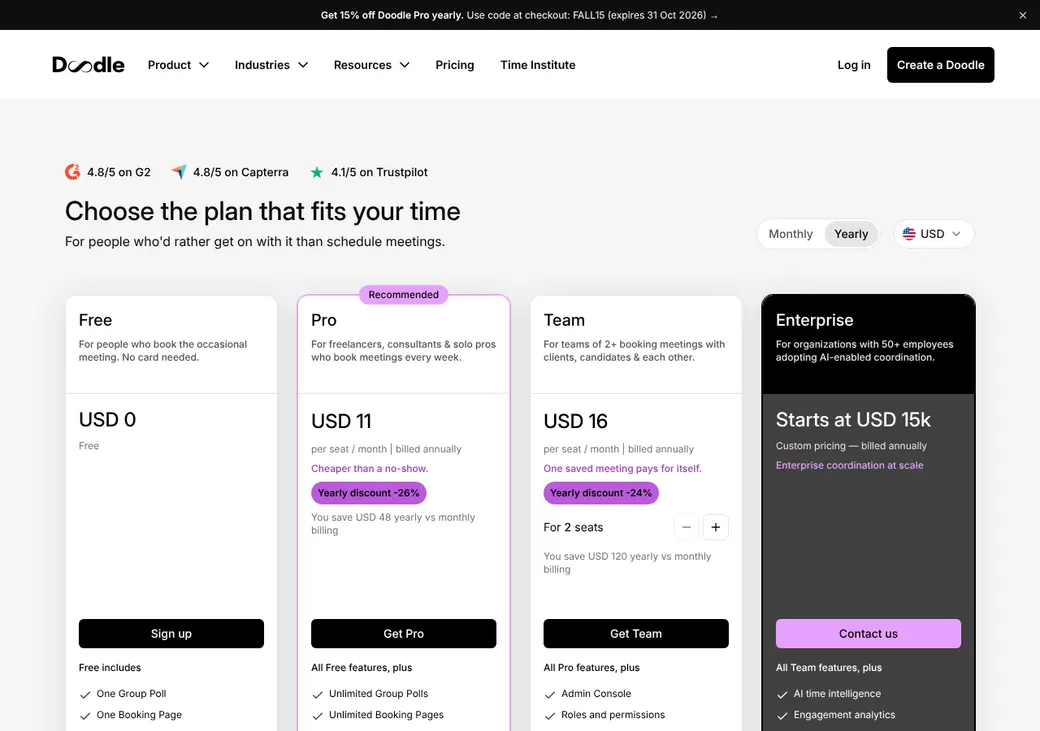
- Free plan. Pro from $11 a month, billed annually
- Team scheduling
- Up to five co-hosts and booking for colleagues on Team
- Reminders
- One email reminder on paid plans. Texts only through Zapier
- CRM connections
- Salesforce and HubSpot through Zapier
- HIPAA BAA
- Only with a signed master services agreement, and Doodle still tells users to keep health details off booking pages
- Apps
- Web and mobile browser
Our take
Doodle is a good fit for an agent who books clients one on one and also sets up group meetings, such as an office meeting or a client workshop. Clients don't need an account to book or vote.
Pro is the plan most solo agents need, at $11 a month billed yearly. It's the first plan with email reminders, and it drops the ads and the Doodle fee on payments.
Team booking pages need every host free at once, so Doodle won't spread new leads across producers. Health and Medicare agents should also know that Doodle asks users to keep insurance details off booking pages.
Pros
- Booking pages, group polls and sign-up sheets in one tool
- Free plan with one booking page and no card
- Clients book without an account
- Custom questions with answers in the calendar invite
- Up to five co-hosts on one booking page on Team
Cons
- One email reminder, and only for bookings made over a day ahead
- Texts need Zapier and a separate service
- Team pages need every host free, so new leads aren't shared out
- Doodle asks users to keep insurance details off booking pages
- No mobile app to download
- The Free plan shows ads
Plans and pricing
| Plan | Billed yearly | Billed monthly | What it adds |
|---|---|---|---|
| FreeTrying it out with one booking page | $0 | $0 | One booking page, a single one-on-one link, basic sign-up sheets and polls up to 10 time slots, with ads |
| ProSolo agentsWhere most agents start | $11 | $15 | Unlimited booking pages, polls and sign-up sheets, email reminders, Teams and Webex, Zapier and no ads |
| TeamAgencies with 2 to 100 people | $16 | $21 | Admin console, roles, co-hosted booking pages, booking for colleagues, activity reports and branding |
| EnterpriseLarger agencies that need single sign-on | From $15,000 a year | Annual only | Single sign-on, two-factor sign-in, a customer success manager, a 99.9% uptime promise and priority support |
Pro and Team prices are per person each month, as of October 2026, from doodle.com/en/premium. Yearly plans are charged in full at purchase, and taxes are extra.
What it would cost you
Cost per month
First-year cost
Cost per booked appointment
Uses the prices in the table.
Good to know before you buy
- Pro covers one person. Team needs at least two people and allows up to 100.
- On the Free plan, Doodle takes 3% of each Stripe payment. Pro and up pay no Doodle fee.
- Doodle doesn't collect sales tax on payments, and refunds are done by hand in Stripe.
- Stripe's own processing fees are separate.
Which plan has it
| Feature | Free | Pro | Team | Enterprise |
|---|---|---|---|---|
| Booking pages | 1 | Unlimited | Unlimited | Unlimited |
| One-on-one meeting links | 1 | Unlimited | Unlimited | Unlimited |
| Group poll time slots | 10 | Unlimited | Unlimited | Unlimited |
| Sign-up sheet sessions | 20 | Unlimited | Unlimited | Unlimited |
| Connected calendars | 1 | Up to 10 | Up to 10 | Up to 10 |
| Custom booking questions | ||||
| Take payment with Stripe | 3% Doodle fee | |||
| Zoom and Google Meet | ||||
| Microsoft Teams and Webex | ||||
| Email reminders | ||||
| Zapier | ||||
| No ads | ||||
| Co-hosted booking pages | ||||
| Book for colleagues | ||||
| Admin console and roles | ||||
| Single sign-on and two-factor sign-in |
Getting started
Sign up free
Make an organizer account on the Free plan. No card is needed, and clients never need an account.
Connect your calendar
Booking pages need Google or Microsoft 365. Doodle checks your connected calendars for conflicts.
Set up your booking page
Set the meeting length, hours, buffers, notice and daily limit. Add the questions you want answered before you meet.
Share your link
Share it by email or text, or link to it from your signature or website.
Choose a plan
Upgrade to Pro for unlimited pages and reminders, or to Team to co-host and book for colleagues.
Setup is self-serve, with a help center and email support. Enterprise adds a customer success manager and priority support.
Booking and calendars
Booking pages and links
A booking page is a reusable link where clients pick from your open times. A one-on-one link offers a few times you choose, group polls let several people vote on a time and sign-up sheets fill sessions. Pages come in five languages, including Spanish.
Intake questions
Doodle asks for name and email, and you can add required or optional questions. Answers show in the confirmation email and the calendar invite. Booking links can carry a tracking tag, so you can see which source sent the client.
Calendar sync
- Works with
- Google Calendar, Microsoft 365 and iCloud
- Calendars checked
- One on Free. Up to 10 on paid plans
- Where bookings go
- A connected calendar
- Rescheduling
- Clients cancel and rebook through the original link
- What Doodle sees
- Event titles, dates and times on your connected calendars
Mobile app
Doodle's iPhone and Android apps are paused and can't be downloaded. Use the mobile site instead, which you can add to your home screen.
Team routing
Team and Enterprise booking pages can have up to five hosts, including the owner. Doodle offers only times when every host is free, and all hosts need connected calendars on the same subscription.
Co-hosted booking pages
Every host joins the meeting, which suits a joint review with a producer and a service rep.
Book on behalf
An assistant can book appointments for a colleague without being added to the meeting.
Team pages don't split leads. Every host must be free and joins the meeting. To spread new appointments across producers, look at a tool with round robin.
Reminders and texts
Reminders
Booking pages send a confirmation email and a calendar invite. Paid plans add one email reminder 24 hours before, but only when the client booked more than 24 hours ahead.
Text message rules
- How texts work
- Through Zapier and a separate text service
- Client consent
- Getting consent is up to you
Integrations
| Connects to | Type | How | From plan | What it does |
|---|---|---|---|---|
| Google Calendar | Calendar | Built in | All plans | Checks busy times and adds bookings |
| Microsoft 365 | Calendar | Built in | All plans | Checks busy times and adds bookings |
| iCloud | Calendar | Built in | All plans | Checks busy times and adds bookings, using an Apple app password |
| Salesforce | CRM | Zapier | Pro | Creates or updates leads and contacts from a booking |
| HubSpot | CRM | Zapier | Pro | Logs a booked meeting in HubSpot |
| Zoom and Google Meet | Video | Built in | All plans | Adds a meeting link |
| Microsoft Teams and Webex | Video | Built in | Pro | Adds a meeting link |
| Stripe | Payments | Built in | All plans | Takes payment at booking |
| Zapier | Automation | Zapier | Pro | Sends booked and changed meetings to other apps |
Zapier connections need a Zapier account, which is billed separately.
Security and HIPAA
HIPAA and health data
Doodle signs a BAA only as part of a signed master services agreement, which names no plan. Even then, it tells users not to collect health or insurance details on booking pages. Keep Medicare numbers, diagnoses and policy details out of your booking questions.
Security
- SOC 2 Type II examination
- Encrypted in transit
- Data hosted on AWS in Ireland and elsewhere in the EU
- Outside penetration testing
- Calendar access you can revoke any time
- Single sign-on and two-factor sign-in on Enterprise
Contract terms
- Billing
- Monthly or yearly. Yearly is charged in full up front
- Renewal
- Renews on its own for the same period
- Price at renewal
- Can change at renewal after notice
- Notice
- Enterprise gives 30 days notice to stop renewal
- Canceling
- Turn off auto-renew in settings and keep access to the end of the term. Deleting the account erases your data
- Refunds
- Yearly self-serve plans get a full refund within 14 days. Enterprise fees aren't refundable
- Your data
- Yours. Paid plans can export poll, sign-up and question answers to Excel
From Doodle's general terms, effective June 4, 2026.
What users say
What reviewers say most often, as of October 2026.
What users like
- Easy group scheduling
- Simple to set up
- Fewer back-and-forth emails
- Handles time zones well
What users dislike
- Ads on the Free plan
- Limited customization
- Notification and calendar sync problems
Doodle alternatives
- CalendlyFree plan. Paid from $10 a seat per monthRound robin and routing forms to share leads across producers
- Acuity SchedulingFrom $16 a month per account. No free planIntake forms, text reminders and a BAA on Premium
- YouCanBookMeFree plan. Paid from $8.10 a monthRound robin by availability or equal split, plus built-in HubSpot
- AppointletFree plan. Premium from $9 a member per monthPriority round robin and a built-in Salesforce connection
- SavvyCalFree to set up and test. Paid from $10 a user per monthRound robin and an AgencyZoom connector
See every option in appointment scheduling software.
Frequently asked questions
How much does Doodle cost?
The Free plan costs nothing for one booking page. Pro is $11 a month billed yearly or $15 billed monthly, and Team is $16 or $21 per person.
Does Doodle sign a BAA for HIPAA?
Only as part of a signed master services agreement, which names no plan. Even then, Doodle tells users not to collect health or insurance details on booking pages, so treat its booking pages as not for health data.
Can Doodle share appointments across agents?
Team booking pages can have up to five hosts, but every host must be free and all of them join the meeting. Doodle won't split new bookings between producers.
Does Doodle send text reminders?
Only through Zapier and a separate text service.
Does Doodle work with Outlook?
Yes, with Microsoft 365, plus Google Calendar and iCloud. Doodle checks them for conflicts and adds the booked meeting.
Does Doodle work with Salesforce or HubSpot?
Through Zapier on paid plans. A booking can create or update a Salesforce lead or contact, or log a meeting in HubSpot.
How we researched this review. We based this review on the pricing, terms and product pages published by Doodle, reviewed in October 2026, together with our team's experience working with insurance agents and agency owners since 2008.
Corrections
Vendors change their pricing all the time and they don't email us when they do. So if you see a price on here that's gone up, a plan Doodle quit selling or a contract term that reads different now, let us know and send the link to the page where Doodle has it. Somebody here pulls up that page and checks it before we change anything on ours.