
Appointlet review for insurance agents: pricing, features and integrations
Appointlet lets clients book time with you from a link, a team page or your agency website. It checks your Google or Microsoft calendar, books the meeting and adds a video link.
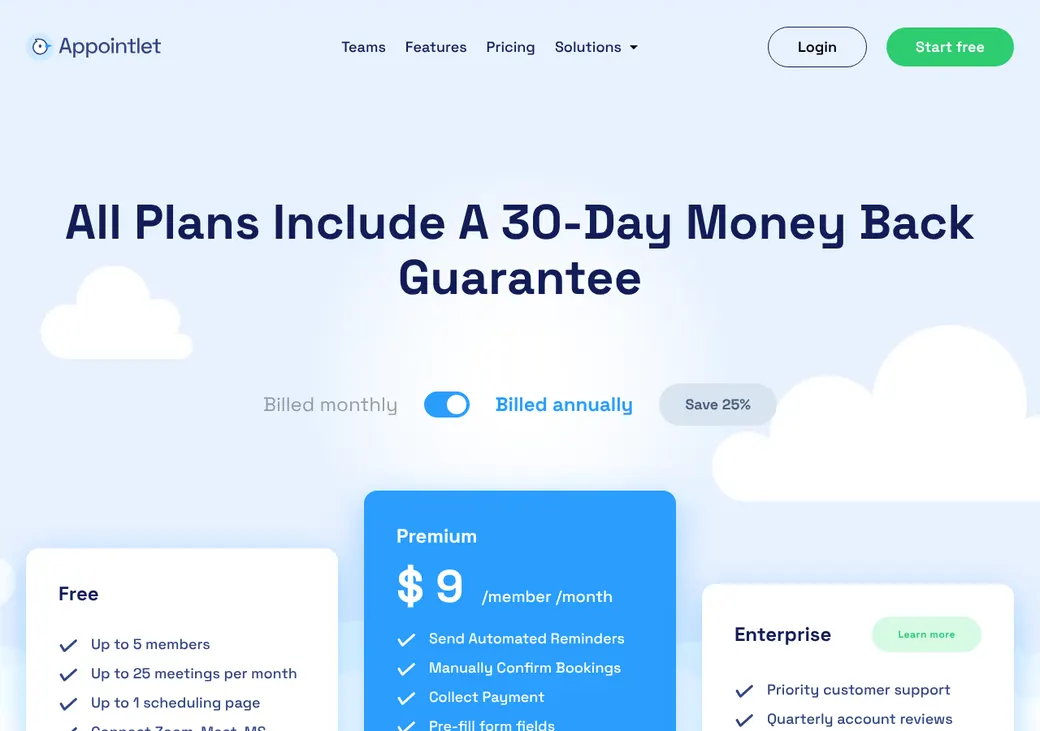
A Free plan covers a small team with light booking. Most agents will want Premium, priced per person, for email reminders, round robin and Zapier.
- Best for
- Solo agents and small agencies that share appointments by priority
- Price
- Free plan. Premium from $9 a member per month, billed annually
- Free trial
- 14 days of Premium. No card needed
- Team scheduling
- Round robin with producer priorities on Premium. Group meetings on every plan
- Reminders
- Email reminders on Premium. Texts only through Zapier and a text provider
- CRM connections
- Salesforce built in, in beta. HubSpot, Zoho CRM and SmartOffice through Zapier
- HIPAA BAA
- Not offered
- Apps
- Web and iPhone
Our take
Appointlet suits a solo agent or small agency that wants a simple booking link and an even share of appointments across producers. It's quick to set up, and clients find the booking page easy.
Premium is the plan most agents need, at $9 a member per month billed yearly. The Free plan has no reminders and stops at 25 bookings a month.
Text reminders are the main gap. They need Zapier and a separate text provider, and Appointlet doesn't offer a BAA for health agents.
Pros
- Round robin with producer priorities on Premium
- Group meetings with several hosts on every plan
- Salesforce connection built in
- Booking exports show the lead source and campaign
- Video links for Zoom, Teams, Google Meet and more
- 14-day Premium trial without a card
Cons
- Free plan stops at five members, 25 bookings a month and one page
- Every login is a paid member, including owners and admins
- Text reminders need Zapier and a separate text provider
- No routing by state, license or line
- No BAA for health data
- No Android app
Plans and pricing
| Plan | Billed yearly | Billed monthly | What it adds |
|---|---|---|---|
| FreeTrying it out with a small team | $0 | $0 | Up to five members, 25 bookings a month and one scheduling page |
| PremiumAgents who want reminders and round robinWhere most agents start | $9 | $12 | Unlimited meetings, email reminders, round robin, payments, prefilled links, Zapier and webhooks |
| EnterpriseAgencies that want account reviews | Quote only | Quote only | Priority support, quarterly account reviews and added security measures |
Premium prices are per member each month, as of October 2026, from appointlet.com/pricing.
What it would cost you
Cost per month
First-year cost
Cost per booked appointment
Uses the Premium price in the table. Texts sent through Zapier cost extra.
Good to know before you buy
- Every login is a paid member, including owners and admins.
- When the trial ends, the account moves to the Free plan unless you upgrade.
- Zapier, text providers and payment processors bill you separately.
- Stripe charges 2.9% plus $0.30 per payment. Appointlet takes no cut.
- Schools and nonprofits can ask for 25% off with proof of status.
Which plan has it
| Feature | Free | Premium |
|---|---|---|
| Bookings a month | 25 | Unlimited |
| Booking page and website embed | ||
| Google and Microsoft calendars | ||
| Video meeting links | ||
| Confirmation emails | ||
| Group meetings with several hosts | ||
| Salesforce, built in | ||
| Email reminders | ||
| Round robin | ||
| Approve bookings by hand | ||
| Take payment when booking | ||
| Prefilled booking links | ||
| Zapier and webhooks | ||
| Remove Appointlet branding |
The Free plan also stops at five members and one scheduling page. Enterprise adds priority support, quarterly account reviews and added security measures, priced by quote.
Getting started
Start the free trial
You get 14 days of Premium without a card.
Connect your calendar
Each person connects Google or Microsoft 365 and picks which calendars block time. Pick one calendar for new bookings.
Set up your meeting types
You'll want one per meeting, for example a quote review and an annual review. Add your intake questions, buffers and daily limits.
Share your link
Send the link in emails and texts, add it to your signature or show it on your website as a page or a popup.
Choose a plan before the trial ends
If you don't upgrade, the account moves to the Free plan with five members, 25 bookings a month and one page.
Setup is self-serve, with help articles and a video tutorial. Support is by live chat on weekdays and by email, with no phone support.
Booking and calendars
Booking pages and links
Clients book from a hosted page, an inline embed on your website or a floating popup, without making an account. Team pages share appointments, while personal pages and direct links go to one agent or one meeting type. Premium can hide a meeting type from the page and still book it through its own link.
Intake questions
Forms can ask required or optional questions as text, choices, checkboxes, dates and times. Premium links can fill in the client's name, email and answers for them. Pages come in nine languages, including Spanish.
Calendar sync
- Works with
- Google Calendar, Google Workspace, Microsoft 365 Business and Outlook.com
- Doesn't work with
- Exchange, Outlook desktop or Microsoft 365 Personal and Family
- Calendars checked
- The calendars each person picks
- Where bookings go
- One calendar each person picks
- Changes in Appointlet
- Rescheduling or canceling updates the event and tells the client
- Changes you make
- Moving or deleting the event in Google or Outlook reschedules or cancels it when Sync Calendar Changes is on
Mobile app
The iPhone app lets you manage and copy your booking links. Everything else is done on the web, and a Chrome extension keeps your links one click away.
Team routing
Premium can share appointments across producers with round robin. Group meetings, where a time shows only when every host is free, work on every plan.
Priority round robin
Bookings are spread evenly among the open producers at the top priority. Lower-priority producers pick up bookings when the top tier isn't free.
Client picks
Clients can choose a producer on a team page, or book one agent from a personal page.
No license check. Appointlet won't route by state, license, carrier appointment, line, language or whether the client is new. Intake answers don't change who gets the booking either.
Reminders and texts
Reminders and no-shows
Every plan sends confirmation and change emails. Premium adds email reminders you set for each meeting type. You tag no-shows yourself, then filter them, export them or send them to Zapier for follow-up.
Text message rules
- How texts work
- Through Zapier and a text provider such as ClickSend, which bill you separately
- Client consent
- You can add a phone field and a required consent box. Appointlet doesn't keep a record of consent
- Opt-outs
- STOP replies aren't handled in Appointlet
- Business texting registration
- Appointlet doesn't handle the US carrier registration that business texting needs
Integrations
| Connects to | Type | How | From plan | What it does |
|---|---|---|---|---|
| Google Calendar | Calendar | Built in | All plans | Checks busy times and adds bookings |
| Microsoft 365 and Outlook.com | Calendar | Built in | All plans | Checks busy times and adds bookings |
| Salesforce | CRM | Built in | All plans | Runs your Salesforce flows when a meeting is booked, moved or canceled. Needs API and Manage Flows permissions |
| Salesforce | CRM | Zapier | Premium | Sends booking data to the Salesforce actions you pick |
| HubSpot | CRM | Zapier | Premium | Finds or creates the contact and updates it |
| Zoho CRM | CRM | Zapier | Premium | Sends booking data to the fields you set up |
| SmartOffice | Insurance CRM | Zapier | Premium | Adds a contact, lead or activity |
| Zoom, Google Meet, Microsoft Teams, Webex, GoToMeeting and Join.me | Video | Built in | All plans | Adds a meeting link to the booking |
| Stripe and PayPal | Payments | Built in | Premium | Takes payment before the booking is confirmed |
| Webhooks | Developer | Built in | Premium | Sends booking data to another system |
Zapier connections need a Zapier account, which is billed separately. Booking exports on every plan include the lead source and campaign from your link.
Security and HIPAA
HIPAA and health data
Appointlet doesn't offer a BAA or a HIPAA plan. Leave health details and Medicare numbers off your booking forms.
Security
These are Appointlet's own controls. It has no SOC 2 report, single sign-on or customer audit log.
- Encrypted in transit and at rest
- Hosted on AWS with each customer's data kept separate
- Penetration tests at least once a year
- Staff access reviewed twice a year
Contract terms
- Billing
- Monthly or yearly
- Renewal
- Renews on its own for the same period until the owner cancels
- Canceling
- Cancel in billing settings or through support. Premium runs to the end of the period, then the account moves to Free
- Refunds
- Only within 7 days of a billing cycle and only if no bookings were made since the subscription started. Yearly refunds carry a 10% fee
- Your data
- CSV export of meetings, clients, hosts, intake answers and campaign details
From Appointlet's terms, last updated May 15, 2018 and still the current version in October 2026.
What users say
What reviewers say most often, as of October 2026.
What users like
- Easy to set up
- Booking pages clients find easy
- Calendar and video connections
- Helpful support
What users dislike
- Limited control over how booking pages look
- Calendars sometimes need reconnecting
- Invitations can be fiddly
Appointlet alternatives
- CalendlyFree plan. Paid from $10 a seat per monthRouting forms, built-in HubSpot and text reminders on Standard
- Acuity SchedulingFrom $16 a month per account. No free planPriced per account, with intake forms and a BAA on Premium
- Cal.comFree for one user. Teams from $12 a user per monthRouting forms, CRM owner routing and a BAA add-on
- YouCanBookMeFree plan. Paid from $8.10 a monthEqual-split round robin and built-in HubSpot
See every option in appointment scheduling software.
Frequently asked questions
How much does Appointlet cost?
Premium is $9 a member per month billed yearly or $12 billed monthly. The Free plan costs nothing for up to five members and 25 bookings a month.
Does Appointlet sign a BAA for HIPAA?
No. Appointlet doesn't offer a BAA or a HIPAA plan, so keep health details out of your booking questions.
Does Appointlet send text reminders?
Not by itself. Texts go through Zapier and a provider such as ClickSend, which bill you separately.
Does Appointlet work with Outlook?
Yes, with Microsoft 365 Business and Outlook.com. It doesn't work with Exchange, Outlook desktop or Microsoft 365 Personal and Family.
Does Appointlet do round robin?
Yes, on Premium. It spreads bookings across the open producers and lets you set who gets priority.
Does Appointlet work with Salesforce or HubSpot?
Salesforce connects directly and runs your Salesforce flows. HubSpot, Zoho CRM and SmartOffice connect through Zapier on Premium.
How we researched this review. We based this review on the pricing, terms and product pages published by Appointlet, reviewed in October 2026, together with our team's experience working with insurance agents and agency owners since 2008.
Corrections
Vendors change their pricing all the time and they don't email us when they do. So if you see a price on here that's gone up, a plan Appointlet quit selling or a contract term that reads different now, let us know and send the link to the page where Appointlet has it. Somebody here pulls up that page and checks it before we change anything on ours.