InsuranceAgencyTools

Brevo review: pricing, automations and AMS connections for agents

By the IAT editorial team | Updated October 4, 2026

Brevo is an email and texting platform priced mainly by how many emails you send each month, with a cap on stored contacts at each paid tier. Its anniversary date trigger can send renewal or birthday emails from date fields you import.

It suits a small agency that wants a free plan to start and writes its own emails. Standard is the first plan with no footer included and no 2,000-contact limit on automations.

Best for
Small agencies that want a free start and pay by emails sent, within a contact cap
Price
Free plan. Paid plans from $9 a month for 5,000 emails and up to 500 contacts
Priced by
Emails sent each month. Each tier also caps how many contacts you can store
Free plan or trial
Free plan with 300 emails a day. No timed trial
Agency system sync
None. Zapier or the API
Renewal emails
Yes, from a renewal date field you import
Insurance content
None. You write your own emails
Texting
Prepaid text credits on every plan

Our take

Brevo is a general platform with no insurance content or AMS link. What sets it apart is the monthly email allowance, which suits an agency that emails only a few times a month.

The contact caps on paid tiers still matter. A list over 2,500 contacts pushes you past the first three tiers, and blocked contacts count too.

Texting runs on prepaid credits that never expire, which suits occasional reminders. US texting first needs a registered toll-free number.

Pros

  • A free plan with no card needed
  • Priced by emails sent, which favors infrequent senders
  • Date triggers for renewals and birthdays on every plan
  • Separate block lists for email and text
  • Text credits never expire

Cons

  • No insurance content or compliance review
  • No AMS connection of any kind
  • Blocked contacts still count toward your cap
  • No refunds, and the paid term stays due if you cancel
  • US text credit prices aren't on the pricing page

Plans and pricing

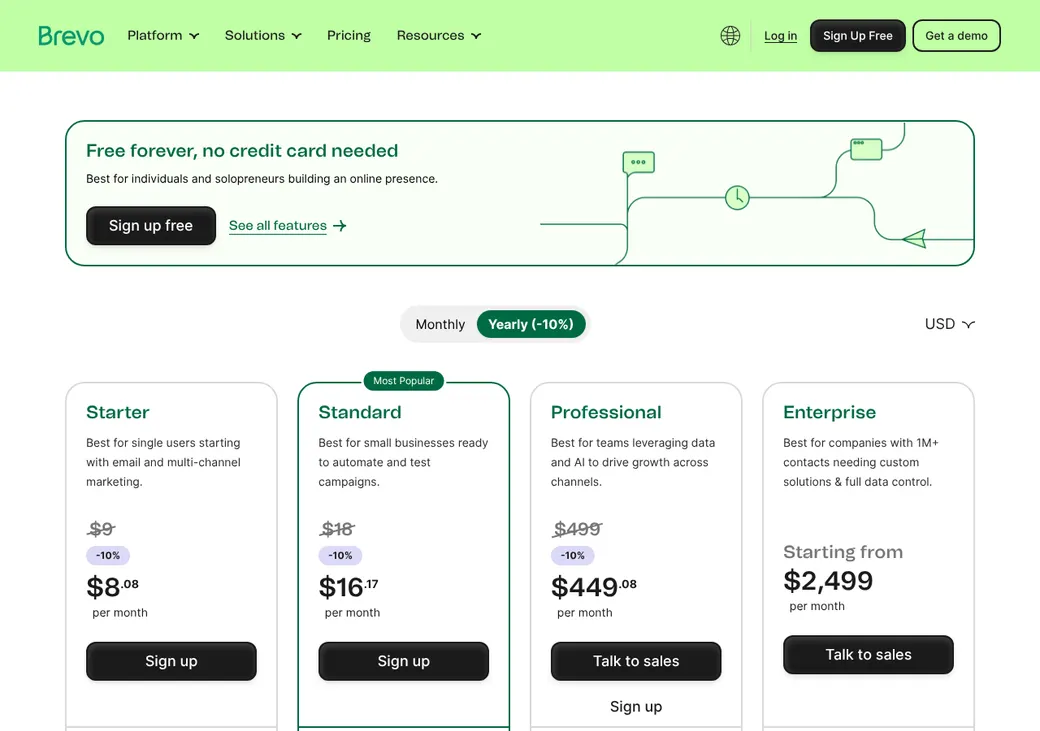
Screenshot of Brevo's pricing page at brevo.com
Brevo's pricing page at brevo.com, as it looked on October 8, 2026.
PlanMonthly priceEmailsWhat it adds
FreeTrying it out$0300 a dayUp to 100,000 stored contacts, automations for 2,000 contacts and a Brevo footer on every email
StarterA small newsletter list$9From 5,000 a monthNo daily cap, AI writing help and sign-up forms. The footer stays unless you pay to remove it
StandardRenewal and birthday automationsWhere most agencies start$18From 5,000 a monthAutomations with no contact cap, A/B tests, send time optimization and no footer
ProfessionalLarger agencies$499From 150,000 a month10 users, consent groups, phone support and deliverability help
EnterpriseSeveral brandsQuote onlyCustomSub-accounts, single sign-on and one dedicated IP address

Prices as of October 2026, from brevo.com/pricing. Yearly billing saves about 10%: Starter is $96.96, Standard $194.04 and Professional $5,388.96 a year.

How the tiers work

The first three tiers are 5,000 emails with up to 500 contacts, 10,000 with up to 1,500 and 15,000 with up to 2,500. Passing the contact cap moves you up a tier and raises the price. The Free plan stores up to 100,000 contacts but sends only 300 emails a day.

Good to know before you buy

  • Unsubscribed, bounced and blocked contacts still count toward your contact cap.
  • Unused emails expire each month and don't carry over.
  • Removing the footer on Starter costs $9 a month.
  • Extra users on Standard cost $9 a month each, up to three users.
  • Brevo approves each new account before it can send.

Which plan has it

FeatureFreeStarterStandardProfessionalEnterprise
Users11Up to 310Unlimited
Contacts in automations2,0002,000UnlimitedUnlimitedUnlimited
Date-based automations
Brevo footer removedAdd-on
A/B testing
Click heatmaps and device reports
Consent groups
Phone support
Dedicated IP addressAdd-on
Text credits

AMS and CRM connections

No agency system connects to Brevo. Client and renewal data comes in by file import, sign-up forms, Zapier or the API. You keep it current yourself.

Connects toHowWhat syncsDirection
ZapierZapier connector, every planContacts and Brevo actionsBoth ways
Your own systemsAPI and webhooksContacts, deals, tasks, notes and eventsBoth ways, in real time
SalesforceBrevo pluginContactsInto Brevo
WordPress, Shopify and 500 other toolsBrevo pluginsContacts and site or store activityInto Brevo

Webhooks that push data into Brevo need Professional.

Contacts and policy data

What counts as a contact
Each stored person, including unsubscribed, bounced and blocked ones
Policy data it holds
None built in. Store line, carrier and renewal date as custom fields. Professional adds one custom object
Custom fields
Up to 200 per account
Where dates come from
A file import, a form, a plugin or the API
Segments
Saved segments on every plan, built on fields, site visits and email activity

Automations

Renewal emails
The anniversary date trigger sends before, on or after a renewal date field, at a set time each day
Birthday and other dates
The same trigger works on any date field
Other triggers
Form sign-ups, page visits, email clicks and custom events
Plan needed
Free and Starter run automations for up to 2,000 contacts. Standard and up have no cap
Testing
Split contacts across different paths to see which works better

Content and templates

Insurance content

None. The templates are the same for every Brevo account, so your agency writes its own insurance emails.

Compliance review

Brevo doesn't review what you send. Your agency checks every claim and disclosure.

Templates
More than 40, sorted by industry and purpose, plus a drag-and-drop editor
AI writing
Drafts subject lines and email copy on every paid plan
Saved sections
Reusable blocks such as a signature or a disclosure

Sending and deliverability

Sends from
Your own domain once you authenticate it
Domain setup
A Brevo code, DKIM and DMARC records in your DNS. These prove the email really comes from your agency
Who sets it up
Brevo can sign in to your DNS host and add them, or you or your IT person paste them in
Shared or dedicated IP
Shared addresses on most plans. A dedicated one is $251 a year on Professional and included on Enterprise
Bounces
Hard bounces are dropped automatically
Your own mailbox
Not for campaigns. They send through Brevo
Service emails
Transactional email by API or SMTP is on every plan

If you already have a DMARC record, set up by hand to keep it. Automatic setup asks to replace it.

Texting

Available on
Every plan, with prepaid credits sold in packs of 100
Price or credits
The credits per text depend on the country and length. A text over 160 characters counts as two
Credits expire
Never
Picture texts
2.1 credits each, to US numbers only
Number registration
US and Canada texting needs a registered toll-free number. Approval can take four to six weeks
Consent and opt-outs
STOP blocks a contact from text campaigns. The text block list is separate from email

The price of a US text credit isn't listed on the pricing page. Your agency handles written consent for marketing texts under federal law.

Reporting

What it tracks

  • Opens and clicks on every plan
  • Click heatmaps and device reports from Standard
  • Custom dashboards on Professional
  • Sales credited to campaigns, more detailed on Professional

Apple Mail can load emails in the background, so open rates run high. Clicks are the steadier measure.

Getting started

  1. Open a free account

    No card is needed. Brevo approves the account before it sends.

  2. Authenticate your domain

    Let Brevo add the records or paste them in yourself.

  3. Import your clients

    Add renewal and birth dates as custom fields in the file.

  4. Build an anniversary automation

    Set it to send a set number of days before each renewal date.

  5. Pick a plan

    Move to Standard once automations reach more than 2,000 contacts.

Free, Starter and Standard are self-serve with email help. Brevo publishes a guide for moving from Mailchimp.

Contract and your data

Billing
Monthly or yearly, chosen at sign-up
Renewal
Renews automatically for the same length
Canceling
Anytime, but fees for the rest of the paid term stay due. Professional needs written notice 15 days before renewal
Refunds
None for unused time or emails
Pausing
Monthly plans can pause for up to three months
Your list
Export contacts and reports anytime while subscribed
After you cancel
Data is deleted at once unless you ask for a 24-hour recovery window, billed at your last monthly price
Idle accounts
Can be deleted after six months with no logins, following an email warning

From Brevo's terms and help pages, checked October 2026.

Frequently asked questions

How much does Brevo cost for 1,000 clients?

The Free plan holds 1,000 clients but sends only 300 emails a day. A paid plan needs the 10,000-email tier, which allows up to 1,500 contacts, and Brevo shows its price only in the calculator on its pricing page.

Does Brevo connect to my AMS?

No. Client and renewal data comes in by import, Zapier or the API.

Can Brevo send renewal reminders?

Yes. The anniversary date trigger sends before, on or after a renewal date you store on each contact.

Is Brevo free?

Yes, the Free plan allows 300 emails a day with a Brevo footer. Automations on it reach up to 2,000 contacts.

Can Brevo send texts?

Yes, on every plan with prepaid credits. US texting needs a registered toll-free number, which can take four to six weeks.

How we researched this review. We based this review on the pricing, terms and product pages published by Brevo, reviewed in October 2026, together with our team's experience working with insurance agents and agency owners since 2008.

Corrections

Vendors change their pricing all the time and they don't email us when they do. So if you see a price on here that's gone up, a plan Brevo quit selling or a contract term that reads different now, let us know and send the link to the page where Brevo has it. Somebody here pulls up that page and checks it before we change anything on ours.

Correct this listingClaim this listing