AgencyComp review: pricing, statement matching and producer pay
AgencyComp checks your carrier commission statements against what each policy should pay. You upload Excel statements and it matches each line to a policy. Its reports then show missing and short payments.
It is built for life, health, Medicare and benefits agents. Plans are priced by how many clients you track, starting at $39.95 a month.
- Best for
- Life, health and Medicare agents and small agencies that want a low monthly price
- Price
- From $39.95 a month
- Setup fee
- Optional onboarding, $150 for up to 10 carriers
- Free trial
- 14 days, no card needed
- Statement intake
- Excel uploads, with a saved map for each carrier
- Splits and overrides
- Duplicate the policy for each producer. Overrides go in as other pay
- Producer statements
- A report for producers paid a fixed share
Our take
AgencyComp fits a solo agent or small life, health or Medicare agency that wants to stop checking statements by hand. The cheapest plan, Pro, covers a solo book of up to 500 clients. An agency with more clients or staff moves up to Select or Premier.
The Medicare templates are a plus if you sell Advantage or drug plans. The limit to know first is intake. Every statement is an Excel file you download and upload yourself, and each carrier needs a map before its lines will post.
Pros
- Low published prices, billed month to month
- Free 14-day trial with no card
- Missing Commission and Projected vs Actual reports show short pay
- Medicare Advantage and Part D templates
- Creates up to 50 policies at once from unmatched lines
Cons
- Excel uploads only, with no PDF reading or carrier downloads
- Split sales need a copy of the policy for each producer
- No producer portal or payroll file
- Extra users can't see reports
- Access to your data ends the moment you cancel
Plans and pricing
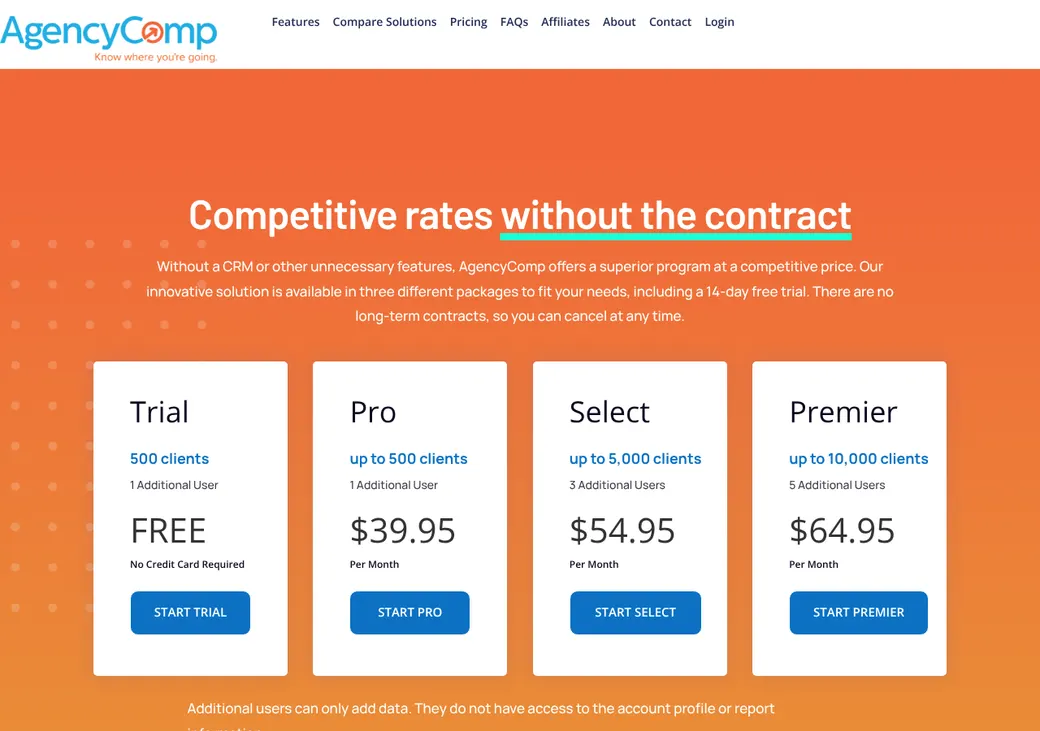
| Plan | Price | Clients | Extra users |
|---|---|---|---|
| TrialTry it on your own statements | Free for 14 days | Up to 500 | 1 |
| ProUp to 500 clientsWhere solo agents start | $39.95 a month | Up to 500 | 1 |
| SelectGrowing agencies | $54.95 a month | Up to 5,000 | 3 |
| PremierLarger books | $64.95 a month | Up to 10,000 | 5 |
Prices as of October 2026, from agencycomp.com/pricing. All plans bill monthly. The limit counts clients, not policies, so a client with three policies counts once.
| Fee | Price | What it covers |
|---|---|---|
| Onboarding, first 10 carriers | $150 once | AgencyComp loads your policies, sets up your commission plans, builds statement maps and imports two past statements per carrier |
| Each carrier after that | $12 once | The same work for one more carrier |
Good to know before you buy
- Onboarding is optional. You can build your own maps during the trial.
- After the trial ends, the account shows only the dashboard until you pick a plan.
Getting started
Start the trial
Sign up for 14 days free with no card, or book a live demo first.
Load your policies
Add policies and clients, or pay for onboarding and AgencyComp imports them.
Set up commission plans
Enter how each carrier pays you: rates by policy year, fees, premium basis, payment mode and any advance.
Map each carrier statement
Match the columns of one Excel statement to AgencyComp fields and save the map for next month.
Post your first statements
Upload up to 15 at once, then work the lines that didn't match.
Help comes by phone and email, with a help center, tutorial videos and a one-on-one demo.
Statement intake
- File types
- Excel (XLSX)
- How statements arrive
- You download them from each carrier and upload them, up to 15 at a time
- Carrier layouts
- You build a map for each carrier and reuse it. A generic template covers statements you reformat first
- Statements from an upline
- Add a carrier column so one file can hold several carriers
Matching and missing payments
- Matches on
- Policy number, effective date, product, revenue type, client and producer
- Lines it can't match
- They wait as Pending. Match them to a policy, create a new policy, fix and repost them or mark them ignored
- New policies in bulk
- Create up to 50 policies at once from pending lines
How it finds missing pay
AgencyComp works out what each policy should pay from its commission plan. The Missing Commission report lists policies with no payment, and Projected vs Actual shows payments above or below what you expected.
Fixing a mistake
Unmatching a line sends it back to Pending and undoes the policy changes it made. You can correct a map and post the statement again.
Splits, overrides and hierarchy
Each policy holds one producer. To split a sale, you copy the policy for each producer and give each copy that producer's share of the premium.
Bonuses and overrides (pay to an upline on a downline's sale) are entered on their own as other pay. AgencyComp handles splits only and has no multi-level hierarchy.
Advances, chargebacks and renewals
- Advances
- A plan can set an advance percentage and cap. The Advanced Commission report shows what you still owe the carrier if a policy lapses
- Renewals
- Set different rates by policy year, for new business and renewals
- Bonuses
- Bonuses, overrides and health assessment payments go in as other pay
Medicare commissions
Built-in templates cover Medicare Advantage and Part D drug plans. You pick the plan type, location, plan years and whether renewals pay at fair market value (the yearly maximum Medicare sets) or a level amount.
The enrollment type decides the pay. New to Medicare and new to Advantage with an existing drug plan pay the first-year amount, and a member who isn't new to Medicare pays the renewal amount.
The templates also handle January 1 renewals and the yearly fair market value update.
Producer statements and pay
- Statements
- The Commission Statement report shows each producer's pay at a fixed share of what you received
- Which money counts
- You choose the carrier statements that feed it. Statements with pending lines are left out
- Paying producers
- You pay them yourself. AgencyComp makes the report only
Integrations
| Connects to | Type | How | What it does |
|---|---|---|---|
| Zapier | Automation | Zapier | Adds or finds producers, clients, carriers and policies from apps such as Zoho CRM, VanillaSoft, ActiveCampaign, Google Sheets and Airtable |
Zapier is a separate subscription. Carrier statements still come in as file uploads.
Reports
Filter by client, producer, carrier, product, plan type, policy status and period. Some reports look back or ahead up to ten years, and most export.
Security and access
Who sees what
One main subscriber plus named users with their own logins. Extra users can't see reports or the account profile.
Security
- Hosted on Amazon Web Services
- Daily backups
- Monitoring and logging
- Encrypted transfer for health information
- Uploaded files kept only a short time
- Card payments handled by Stripe
Contract and your data
- Term
- Month to month, no long-term commitment
- Renewal
- Renews each month, billed in advance
- Canceling
- In the account or by email to support. It takes effect right away
- Refunds
- Fees already paid are not refunded
- Your data
- Export your reports before you cancel because you lose access at once
- Failed card payment
- The account pauses after 16 days and cancels after 90 if not restarted
From AgencyComp's terms of service dated June 9, 2026.
AgencyComp alternatives
- Commission TrackerFrom $67 a monthReads PDF statements and offers a done-for-you processing service
- CommissionIQFrom $79 a monthHierarchy levels and FMO connections for uplines
- NextCommissionSolo from $133.33 a month billed yearlyBranded sub-agent statements and group benefits splits
- Core CommissionsFrom $10 a payee a month, 15 minimumRules engine and producer portal for larger agencies
See every option in insurance commission software.
Frequently asked questions
How much does AgencyComp cost?
Pro is $39.95, Select $54.95 and Premier $64.95 a month. Optional onboarding is $150 for up to 10 carriers.
Does AgencyComp have a free trial?
Yes, 14 days with no card. It covers up to 500 clients and one extra user.
Can AgencyComp read PDF commission statements?
No. It takes Excel files, so a PDF statement has to be converted first.
Does AgencyComp handle Medicare commissions?
Yes. Templates for Medicare Advantage and Part D set first-year and renewal pay by enrollment type.
Can AgencyComp pay my producers?
It shows what each producer is owed in a statement report. You pay them yourself.
Does AgencyComp connect to my CRM?
Only through Zapier, which can add producers, clients and policies from apps such as Zoho CRM.
How we researched this review. We based this review on the pricing, terms and product pages published by AgencyComp, reviewed in October 2026, together with our team's experience working with insurance agents and agency owners since 2008.
Corrections
Vendors change their pricing all the time and they don't email us when they do. So if you see a price on here that's gone up, a plan AgencyComp quit selling or a contract term that reads different now, let us know and send the link to the page where AgencyComp has it. Somebody here pulls up that page and checks it before we change anything on ours.