
Act! review: pricing, plans and integrations
Act! is a general CRM and email marketing suite that agents set up for insurance with Custom Industry Tables. It tracks contacts, deals and renewal follow-up beside your AMS.
Advantage plans cost $30 to $60 a user per month, paid yearly. You can try it free for 14 days without a card.
- Best for
- Small agencies that want a general CRM with email marketing and keep policies in an AMS
- Type
- General CRM platform with insurance setup
- Lines
- Life, personal auto, commercial and health in its insurance setup
- Price
- $30 to $60 a user per month, billed yearly
- Free trial
- 14 days, no card needed
- AMS connections
- None built in. Custom links through the Web API
- Calling and texting
- Calls from your own phone. Texting is an add-on from $19 a month
- Apps
- Web, iPhone, Android and Windows desktop
Our take
Act! suits small agencies that want a long-running CRM with email campaigns built in. Policies live in Custom Industry Tables, which add rows to each contact. The AMS stays the book of record.
Ultimate is the plan that includes those insurance tables and a client portal. On the two lower plans both cost extra.
There is no AMS link, carrier download or commission tracking. Treat it as a marketing and follow-up tool next to an agency system, not a stand-in for one.
Pros
- Prices for every plan on its website
- 14-day free trial with no card
- iPhone and Android apps for cloud users
- Insurance template for tracking policies on each contact
- Email marketing included on every plan
Cons
- No AMS connection or carrier downloads
- Insurance tables cost extra below Ultimate
- No commission tracking or Medicare tools
- Client portal shows documents, not ID cards
- Advantage plans bill a year up front
Plans and pricing
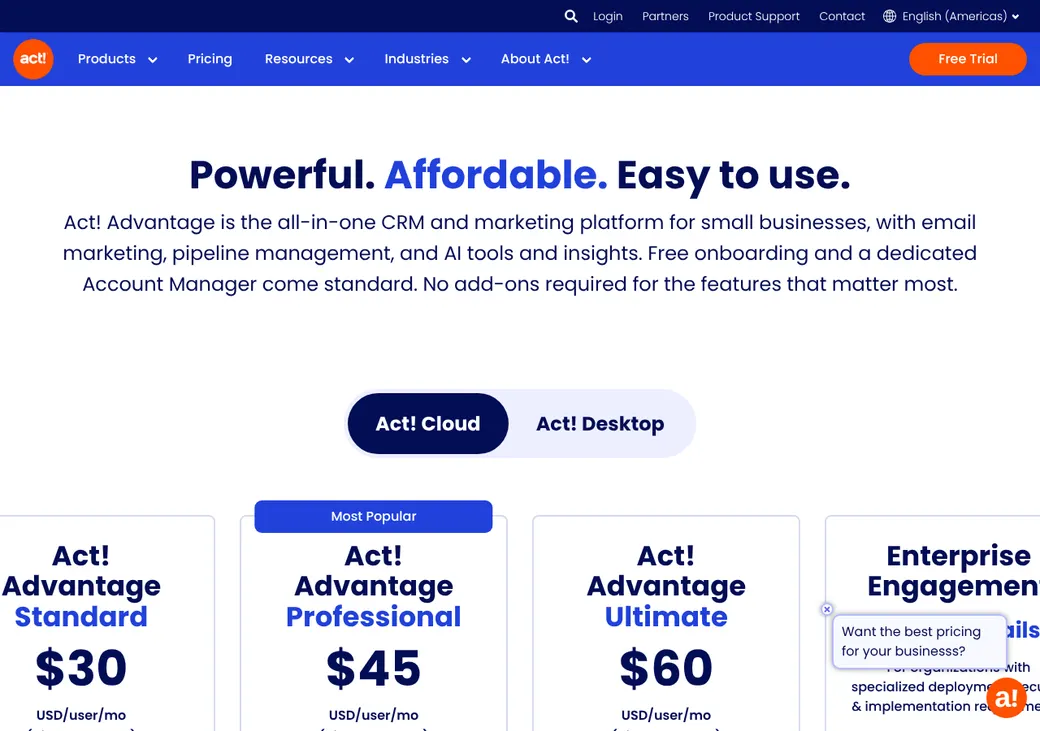
| Plan | Price a user per month | Billed | What it adds |
|---|---|---|---|
| Advantage StandardA solo agent or small office | $30 | Yearly | CRM, phone app, 2,500 emails a month, Outlook and Gmail, scheduling, forms and reports |
| Advantage ProfessionalAgencies that email clients often | $45 | Yearly | 25,000 emails a month, campaign templates, RingCentral and accounting links and AI writing help |
| Advantage UltimateAgencies that track policies in Act!Includes the insurance tables | $60 | Yearly | Insurance tables, client portal, marketing automation, lead scoring and 50,000 emails a month |
| Premium DesktopOffices that run it on their own server | $40 | Monthly | Installed on your own computers, with offline access on your network |
Prices as of October 2026, from Act!'s pricing page. Act! also quotes an Enterprise plan with private hosting.
What it would cost you
Cost per month
First-year cost
Software cost per new policy
Uses the yearly-billed Advantage prices. Add-ons and texting cost extra.
Billed on top
| Add-on | Price |
|---|---|
| Insurance tables on Standard | $10 per user per month |
| Insurance tables on Professional | $5 per user per month |
| Insurance tables on Premium Desktop | $10 per user per month |
| Client portal on Professional | $100 per month per account |
| Enhanced support on Standard | $10 per user per month |
| Desktop Sync | $10 per user per month |
| More email sends | $15 per 2,500 sends a month |
| More storage | $4 per 5 GB a month |
Texting add-on
| Texts a month | Price a month |
|---|---|
| 345 | $19 |
| 1,000 | $49 |
| 3,000 | $99 |
| 10,000 | $249 |
Good to know before you buy
- You can lower your user count only at renewal, and by no more than a quarter.
- Setup help from Act! staff costs $175 an hour, or from $112.50 with a prepaid block.
Which plan has it
| Feature | Standard | Professional | Ultimate |
|---|---|---|---|
| Email sends a month | 2,500 | 25,000 | 50,000 |
| Insurance tables | Add-on | Add-on | |
| Client portal | Add-on | ||
| Marketing automation and lead scoring | |||
| RingCentral and accounting links | |||
| Phone app | |||
| Appointment booking and web forms | |||
| Cloud storage | 15 GB | 25 GB | 35 GB |
| Enhanced support | Add-on | Add-on |
Client and policy records
- Records it keeps
- Contacts, companies, deals, groups, notes and activity history
- Policies
- In Custom Industry Tables, using the Insurance template
- Role next to your AMS
- Sits beside it. Your AMS stays the policy book of record
- User roles
- Six levels from Administrator to Browse, plus export and API permissions
Custom Industry Tables add spreadsheet-style rows to a contact, one row per policy, with fields such as carrier and renewal date. You set them up, so plan the fields before you import.
Leads and pipeline
Facebook leads arrive through Act! Connect, its app connector. Deals move through pipeline stages you name. Act! names no insurance lead vendors.
Renewals, retention and cross-sell
- Renewal reminders
- Run from the renewal dates in your insurance tables
- Cross-sell
- Segment clients by policy type, then send email campaigns
- Automation
- Drip campaigns on every plan, full marketing automation on Ultimate
Email, calling and texting
Calling
Calls go through your own phone from the mobile app. RingCentral connects on Professional and Ultimate.
Texting
An add-on run by Message Media. Texts are sent and received on the contact record.
Email marketing comes with every plan, with campaign templates on Professional and automation on Ultimate.
- Opt-outs
- Unsubscribe tools for email, opt-out handling for texts
- Texting registration
- 10DLC, the US carrier registration for business texting, is in the texting price unless your order says otherwise
- Who answers for consent
- Your agency. It also repays any carrier fines
AMS and carrier connections
No AMS connects to Act! out of the box, and there are no carrier downloads. Custom links to your agency system need the Web API and a developer.
| Connects to | Type | How | Direction | What it does |
|---|---|---|---|---|
| Outlook | Email and texting | Built in | Both ways | Contacts, email, activities and calendar |
| Google Contacts | Email and texting | Built in | Into Act! | Adds new Act! contacts from Google |
| Facebook Lead Ads | Forms and websites | Act! Connect | Into Act! | Turns Facebook leads into contacts |
| SMS Message Media | Email and texting | Add-on | Both ways | Two-way texts saved to the contact |
| QuickBooks Online | Accounting and commissions | Act! Connect | From Act! | Creates a QuickBooks customer for each new contact |
| Accounting Link | Accounting and commissions | Built in | Both ways | Quotes, orders, invoices and balances from QuickBooks Online, Xero or MYOB. Professional and up |
| Slack | Other | Act! Connect | From Act! | Alerts for new contacts |
| Web API | Other | API | Custom connections, with an API permission per user |
Client portal and mobile app
Mobile app
iPhone and Android apps for cloud users cover contacts, calendar, deals, nearby contacts and a business card scanner. Premium Desktop works offline on your own network.
Client portal
Included on Ultimate, or $100 per month per account on Professional. Clients see account pages and documents you share, not ID cards or policy service.
Reporting
Reports
- More than 80 built-in reports
- Act! Insight dashboards
- Sales goals and results
- Email campaign results
Migration and getting started
Start the free trial
14 days with no card. Trial data is deleted with no backup if you let it lapse.
Bring in your contacts
Import a spreadsheet, or move an older Act! desktop database to the cloud.
Set up the insurance tables
Add the Insurance template on Ultimate, or buy it as an add-on on Standard or Professional.
Work with your onboarding contact
Act! includes free onboarding and a named account manager. Hands-on setup is billed by the hour.
Support by phone, chat, tickets and email, Monday through Friday 9 a.m. to 7 p.m. ET.
Contract, export and cancellation
- Term
- One month unless your order sets another. Advantage is billed yearly, so what you can cancel mid-term depends on your order
- Renewal
- Automatic, for the same length
- Notice to cancel
- 10 days before the period ends, by email to customerservice@act.com
- Refunds
- None for unused time
- Your data
- Export lists to Excel or CSV, if your role allows it
Export before you leave. After you cancel, Act! holds your data for 60 days and charges a fee to hand it back. Then it is deleted.
Act! alternatives
- HubSpotFree CRM. Paid from $20 a user per monthFree plan to start, with insurance setup by partners
- Zoho CRMFree for 3 users. Paid from $14 a user per monthCustom modules for policies and a free plan for small teams
- PipedriveFrom $14 a user per month, billed yearlySimple sales pipeline, lighter on email marketing
- Salesforce Financial Services CloudInsurance Brokerages from $500 a user per monthBuilt-in policy objects for larger agencies and carriers
See every option in insurance CRM.
Frequently asked questions
How much does Act! cost for an insurance agency?
Advantage runs $30, $45 or $60 a user per month, billed yearly.
Does Act! connect to my AMS?
Not out of the box. A custom link through the Web API is the only route, so most agencies keep the AMS as the policy system.
Can Act! track insurance policies?
Yes, in Custom Industry Tables with the Insurance template. It is a configured table, not a full policy system.
Is there a free trial of Act!?
Yes, 14 days with no card.
What happens to my data if I cancel Act!?
Act! keeps it for 60 days and charges a fee to return it, then deletes it. Export first.
How we researched this review. We based this review on the pricing, terms and product pages published by Act!, reviewed in October 2026, together with our team's experience working with insurance agents and agency owners since 2008.
Corrections
Vendors change their pricing all the time and they don't email us when they do. So if you see a price on here that's gone up, a plan Act! quit selling or a contract term that reads different now, let us know and send the link to the page where Act! has it. Somebody here pulls up that page and checks it before we change anything on ours.