
InsureTrek review: pricing, NIPR filing and features
InsureTrek tracks producer licenses, appointments and continuing education (CE) from NIPR and files new and renewal license applications. Status rolls up through your agency or upline hierarchy.
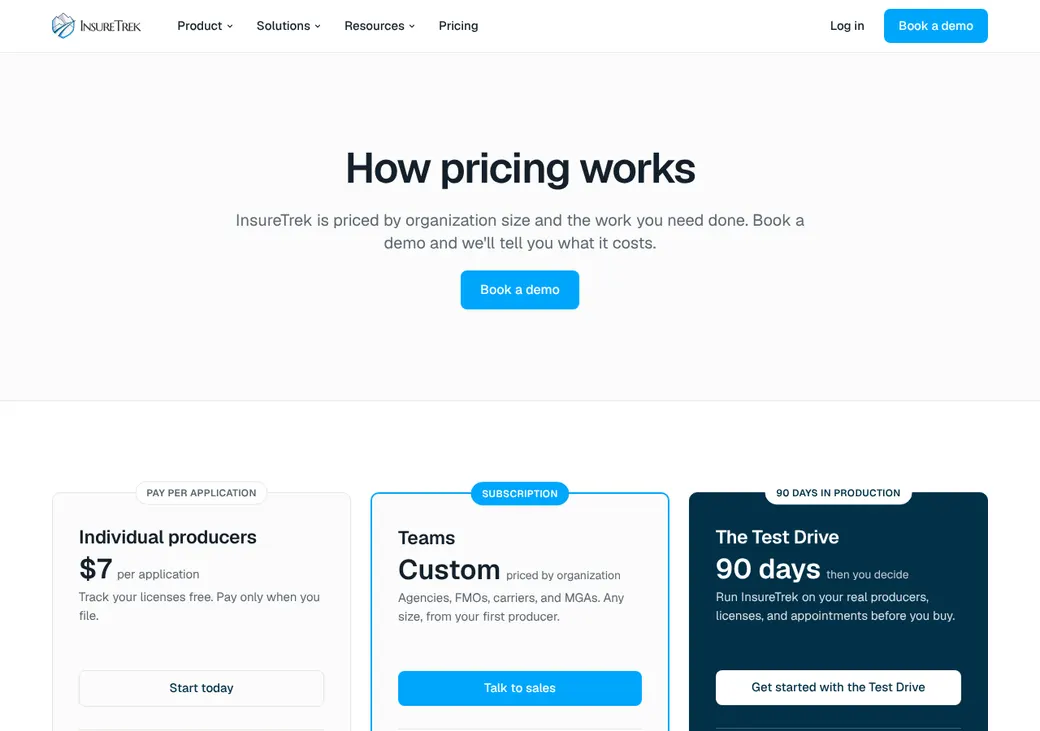
Individual producers track for free and pay $7 per application. Teams, for agencies, IMOs, FMOs, carriers and MGAs, is priced by quote.
- Best for
- Individual producers, plus agencies, IMOs and FMOs that file licenses for a downline
- Price
- Free tracking for producers. $7 per license application. Teams are quoted
- State fees
- The state fee is added to each application and shown before you submit
- NIPR sync
- NIPR alerts as states report changes, plus a nightly resync
- License filing
- New, renewal and added-line applications in every state, singly or in batches
- Appointments
- Tracks status. The carrier files appointments and terminations
- Carrier contracting
- In beta on Teams
- Demo or trial
- Demo, plus a 90-day Test Drive for Teams
Our take
InsureTrek suits two buyers. An individual producer gets free license tracking and pays only when filing, and an agency, IMO or FMO gets team tools for filing licenses across a downline.
It files more than most trackers, from new licenses to renewals that go in on their own when the state window opens. Admins can also send applications for many producers in one batch. Appointments are the gap, since the carrier still files them and the terminations.
Pros
- Free license tracking for producers
- A published price per application, with the state fee shown first
- Renewals go in on their own when the state window opens
- Batch Apply files for many producers at once
- Multi-level hierarchies with roll-up reports
- A 90-day Test Drive for teams
Cons
- Doesn't file appointments or terminations
- Carrier contracting is still in beta
- Team pricing is quoted
- No refunds on team subscriptions
Plans and pricing
| Plan | Price | Who pays | What it adds |
|---|---|---|---|
| Individual producersProducers filing their own licensesWhere solo producers start | Free to track. $7 per application | The producer | License filing, automatic renewals, CE tracking and alerts for renewals and regulatory actions |
| TeamsAgencies, IMOs, FMOs, carriers and MGAs | Quote only | The organization. It decides who pays each application fee | Team dashboard, producer portal, bulk import, Batch Apply, hierarchy roll-ups, exports, API and contracting in beta |
Prices as of October 2026, from insuretrek.com/pricing. Teams are priced by producer count, the modules you use, how much filing InsureTrek handles and the setup scope, with no producer minimum.
| Fee | Amount | Who pays |
|---|---|---|
| InsureTrek application fee | $7 per application | The producer. On Teams, the agency decides |
| State license fees | Set by each state and shown before you submit | Added to the same application |
Good to know before you buy
- Tracking licenses and appointments stays free, even after a team account ends.
- Producers you offboard drop off the Teams subscription.
- Teams pay the subscription by card or bank transfer (ACH).
90-day Test Drive
Teams can run every feature for 90 days on their real producers, next to the system they use now. You agree on success measures up front and can walk away at day 90 with no penalty. Ask for the Test Drive price at the demo.
Which plan has it
| Feature | Individual producers | Teams |
|---|---|---|
| License and appointment tracking | ||
| License applications and renewals | ||
| Automatic renewals | ||
| CE tracking | ||
| Renewal and regulatory alerts | ||
| Batch Apply for many producers | ||
| Team dashboard and producer portal | ||
| Multi-level hierarchy and roll-up reports | ||
| Termination tracking | ||
| Carrier contracting | Beta | |
| Exports and API | ||
| Dedicated implementation | Available |
NIPR and state filing
- Connection to NIPR
- Official NIPR reseller. Pulls from the Producer Database and files through NIPR
- How often it syncs
- A full pull when you add a producer, then NIPR alerts as states report changes, with a nightly resync as a backstop
- States covered
- Resident and nonresident licenses in every state
What it pulls from NIPR
- The full producer record by National Producer Number (NPN)
- License and appointment changes
- Regulatory actions
- Name and address changes
What it files for you
- New resident and nonresident licenses
- Renewals, sent on their own when the state window opens
- Added lines of authority
- Agency license renewals and amendments
It doesn't file appointments. InsureTrek tracks appointment status and flags terminations that are due, but the carrier files both with the state.
Licenses and credentials
License types
- Resident and nonresident producer licenses
- Agency licenses
- Lines of authority by state
- New hires still waiting on a license
Other credentials tracked
- CE status
- Regulatory actions
- Name and address changes
- Licensing documents, filed by state, type and date
A CE dashboard shows which producers are at risk, not yet confirmed or on track for their due date. Each record lists the state's total hours, ethics hours and cycle. Reminders go out on their own, and the producer or an admin marks CE done with the certificate attached.
Batch Apply sends new, renewal and added-line applications for many producers at once, with any NIPR error shown for each one. An eligibility check runs before each application.
Appointments and terminations
- How appointments are filed
- The carrier files them. InsureTrek shows status from NIPR by state, carrier or producer
- States
- Every state that reports appointments to NIPR
- Terminations
- Alerts you when one is due and tracks it. The carrier files the notice
- Ready to sell
- Combines license, line of authority, appointment and contracting status
Contracting and onboarding
- Carrier paperwork
- In beta. You enter a producer once, and InsureTrek sends each carrier its paperwork by PDF, email, fax, web form or the carrier's portal. Missing details are flagged first
- Ready-to-sell check
- Contracting status sits on the producer record and feeds the ready-to-sell check, along with carrier ready-to-sell reports
- Downline onboarding
- Uplines invite a downline agency, collect its agency agreement and track its checklist
- Who pays for contracting
- Included in Teams
Each contract moves through stages, from draft and producer signature to upline review, carrier submission and approval. In a self-serve portal, producers can view licenses, add documents and open a new state application.
Hierarchies and roles
Hierarchies run from carriers and FMOs down to producers, with as many layers as you have. A producer with several uplines is one record with a status for each.
History follows a producer who changes uplines. Commission levels are set for each relationship, and every change is logged.
- User roles
- Producer, agency admin, licensing admin and upline compliance officer
- Branches
- Branch agencies can have their own billing
Alerts and renewals
Alerts it sends
- License and renewal status changes
- Application status and licensing fee changes
- Regulatory actions
- Differences between InsureTrek and NIPR or state data
- Weekly reports, sent on their own
Each alert goes by role to an upline compliance officer, the agency admin or the producer, and users pick which ones arrive by email. Every alert and its fix is logged on the producer's record. InsureTrek Mailbox gathers licensing emails, appointment confirmations and carrier approvals in one shared inbox.
Integrations
| Connects to | Type | Direction | What it does |
|---|---|---|---|
| NIPR | NIPR | Both ways | Pulls license, appointment and regulatory data by NPN and files license applications |
| InsureTrek REST API | API | Both ways | Reads producer, license and appointment data and onboards producers, with a key for each organization |
| Partner portals | Onboarding | Embedded | Puts InsureTrek's producer onboarding inside a partner's portal, in early access |
| MCP server | AI assistants | Both ways | Lets AI assistants view producer data and act within the user's permissions, in early access |
| Microsoft | Login | In | Single sign-on for agency users |
| CSV export | Export | Out | Producer, license, appointment and invoice exports |
MCP is a standard way to plug AI assistants into other software.
Getting started
Sign up or book a demo
Individual producers sign up at app.insuretrek.com. Teams start with a demo.
Try the Test Drive
Teams can run InsureTrek on their real producers for 90 days, next to the current system.
Load producers by NPN
Send your producer list, the states they're licensed in and your carriers. InsureTrek loads the roster and pulls licenses and appointments from NIPR.
Set alerts and roles
Choose who gets which alerts by email and what each role can see.
InsureTrek's team runs setup for Teams, and dedicated implementation is available. Support comes by email, phone and an in-app help center.
Security
How producer data is protected
- SOC 2 Type II audit, with the report on request
- Encrypted in transit and at rest
- Hosted in the US with automatic backups
- Role-based access, with each customer's data kept apart
- Social Security numbers masked by default
- Microsoft single sign-on
- Staff access kept to a minimum and logged
Contract and your data
- Term
- Set in your order
- Renewal
- Renews unless you stop it by emailing InsureTrek. The cancellation counts once InsureTrek confirms it in writing
- Price changes
- InsureTrek can change fees, and you can choose not to renew
- Refunds
- None. Unused prepaid fees come back only if you end it over a breach InsureTrek didn't fix within 30 days
- Your data when you leave
- Teams can export CSVs. InsureTrek deletes your data within 30 days of your request after the end
- After you leave
- License tracking stays free. Each filing still costs the application fee plus the state fee
- Terms
- Raise billing errors within 60 days. Disputes go to arbitration in Hillsborough County, Florida
From InsureTrek's terms dated August 26, 2026, checked October 2026.
InsureTrek alternatives
- AgenzeeSolo Producer from $20 a month, billed yearlyCarriers and MGAs can file appointments in 41 states
- AgentSync ManageQuote onlyFiles appointments and terminations through NIPR, on Salesforce
- ProducerflowQuote onlyFiles appointments in bulk and on just-in-time triggers
- SureLCQuote only. Producers pay no subscriptionContracting with many carriers, built for IMOs, FMOs and BGAs
See every option in insurance licensing software.
Frequently asked questions
How much does InsureTrek cost?
Producers track licenses and appointments at no cost and pay $7 per license application, plus the state fee. Teams is priced by quote.
Who pays the state fees with InsureTrek?
The producer pays them with each application. On Teams, the agency decides whether it or the producer pays.
Does InsureTrek file appointments?
No. It tracks appointment status and flags terminations that are due, and the carrier files both with the state.
Can I try InsureTrek before buying?
Teams get a 90-day Test Drive on their real producers and can walk away with no penalty. Producers can track their licenses for free.
Does InsureTrek track CE?
Yes. A CE dashboard shows who is at risk, not yet confirmed or on track. Reminders go out on their own.
Does InsureTrek do carrier contracting?
It's in beta on Teams. You enter a producer once, and InsureTrek delivers each carrier's paperwork by PDF, email, fax, web form or portal.
How we researched this review. We based this review on the pricing, terms and product pages published by InsureTrek, reviewed in October 2026, together with our team's experience working with insurance agents and agency owners since 2008.
Corrections
Vendors change their pricing all the time and they don't email us when they do. So if you see a price on here that's gone up, a plan InsureTrek quit selling or a contract term that reads different now, let us know and send the link to the page where InsureTrek has it. Somebody here pulls up that page and checks it before we change anything on ours.