Commission Clarity review: pricing, statement matching and producer pay
Commission Clarity checks the commission you were paid against what your own rules say you should get. It works on top of Google Sheets, where you keep your policies and payments.
It suits solo advisors and small agencies that already run their book in a spreadsheet. Commission Monitor costs €20 a month, and agency plans start at €99.
- Best for
- Solo advisors and small agencies that keep their book in Google Sheets
- Price
- €20 a month
- Agency plans
- From €99 a month
- Free trial
- 14 days, plus a demo with sample data
- Statement intake
- Reads payment rows you keep in Google Sheets. No carrier file import
- Splits and overrides
- Advisor, mentor and agency shares in each rule
- Producer statements
- Monthly settlement export per advisor on agency plans
Our take
Commission Clarity fits a solo advisor or small agency that already tracks policies in Google Sheets and wants to see short and missing pay. A solo advisor needs Commission Monitor at €20 a month. Agencies get advisor seats and a monthly settlement export from Starter Agency up.
The limit to know first is intake. It doesn't read carrier statement files, so someone has to copy each statement into your sheet in its layout. The company is based in Slovenia and bills in euros.
Pros
- Low prices, monthly or yearly
- 14-day trial and a demo with sample data
- Sorts every payment as correct, short, missing or clawed back
- Advisor, mentor and agency shares in each rule
- Your book stays in your own Google Sheets
Cons
- No carrier statement import, so you key or paste payments into a sheet
- Matches on policy number only
- Hierarchy covers one mentor level, not a full upline
- No CRM or agency system connection
- Priced in euros
Plans and pricing
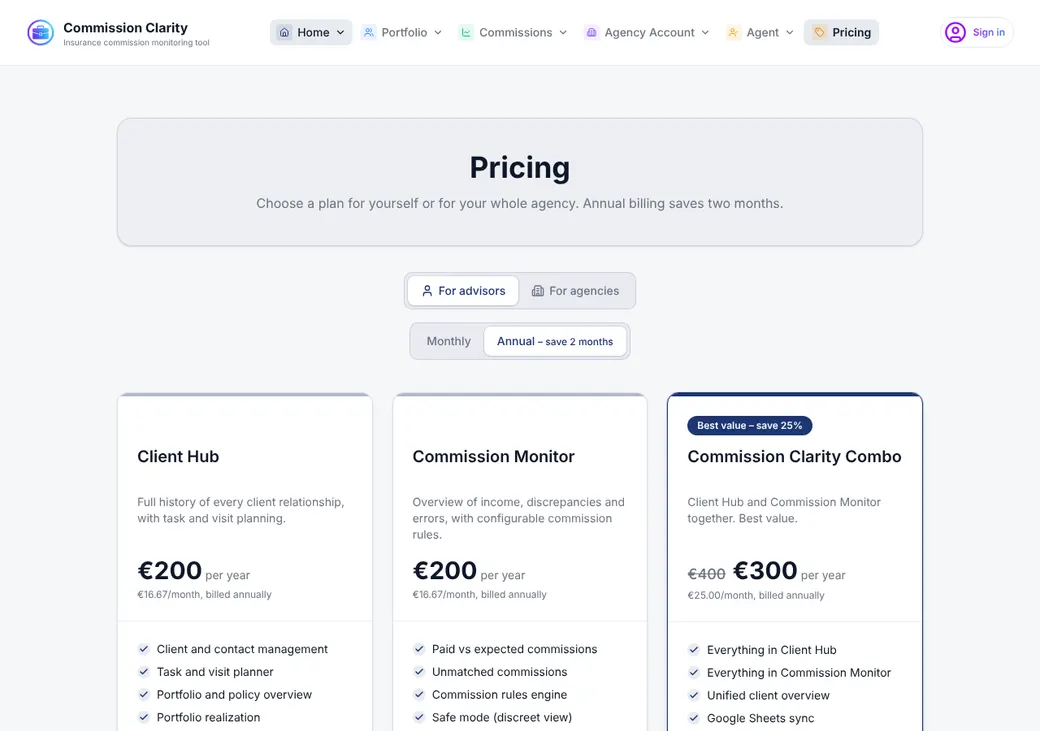
| Plan | Billed monthly | Billed yearly | What you get |
|---|---|---|---|
| Commission MonitorOne advisor tracking commissionWhere solo advisors start | €20 a month | €200 a year | Paid versus expected, unmatched payments, the rules engine and Safe Mode, which hides client names on screen |
| Client HubOne advisor managing clients | €20 a month | €200 a year | Clients, tasks and visits. No commission tracking |
| ComboOne advisor who wants both | €30 a month | €300 a year | Commission Monitor and Client Hub together |
| Starter AgencyUp to 5 advisors | €99 a month | €990 a year | Combo for the team, 3 advisor seats included |
| Pro Agency6 to 20 advisors | €249 a month | €2,490 a year | 10 advisor seats, a share for each member and priority email support |
| EnterpriseMore than 20 advisors | From €599 a month | Quote only | Unlimited seats, custom onboarding and data mapping, reports built to order |
Prices as of October 2026, in euros, from commissionclarity.app/pricing.
| Plan | Extra seat |
|---|---|
| Starter Agency | €25 a month |
| Pro Agency | €20 a month |
A five-advisor agency on Starter Agency pays €99 plus two extra seats, or €149 a month.
Good to know before you buy
- Prices are in euros, so your card may add a currency fee.
- The paid plan starts on its own when the trial ends unless you cancel.
- Client Hub alone does no commission tracking.
Which plan has it
| Feature | Commission Monitor | Combo | Starter Agency | Pro Agency |
|---|---|---|---|---|
| Paid versus expected commission | ||||
| Unmatched payments list | ||||
| Commission rules engine | ||||
| Safe Mode for screen sharing | ||||
| Client Hub | ||||
| Advisor seats included | 1 | 1 | 3 | 10 |
| Filter by advisor and settlement export | ||||
| Advisor comparison | ||||
| A share set for each member | ||||
| Priority email support |
Getting started
Try the demo
Click through the sample-data demo before you sign in.
Start the trial
Sign in with an emailed link for 14 days of full access.
Connect your sheets
Link the Google Sheets that hold your policies and paid commissions, set up from its templates.
Write your rules
Add a rule for each insurer, and for each product when pay differs. The vendor says a typical book takes about an hour.
Check the results
Open paid versus expected and work the missing and short payments.
Help comes by email, phone and a contact form, plus a public user guide. Enterprise adds custom onboarding.
Statement intake
- Where data comes from
- Google Sheets that you keep up to date
- Carrier statements
- You copy each statement into the paid-commission sheet. It doesn't read carrier files
- Carrier layouts
- Generic templates for policies, payments and rules. No carrier-specific layouts
- Enterprise
- Custom data mapping is part of onboarding
Matching and missing payments
- Matches on
- Policy number
- Lines it can't match
- They go to an unmatched list you can search by policy, client, insurer or product and export
How it finds missing pay
Each rule sets a rate or amount, a payout schedule and a tolerance. Payments are sorted as correct, underpaid, not yet due, missing, unmatched or clawed back.
What you do next
Set a status and add a comment, and both are saved to your sheet. You follow up with the insurer yourself.
A canceled policy stays on the missing list until you mark it canceled.
Splits, overrides and hierarchy
Hierarchy
One mentor can sit above an advisor. The mentor sees their share but not the advisor's clients.
When a rate changes, you add a new version of the rule. New policies use it and older policies keep the old rate.
Advances, chargebacks and renewals
- Advances
- A payout schedule can pay an advance in month one and installments after it
- Chargebacks
- Negative payments are marked as clawbacks and reported apart from income
- Renewals
- Rules set first-year and renewal rates and schedule pay across years
Producer statements and pay
- Statements
- A monthly settlement export for one advisor or the whole team, on agency plans
- Advisor view
- Each advisor sees only their own records. Owners and admins see everyone
- Paying producers
- You pay them. The export is a file for your payroll
Integrations
| Connects to | Type | How | What it does |
|---|---|---|---|
| Google Sheets | Data | Built in | Reads policies, payments and rules, and writes back rules, statuses and comments |
| Gmail | Built in | Client Hub shows inbox mail when you allow it | |
| Google Calendar | Calendar | Built in | Client Hub shows your calendar when you allow it |
Gmail and Google Calendar need Client Hub or Combo. There is no CRM or agency system connection.
Reports
Several screens export to CSV. Amounts can show in euros, dollars or pounds.
Security and access
Who sees what
Owners and admins see the whole team or one advisor. Advisors see their own records, and Safe Mode hides client names and policy numbers on screen.
Security
- Sign-in by emailed link, with no password
- Google access limited to what it needs
- Encrypted in transit
- Google sign-in tokens stored encrypted
- Disconnect your sheets and revoke access at any time
Contract and your data
- Term
- Monthly or yearly. Enterprise is quoted
- Renewal
- Renews on its own at the end of each period
- Canceling
- In My Account. Access runs to the end of the paid period
- Your data
- Your book stays in your own Google Sheets. Reports export to CSV
- After you cancel
- Account data may be kept up to 6 months and invoices for 10 years
From Commission Clarity's terms and privacy policy, checked October 2026.
Commission Clarity alternatives
- AgencyCompFrom $39.95 a monthImports Excel carrier statements and has Medicare templates
- CommissionIQFrom $79 a monthPulls statements from carrier portals and handles FMO hierarchies
- NextCommissionSolo from $133.33 a month billed yearlyMulti-level sub-agent splits and branded producer statements
- Commission TrackerFrom $67 a monthReads PDF statements and offers a processing service
See every option in insurance commission software.
Frequently asked questions
How much does Commission Clarity cost?
Commission Monitor is €20 a month or €200 a year. Agency plans start at €99 a month for three advisor seats.
Does Commission Clarity have a free trial?
Yes, 14 days with every feature. The paid plan starts when it ends unless you cancel.
Can Commission Clarity import carrier statements?
No. It reads payment rows you keep in Google Sheets, so statements have to be copied into the sheet first.
Can it split commission between advisors?
Yes. Each rule splits pay between the advisor, one mentor and the agency.
Does Commission Clarity work in US dollars?
It can show amounts in dollars, euros or pounds. The subscription itself is billed in euros.
How we researched this review. We based this review on the pricing, terms and product pages published by Commission Clarity, reviewed in October 2026, together with our team's experience working with insurance agents and agency owners since 2008.
Corrections
Vendors change their pricing all the time and they don't email us when they do. So if you see a price on here that's gone up, a plan Commission Clarity quit selling or a contract term that reads different now, let us know and send the link to the page where Commission Clarity has it. Somebody here pulls up that page and checks it before we change anything on ours.