
Brite review for benefits brokers: pricing, carrier feeds and enrollment
Brite lets brokers build branded, phone-friendly benefits guides with a built-in plan picker and an AI assistant. Employees open a guide from one link and then enroll in the employer's own system.
Three plans are billed monthly. Prices are by quote.
- Best for
- Brokers who build benefits guides for many clients and want a plan picker employees can open without logging in
- Type
- Benefits guides and decision support
- Price
- Quote only. Three plans billed monthly
- Who pays
- The broker or employer that subscribes. Carriers may fund done-for-you builds
- Carrier feeds
- None. Plan data comes in from quoting and placement tools
- ACA and COBRA
- Neither
- Demo or trial
- Demo on request
Our take
Brite suits a broker who sends every client a benefits guide each renewal and wants that work to look polished and go faster. Master guides fill in each client's plans for you.
It isn't an enrollment system. Pair it with one that sends carrier files.
Pros
- Guides open from one link with no login
- Plan picker that needs no personal data
- Pulls plans from quoting and renewal tools
- Engagement data across your whole book
Cons
- No enrollment or carrier files
- No ACA or COBRA tools
Plans and pricing
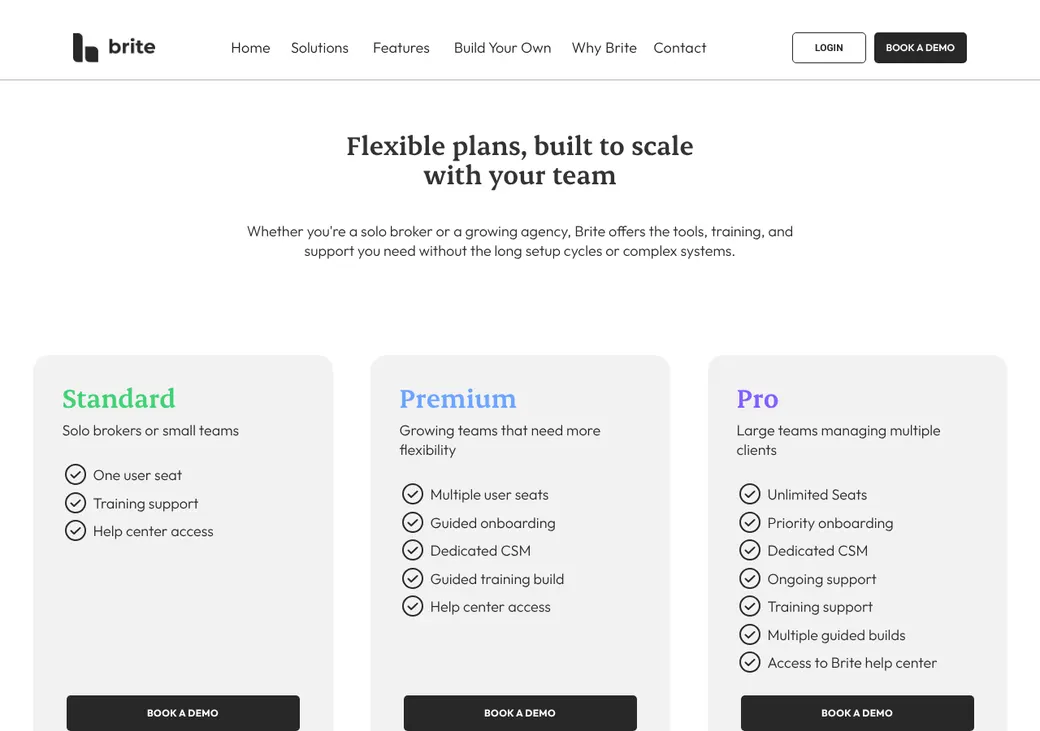
- How it's priced
- Three plans by quote, billed monthly
- Every plan
- The full builder, branded guides, sharing, analytics and support
- Changes
- Add seats or move up a plan any time
- Sold separately
- Guide builds by Brite staff, rush delivery, extra training and advanced texting
Which plan has it
| Feature | Standard | Premium | Pro |
|---|---|---|---|
| User seats | One | Several | Unlimited |
| Help center and training | |||
| Guided onboarding | Priority | ||
| Dedicated success manager | |||
| Guided builds of your guides (done with Brite staff) | One | Several |
Standard is for solo brokers and small teams. Pro is for large teams with many clients.
Who buys it and who pays
- Who buys it
- Brokers from solo to large teams, and employer HR teams
- Who pays
- The subscribing broker or employer
- Done-for-you service
- Brite Professional Services, which carrier partners may fund
- Employees
- Open guides from a link with no login
Decision support
- What it asks
- Expected care, life stage and cost preferences. No personal details needed
- What employees see
- Suggested plans side by side and a cost summary they can save or send
- AI assistant
- Answers typed or spoken questions from the guide, with sources, in the guide, Slack, Teams or text
Guides and enrollment
Brite doesn't take elections. Each guide ends by sending employees to the employer's enrollment system.
Building guides
- Plan import from PDFs, SBCs or spreadsheets
- Drag-and-drop editor with templates and version history
- Agency master guides that fill in each client's plans
- Multi-Class for different plans and rules by class or location
Sharing and tracking
- One link by email, text, Slack, Teams, intranet or QR code
- Scheduled email and text reminders
- Translation into more than 100 languages
- Analytics by page and across your whole book
Where plan data comes from
| Source | What comes in | Direction |
|---|---|---|
| Plansight | Final renewal data | Into Brite |
| PerfectQuote, a group quoting tool | Final quote data | Into Brite |
| ThreeFlow, a benefits placement platform | Plans, designs and rates | Into Brite |
| Zywave | ACA individual plans by ZIP code | Into Brite |
Brite sends no carrier files. Its content marketplace lists carrier content from UnitedHealthcare, Cigna, Guardian, Unum and others.
Payroll and HR connections
| Connects to | What moves | Direction | How |
|---|---|---|---|
| Gusto | Brite guides during onboarding and open enrollment | Into Gusto, then on to Gusto enrollment | Account link |
Getting started
Book a demo
Pick Standard, Premium or Pro.
Import plans
Upload SBCs or pull data from your quoting tool.
Build the guide
Start from a template or your agency's master guide.
Share and track
Send one link and watch views and completions.
Brite Professional Services usually delivers a done-for-you guide in 5 to 15 business days.
Security and HIPAA
HIPAA
Brite says it isn't subject to HIPAA and asks users not to enter identifiable health data. The plan picker needs no personal details.
Brite alternatives
- ALEX by JellyvisionQuote onlyDeeper plan advice using claims data
- NayyaQuote only. Carriers can fund itPlan picks from health and money data
- Employee NavigatorQuote onlyFull enrollment with carrier feeds
- PlansightQuote. SmartSheetingAI from $15 a user a monthRenewals and proposals that feed Brite guides
See every option in employee benefits software.
Frequently asked questions
How much does Brite cost?
Standard, Premium and Pro are quoted and billed monthly.
Does Brite handle enrollment?
No. Guides send employees on to the employer's enrollment system.
Do employees need a login?
No. They open the guide from a link or QR code.
Can Brite build the guide for me?
Yes. Professional Services usually delivers in 5 to 15 business days.
How we researched this review. We based this review on the terms and product pages published by Brite, reviewed in October 2026, together with our team's experience working with insurance agents and agency owners since 2008.
Corrections
Vendors change their pricing all the time and they don't email us when they do. So if you see a price on here that's gone up, a plan Brite quit selling or a contract term that reads different now, let us know and send the link to the page where Brite has it. Somebody here pulls up that page and checks it before we change anything on ours.