
Amazon WorkMail review: plans, pricing and email features for agencies
Amazon WorkMail is business email and calendars run from an AWS account. AWS stopped selling it on April 30, 2026 and shuts it down on March 31, 2027.
This page is for agencies already on WorkMail. It covers what you have today at $4 a person a month and how to get your mail out in time.
- Best for
- Agencies already on WorkMail that need to move before March 31, 2027
- Price
- $4 a person a month, for existing customers
- New sign-ups
- Closed since April 30, 2026
- Mailbox size
- 50 GB a person
- Shared inboxes
- Free groups and aliases. A mailbox several people open is a paid user
- Legal hold
- Not built in. Journaling sends copies to an outside archive
- AMS connections
- None built in. Outlook works with full calendar and contacts
- Contract
- Month to month through your AWS account
Our take
Don't start on WorkMail. AWS closed it to new customers and ends support on March 31, 2027, when every mailbox goes away.
If your agency is on it now, it still works well with Outlook and costs $4 a person a month. Plan the move this year, and export mailboxes before you cancel.
Pros
- Full Outlook support with calendar and contacts
- Journaling to an outside archive at no extra WorkMail cost, though the archive is billed separately
- Mail encrypted with your own AWS keys
- Month to month with no commitment
Cons
- Closed to new customers and ending March 31, 2027
- No built-in archive or legal hold
- Exports leave out contacts and tasks
- Run from the AWS console, which needs a technical admin
Plans and pricing
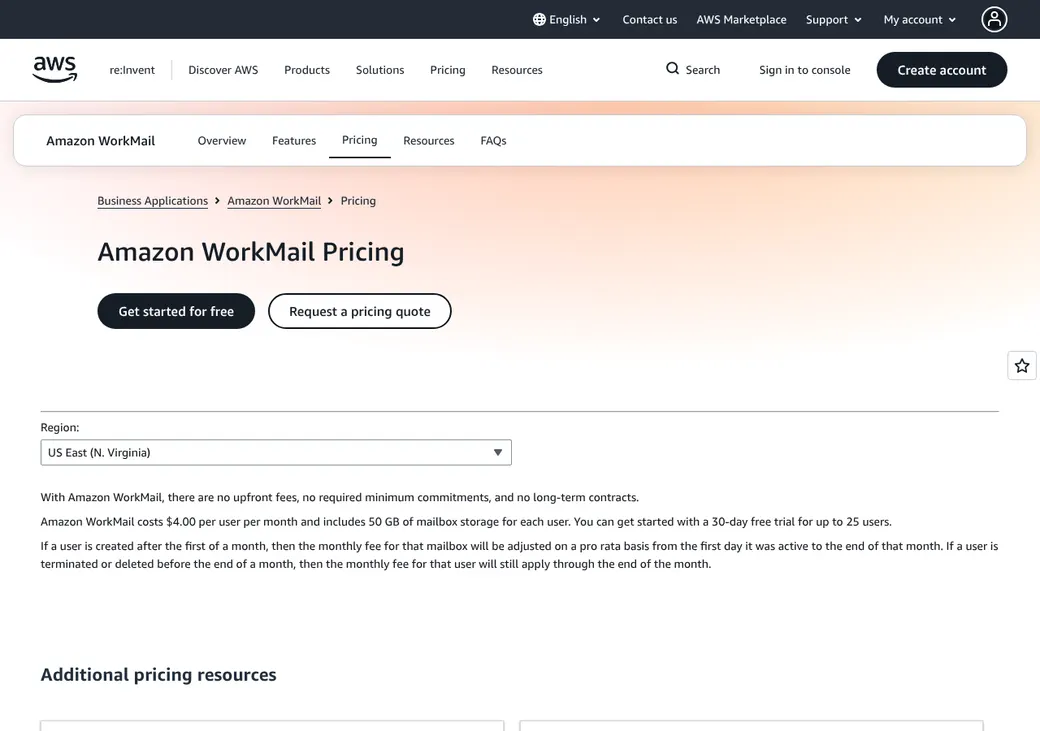
WorkMail is closing. AWS stopped taking new customers on April 30, 2026. Support ends on March 31, 2027, and after that the console and every mailbox are gone.
| Plan | Price a person | Billing | Mailbox | What it includes |
|---|---|---|---|---|
| Amazon WorkMailExisting customers only | $4 | Monthly | 50 GB | Email, calendar, contacts, room booking, journaling and mobile device rules |
Price per active person each month in US dollars, as of October 2026, from AWS's price list. A person added mid-month is prorated. A person deleted mid-month is billed to the end of the month.
Good to know
- Groups and aliases cost nothing.
- Journaling to an outside archive costs nothing in WorkMail, but the archive service is a separate bill.
- Mailbox exports land in your own Amazon S3 storage, which AWS bills separately.
- There is no trial or new account to open.
AMS and CRM connections
| Connects to | Type | How | What it does |
|---|---|---|---|
| Microsoft Outlook | Mail app | Built in | Mail, calendar and contacts in Outlook for Windows and Mac |
| Phone mail apps | Mail app | ActiveSync | Built-in mail on iPhone, iPad and Android. There is no WorkMail app |
| Outside archive tools | Archive | Journaling | A copy of every message sent or received |
| Amazon S3 | Export | API | Mailbox export jobs for mail and calendar items |
| Microsoft Exchange 2010 and 2013 | Migration | Built in | Shared free and busy times and one address book during a move |
No agency system connects directly. An AMS that files mail from Outlook should work while WorkMail lasts. Pick your next provider with that add-in in mind.
Phishing and sign-in protection
- Two-step sign-in
- Through AWS IAM Identity Center
- Can the admin require it
- Yes, with Identity Center-only sign-in. Mail apps then use a personal access token
- Spam and malware
- Every message in and out is scanned
- Spoofed mail
- Inbound DMARC checks are on by default for new organizations
- Access rules
- Allow or block each mail protocol by person and IP address
- Phones
- Device rules can require encryption and a PIN and allow remote wipe
Encryption for client documents
Encrypted email to clients
S/MIME works in Outlook and some phones, not in the web app. Both sides need certificates, so it rarely suits clients.
In transit and at rest
- Encrypted connections
- Mail encrypted at rest with your own AWS keys
Retention, archive and legal hold
- Archive
- None built in. Journaling copies every message to an outside archive
- Retention rules
- Agency-wide rules delete mail from chosen folders after a set number of days
- eDiscovery and legal hold
- Only in the outside archive that receives the journal copies
- Disabled user
- The mailbox is deleted after 30 days
Backup and recovery
- Deleted mail
- People can recover mail removed by a delete rule. Permanent deletes can't come back
- Deleted user
- Mail is removed
- Provider backup
- AWS runs backups across its data centers. You can't restore from them yourself
- Independent copy
- Journaling to an outside archive, or mailbox exports to Amazon S3
Domain setup and sending limits
- SPF, DKIM and DMARC
- Listed in the console with a status for each record
- Who edits DNS
- Your DNS host, or Amazon Route 53 in one step
- Sending limit
- 10,000 outside recipients a person each day and 100,000 an AWS account
When you move, copy these records to your new provider's values and remove the WorkMail ones so mail keeps passing checks.
When a producer leaves
Disable the user
Access stops at once. The mail stays for 30 days, then the mailbox is deleted.
Give a colleague access
Grant Full Access to the mailbox.
Export within 30 days
An export job copies mail and calendar items to your S3 storage. Contacts and tasks are left out.
Moving off WorkMail
Pick your next provider
AWS names Zoho Mail, Kopano Cloud and Zoom Mail and says others work too.
Export every mailbox
Run export jobs to Amazon S3, and save contacts another way since exports skip them.
Set up the new mailboxes
Create people and shared addresses at the new provider and verify your domain there.
Move the mail
Use the new provider's import tool or a migration partner.
Switch MX and the DNS records
Point mail to the new provider and replace SPF, DKIM and DMARC before March 31, 2027.
Admin and support
- Admin console
- AWS Management Console, or the WorkMail API
- Admin roles
- The AWS account holder and permitted AWS users
- Activity log
- Mailbox access logs and AWS CloudTrail
- Data location
- The AWS Region you chose
- Support
- AWS Support
Contract and your data
- Billing
- Monthly through your AWS account, for active people only
- Getting your mail out
- Export jobs to S3 as MIME files. Contacts and tasks aren't included
- After you close the account
- Content can be retrieved for 30 days if the bill is paid
- After March 31, 2027
- WorkMail and its data can't be reached
From the AWS Customer Agreement and WorkMail end-of-support page, checked October 2026.
Amazon WorkMail alternatives
- Zoho Mail and WorkplaceFree for 5 people. Paid from $1 a user a monthNamed by AWS as a move option, and it imports WorkMail
- Microsoft 365Email only from $4, full suite from $7, a user a month billed yearlySame Outlook experience on Exchange, with legal hold on Premium
- Google WorkspaceFrom $7 a user a month billed yearlyGmail with free group inboxes and EZLynx and HawkSoft links
- FastmailFrom $3 a user a month billed yearlySimple email and calendars, month to month
See every option in business email providers.
Frequently asked questions
Is Amazon WorkMail being discontinued?
Yes. AWS stopped taking new customers on April 30, 2026 and ends support on March 31, 2027.
How much does Amazon WorkMail cost?
$4 a person a month for existing customers, billed through AWS.
How do I get my mail out of WorkMail?
Run a mailbox export job to Amazon S3 for each person. It saves mail and calendar items but not contacts or tasks.
Where should a WorkMail agency move?
AWS names Zoho Mail, Kopano Cloud and Zoom Mail. Microsoft 365 is the closest match if your team lives in Outlook.
Does WorkMail work with Outlook?
Yes, with full calendar and contacts on Windows and Mac.
How we researched this review. We based this review on the pricing, terms and product pages published by Amazon WorkMail, reviewed in October 2026, together with our team's experience working with insurance agents and agency owners since 2008.
Corrections
Vendors change their pricing all the time and they don't email us when they do. So if you see a price on here that's gone up, a plan Amazon WorkMail quit selling or a contract term that reads different now, let us know and send the link to the page where Amazon WorkMail has it. Somebody here pulls up that page and checks it before we change anything on ours.